
Introduction
This manual provides essential instructions for the safe operation, maintenance, and troubleshooting of your Lasko 4930 Oscillating High Velocity Tower Fan. Please read this manual thoroughly before using the product and retain it for future reference.

Image: Front view of the Lasko 4930 High Velocity Tower Fan, showcasing its sleek gray design and control panel.
Important Safety Instructions
When using electrical appliances, basic precautions should always be followed to reduce the risk of fire, electric shock, and injury to persons.
- Read all instructions before using this fan.
- Always plug fans directly into a wall outlet/receptacle. Never use with an extension cord.
- Do not operate any fan with a damaged cord or plug. Discard fan or return to an authorized service facility for examination and/or repair.
- Do not run cord under carpeting. Do not cover cord with throw rugs, runners, or similar coverings. Arrange cord away from traffic area and where it will not be tripped over.
- Do not insert or allow foreign objects to enter any ventilation or exhaust opening as this may cause an electric shock or fire, or damage the fan.
- To prevent a possible fire, do not block air intakes or exhaust in any manner. Do not use on soft surfaces, like a bed, where openings may become blocked.
- A fan has hot and arcing or sparking parts inside. Do not use it in areas where gasoline, paint, or flammable liquids are used or stored.
- Use this fan only as described in this manual. Any other use not recommended by the manufacturer may cause fire, electric shock, or injury to persons.
- Always unplug the fan when not in use, when moving from place to place, or before cleaning.
- This fan is for indoor use only.
Package Contents
Verify that all components are present in the package:
- Lasko 4930 High Velocity Tower Fan
- Remote Control (requires 2 AAA batteries, not included)
- User Guide (this document)
Setup
The Lasko 4930 Tower Fan comes fully assembled, ready for immediate use.
- Remove the fan from its packaging.
- Place the fan on a firm, level surface.
- Ensure the power cord is not obstructed and is placed away from traffic areas.
- Plug the fan directly into a 120V wall outlet.

Image: Angled view of the Lasko 4930 Tower Fan, showing its side profile and stable base.
Operating Instructions
Fan Control Panel
The fan can be operated using the control panel located on the top of the unit.

Image: Diagram illustrating the fan's control panel with numbered features: (1) Timer LED Indicators, (2) 4-hour Timer (select 1, 2, or 4 hours), (3) Illuminated Power Button, (4) Fan Speed LED Indicators, (5) Oscillation, (6) Fan Speed (Low, Medium, High).
- Power Button (3): Press to turn the fan ON or OFF. The button illuminates when the fan is on.
- Fan Speed (6): Press the fan speed button to cycle through Low, Medium, and High settings. Corresponding LED indicators (4) will light up.
- Oscillation (5): Press the oscillation button to activate or deactivate the widespread oscillation feature. The fan will gently direct air side to side.
- Timer (2): Press the timer button to set the fan to automatically shut off after 1, 2, or 4 hours. The selected time will be indicated by the Timer LED Indicators (1).
Wireless Remote Control
The fan can also be operated using the included wireless remote control. The remote requires 2 AAA batteries (not included).
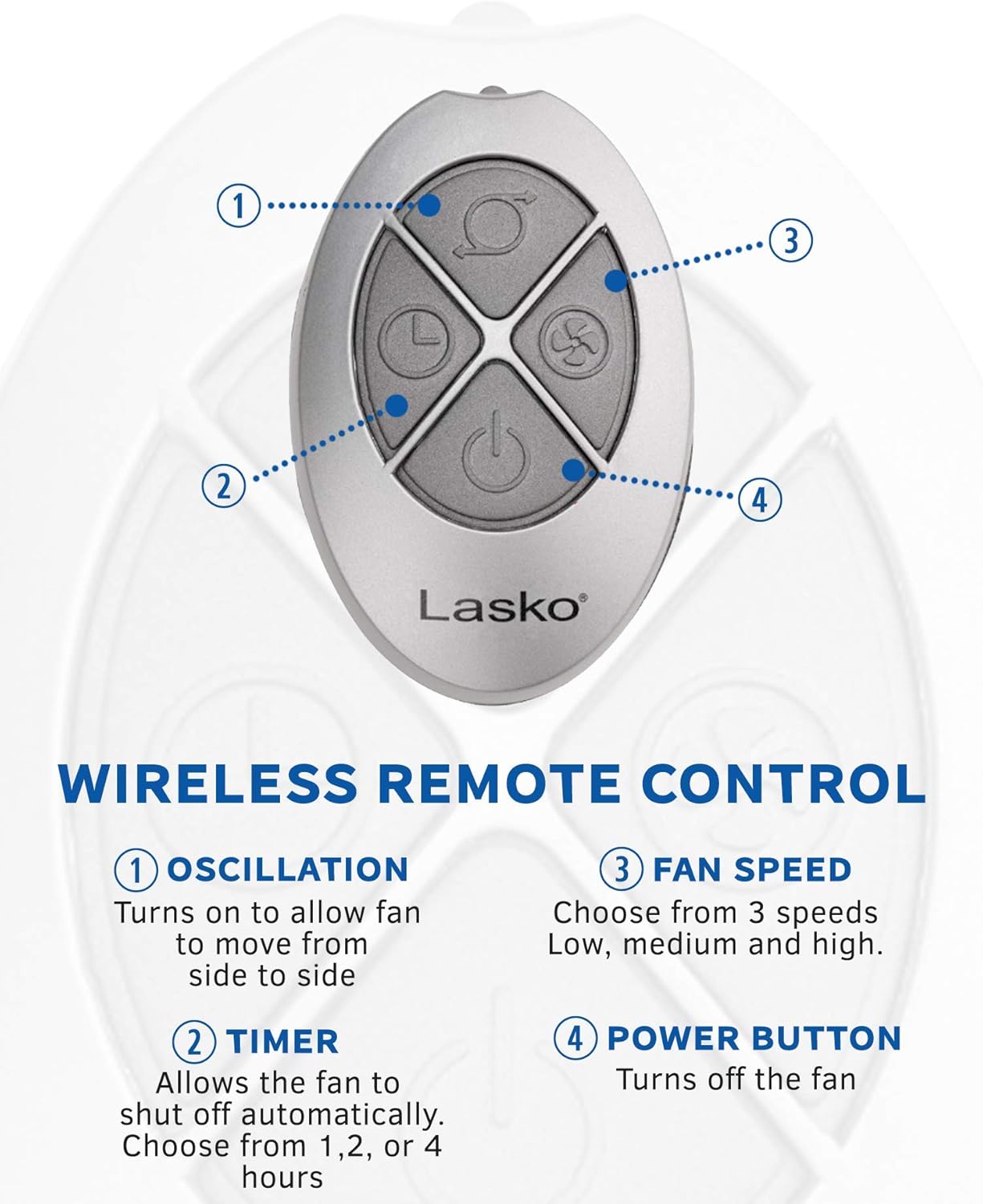
Image: Diagram illustrating the remote control with numbered buttons: (1) Oscillation, (2) Timer, (3) Fan Speed, (4) Power Button.
- Oscillation Button (1): Turns on or off the side-to-side oscillation.
- Timer Button (2): Allows the fan to shut off automatically after 1, 2, or 4 hours.
- Fan Speed Button (3): Cycles through 3 fan speeds: Low, Medium, and High.
- Power Button (4): Turns the fan ON or OFF.
Directional Louvers
In addition to oscillation, the fan features directional louvers that allow you to manually adjust the vertical airflow. Gently move the louvers up or down to direct the air stream as desired.

Image: The Lasko 4930 Tower Fan demonstrating its widespread oscillation feature, with arrows indicating side-to-side movement.
Maintenance
Regular cleaning helps maintain the fan's performance and extends its lifespan.
- Always unplug the fan before cleaning.
- Use a soft cloth to gently wipe the exterior surfaces of the fan.
- To remove dust accumulation from the air intake and exhaust grilles, use a vacuum cleaner with a brush attachment or compressed air.
- Do not immerse the fan in water or allow water to drip into the motor housing.
- Do not use gasoline, benzene, thinner, harsh cleaners, or other solvents as they may damage the fan.

Image: A hand utilizing the convenient carry handle integrated into the Lasko 4930 Tower Fan for easy portability.
Troubleshooting
If your fan is not operating as expected, refer to the following common issues and solutions:
| Problem | Possible Cause | Solution |
|---|---|---|
| Fan does not turn on. | No power to the unit. | Ensure the fan is securely plugged into a working 120V outlet. Check household circuit breaker. |
| Fan is noisy. | High velocity airflow is naturally audible. | This fan generates high velocity airflow, and the sound of the air movement is normal. For quieter operation, select a lower speed setting. |
| Remote control not working. | Dead batteries or obstruction. | Replace the 2 AAA batteries in the remote control. Ensure there is no obstruction between the remote and the fan's sensor. |
Specifications
| Feature | Detail |
|---|---|
| Brand | Lasko |
| Model Name | 4930 |
| Product Dimensions | 8.75"D x 12"W x 35"H |
| Item Weight | 14.2 pounds |
| Power Source | Corded Electric |
| Voltage | 120 Volts |
| Wattage | 105 watts |
| Air Flow Capacity | 354 Cubic Feet Per Minute |
| Number of Power Levels | 3 |
| Special Features | High Velocity, Oscillating, Remote Controlled, Timer |
| Control Method | Touch, Remote |
| Included Components | Fan, User guide |
| Batteries Required | Yes (2 AAA for remote) |
| Indoor/Outdoor Usage | Indoor |
| Assembly Required | No |
Warranty and Support
This Lasko 4930 Tower Fan comes with a 1-year limited warranty from the date of purchase. This warranty covers manufacturing defects under normal use.
For warranty claims, technical support, or replacement parts, please contact Lasko customer service. Refer to the contact information provided on the product packaging or the official Lasko website.
Lasko Customer Service:
Visit Lasko's Official Website


