
Introduction
This manual provides detailed instructions for the installation, operation, and maintenance of your SIB HP 441427-001 Wired Keyboard. This keyboard is specifically designed as a replacement for HP Hewlett Packard DV6000 and DV6100 Pavilion Notebooks. Please read this manual thoroughly before proceeding with installation or use to ensure proper function and longevity of your product.
Product Overview
Key Features
- Designed for use with HP Hewlett Packard DV6000 and DV6100 Pavilion Notebooks.
- Ergonomically designed for comfortable and efficient typing.
- Sleek and compact design.
- Quiet operation during daily use.
- Lightweight, enhancing portability for travel-friendly notebooks.
Package Contents
- 1 x SIB HP 441427-001 Wired Keyboard
- 1 x Ribbon Cable (U.S. layout, integrated)
Setup Instructions
Compatibility
This keyboard is compatible with the following HP notebook models:
- HP Pavilion DV6000 Series
- HP Pavilion DV6100 Series
Please verify your laptop model before proceeding with installation.
Installation Steps
Replacing a laptop keyboard requires careful handling. If you are not comfortable performing this procedure, it is recommended to seek assistance from a qualified technician.
- Power Off and Disconnect: Ensure your laptop is completely powered off and disconnected from the power adapter. Remove the battery.
- Locate Keyboard Retaining Screws: Depending on your specific DV6000/DV6100 model, there may be screws on the bottom of the laptop marked with a keyboard icon, or screws under the battery that secure the keyboard. Remove these screws.
- Release Keyboard Latches: Gently pry up the keyboard bezel or locate small latches along the top edge of the keyboard (often above the function keys). Use a thin, non-metallic tool to carefully release these latches.
- Lift and Disconnect: Carefully lift the keyboard from the laptop. Do not pull forcefully, as it is still connected by a ribbon cable. Gently flip the keyboard over to expose the ribbon cable connector.
- Disconnect Ribbon Cable: The ribbon cable is usually secured by a small ZIF (Zero Insertion Force) connector. Carefully flip up the small retaining clip on the connector and slide the ribbon cable out.
- Connect New Keyboard: Insert the ribbon cable of the new SIB keyboard into the ZIF connector, ensuring it is fully seated. Gently push down the retaining clip to secure the cable.
- Position New Keyboard: Carefully place the new keyboard into its slot, ensuring all edges align. Gently press down to engage the latches or secure it under the bezel.
- Secure Screws: Reinstall any retaining screws that were removed in step 2.
- Reinstall Battery and Power On: Reinsert the battery and connect the power adapter. Power on your laptop to test the new keyboard.

Image 1: Front view of the SIB HP 441427-001 Wired Keyboard. This image shows the full layout of the keys, including function keys and the numeric keypad area.
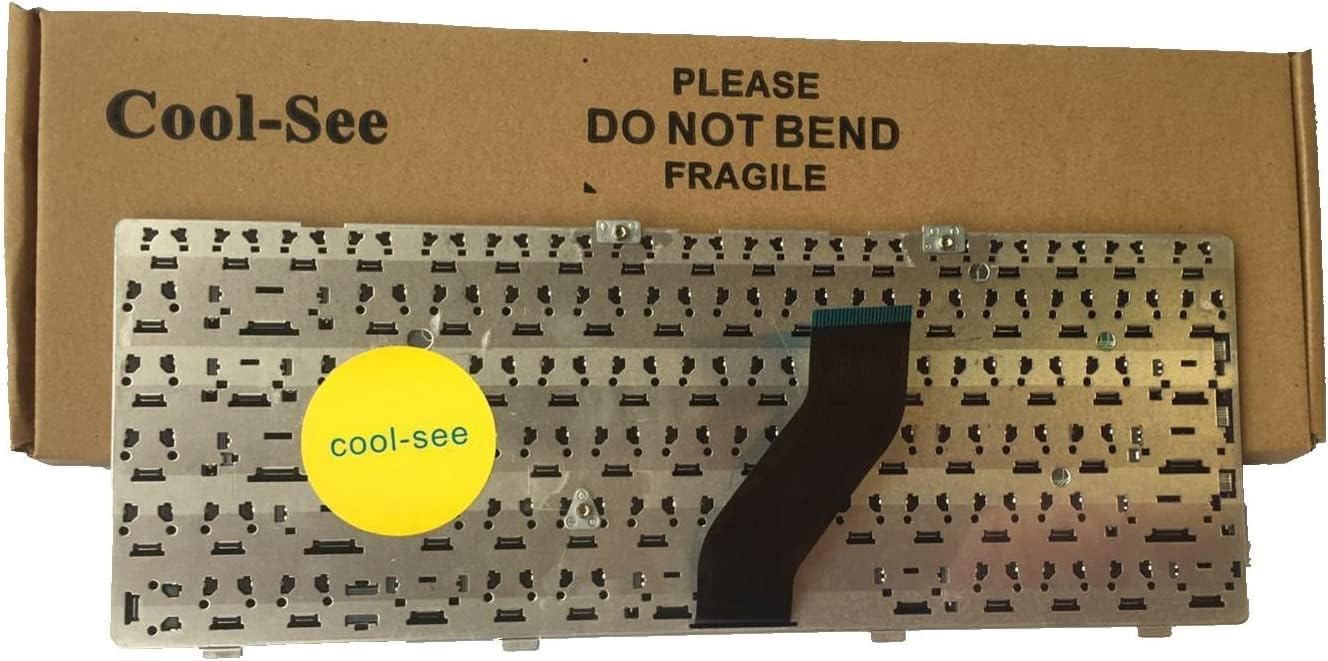
Image 2: Back view of the SIB HP 441427-001 Wired Keyboard, highlighting the flexible ribbon cable and its connector. This cable is crucial for connecting the keyboard to the laptop's motherboard.
Operating Instructions
Once installed, the SIB HP 441427-001 Wired Keyboard functions as a standard laptop keyboard. No additional drivers are typically required for basic operation on compatible HP Pavilion DV6000/DV6100 notebooks.
Basic Keyboard Functions
- Typing: Use the alphanumeric keys for text input.
- Navigation: Utilize the arrow keys, Page Up, Page Down, Home, and End keys for document and web page navigation.
- Special Keys: Keys like Shift, Ctrl, Alt, and the Windows key perform various functions in combination with other keys or for system commands.
- Backspace/Delete: Used for character removal.
- Enter: Confirms input or creates a new line.
Function (Fn) Keys
The keyboard includes a row of function keys (F1-F12) that, when pressed in combination with the Fn key (usually located near the bottom left Ctrl key), perform special actions. These actions are typically indicated by icons on the keys themselves.
- Fn + F1-F12: Common functions include adjusting screen brightness, volume control, toggling Wi-Fi, enabling/disabling touchpad, and external display switching. Refer to your HP Pavilion notebook's original documentation for specific Fn key assignments.

Image 3: Close-up of the keyboard keys, illustrating the layout and symbols on the function keys (F1-F12) which often include icons for media control, brightness, and other system functions.
Maintenance and Care
Proper care will extend the life of your keyboard.
- Cleaning: Use a soft, lint-free cloth slightly dampened with water or a mild cleaning solution to wipe the keycaps and surface. Avoid excessive moisture. For dust and debris between keys, use compressed air.
- Avoid Spills: Keep liquids away from the keyboard to prevent damage to internal components.
- Gentle Use: Avoid pressing keys with excessive force or dropping the laptop, as this can damage the keyboard mechanism or ribbon cable.
- Storage: If the laptop is stored for extended periods, ensure it is in a clean, dry environment.
Troubleshooting
If you encounter issues with your keyboard, refer to the following common problems and solutions:
| Problem | Possible Cause | Solution |
|---|---|---|
| Keyboard not responding | Ribbon cable not properly connected. | Power off the laptop, remove the battery, and carefully re-seat the ribbon cable. Ensure the ZIF connector clip is securely closed. |
| Certain keys not working | Debris under keys; damaged key mechanism; software issue. | Use compressed air to clear debris. If keys are physically damaged, replacement may be necessary. Restart your laptop to rule out software glitches. |
| Keys repeating or sticking | Debris under keys; liquid damage; driver issue. | Clean the keyboard thoroughly. Check for any liquid residue. Update or reinstall keyboard drivers through your laptop's device manager. |
| Incorrect character output | Incorrect keyboard language/layout setting in operating system. | Check your operating system's keyboard language and layout settings and adjust as needed. |
Technical Specifications
| Model Number | 441427-001 |
| Brand | SIB |
| Compatible Devices | HP Pavilion DV6000 Series Laptops, HP Pavilion DV6100 Series Laptops |
| Connectivity Technology | Wired (USB interface via laptop's internal connection) |
| Keyboard Description | Ergonomic |
| Color | Black |
| Material | Plastic |
| Product Dimensions | 13.1 x 5.3 x 0.9 inches (approximately) |
| Item Weight | 6.4 ounces (approximately) |
Warranty and Support
For information regarding warranty coverage, returns, or technical support, please refer to the documentation provided at the time of purchase or contact your retailer directly. Specific warranty terms may vary depending on the seller and region.
For further assistance with your HP Pavilion DV6000 or DV6100 notebook, please consult HP's official support resources.