1. Introduction
This manual provides essential information for the proper installation, operation, and maintenance of your BOSS Audio Systems BV2650UA DVD Player. Please read this manual thoroughly before using the product to ensure safe and optimal performance. Keep this manual for future reference.
Safety Information
- Do not operate the unit in a manner that distracts you from driving. Always prioritize road safety.
- Ensure all wiring is correctly connected to prevent damage to the unit or vehicle electrical system.
- Avoid exposing the unit to extreme temperatures, direct sunlight, or moisture.
- Do not attempt to disassemble or modify the unit. Refer all servicing to qualified personnel.
2. Package Contents
Verify that all items are present in the package before installation:
- BOSS Audio Systems BV2650UA DVD Player Unit
- Remote Control
- Wiring Harness
- Mounting Hardware
- User Manual (this document)
3. Product Overview
The BV2650UA is a versatile DVD player designed for in-car entertainment, featuring multiple media playback options.
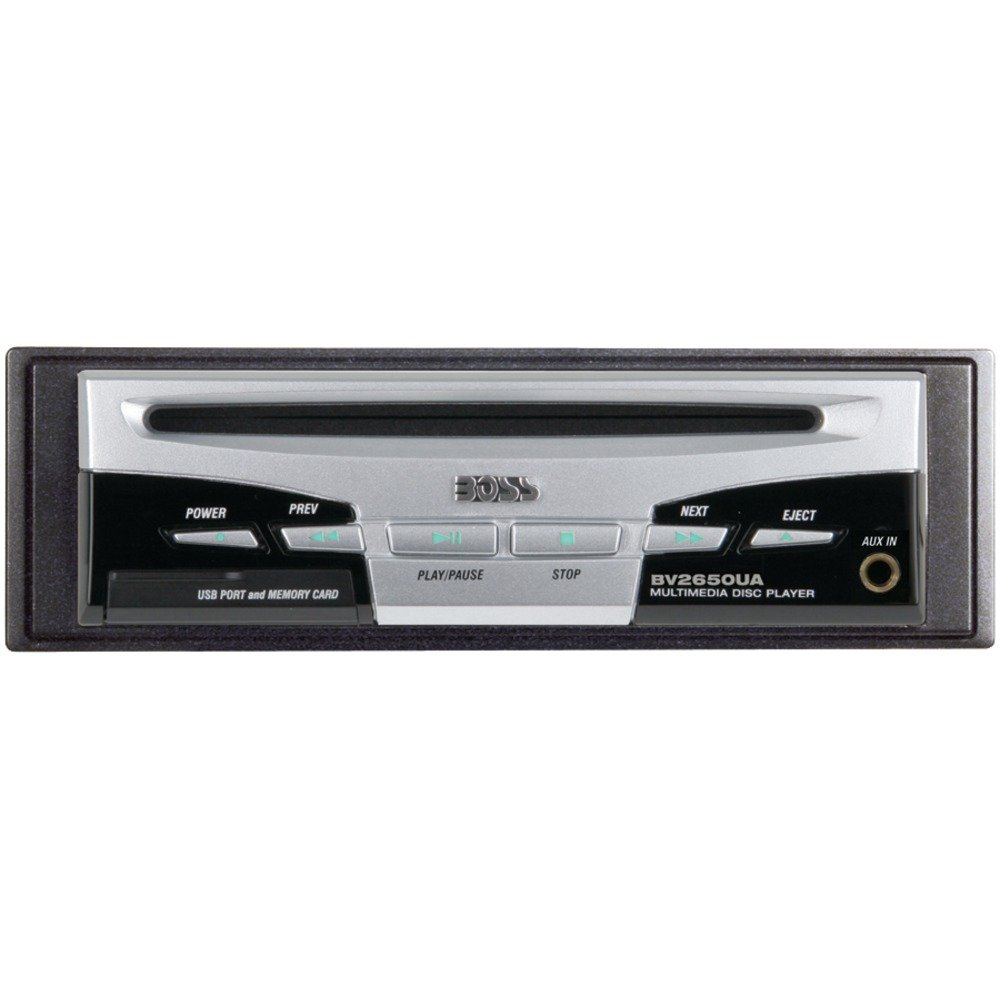
Image: Front view of the BOSS Audio Systems BV2650UA DVD Player, showing the disc slot, control buttons, USB port, and SD card slot.
Front Panel Controls and Ports
- Disc Slot: For inserting DVDs and CDs.
- Eject Button: Releases the disc from the slot.
- Power/Mode Button: Turns the unit on/off and switches between input sources (DVD, USB, SD, AUX).
- Play/Pause Button: Controls media playback.
- Track Skip Buttons: Navigates between tracks or chapters.
- Volume Control: Adjusts audio output level.
- USB Port: Connects USB storage devices for media playback.
- SD Card Slot: Inserts SD/MMC memory cards for media playback.
- AUX Input: 3.5mm jack for connecting external audio devices.
Rear Panel Connections
- Power Connector: For connecting the main power harness.
- RCA Audio/Video Outputs: Connects to external monitors and audio amplifiers.
- Remote Control Input: For wired remote control (if applicable).
4. Setup and Installation
Proper installation is crucial for the performance and longevity of your DVD player. If you are unsure about any steps, consult a professional installer.
Mounting the Unit
- Choose a suitable location in your vehicle, typically in the dashboard or a console, ensuring adequate ventilation.
- Secure the mounting sleeve or bracket using the provided hardware.
- Slide the DVD player into the mounted sleeve until it locks into place.
Wiring Connections
Refer to the wiring diagram provided with your unit for specific connections. General connections include:
- Yellow Wire (Constant Power): Connect to a constant +12V power source.
- Red Wire (Accessory Power): Connect to a switched +12V power source (ignition).
- Black Wire (Ground): Connect to a clean chassis ground point.
- Blue Wire (Remote Turn-On): Connect to the remote turn-on input of an external amplifier or antenna.
- RCA Audio Outputs: Connect to the audio inputs of your car amplifier or head unit.
- RCA Video Output: Connect to the video input of your car monitor.
Warning: Incorrect wiring can cause severe damage to the unit and vehicle. Always disconnect the vehicle's battery before making any electrical connections.
5. Operating Instructions
Basic Operation
- Power On/Off: Press the Power/Mode button to turn the unit on. Press and hold to turn off.
- Source Selection: Press the Power/Mode button repeatedly to cycle through available sources (DVD, USB, SD, AUX).
- Volume Adjustment: Use the volume control knob or buttons to adjust the audio level.
DVD/CD Playback
- Insert a DVD or CD into the disc slot with the label side facing up. The unit will automatically load the disc and begin playback.
- Use the Play/Pause button to pause or resume playback.
- Use the Track Skip buttons to navigate between tracks or chapters.
- To eject a disc, press the Eject button.
USB and SD Card Playback
- Insert a USB drive into the USB port or an SD card into the SD card slot.
- Select the USB or SD source using the Mode button.
- The unit will automatically detect and display the media files. Use the navigation controls to browse and select files for playback.
- Supported formats include MP3, DVD, CD-R/RW, and SDVD.
AUX Input
- Connect an external audio device (e.g., smartphone, MP3 player) to the 3.5mm AUX input jack using an audio cable.
- Select the AUX source using the Mode button.
- Control playback from the connected external device.
Remote Control
The included remote control provides convenient access to all functions. Point the remote control directly at the unit's IR sensor for optimal response.
6. Maintenance
Cleaning the Unit
- Wipe the unit's exterior with a soft, dry cloth. Do not use abrasive cleaners or solvents.
- Keep the disc slot and ports free from dust and debris.
Disc Care
- Handle discs by their edges to avoid fingerprints and scratches.
- Store discs in their cases when not in use.
- Clean dirty discs with a soft, lint-free cloth, wiping from the center outwards.
7. Troubleshooting
If you encounter issues with your BV2650UA DVD Player, refer to the following common problems and solutions:
| Problem | Possible Cause | Solution |
|---|---|---|
| No power | Loose wiring; Blown fuse; Vehicle battery issue | Check power and ground connections; Inspect and replace fuse if necessary; Check vehicle battery. |
| No disc playback | Disc inserted incorrectly; Damaged disc; Unsupported disc format | Reinsert disc correctly; Try a different disc; Ensure disc is a supported format (DVD, CD, CD-R/RW, SDVD). |
| No USB/SD playback | Unsupported file format; Corrupted media; Loose connection | Ensure files are MP3; Try a different USB/SD card; Reinsert media securely. |
| No sound output | Volume too low; Mute activated; Incorrect audio connections | Increase volume; Deactivate mute; Check RCA audio output connections to amplifier/head unit. |
| Remote control not working | Dead batteries; Obstruction; Remote not pointed correctly | Replace remote batteries; Remove any obstructions; Point remote directly at the unit's IR sensor. |
If the problem persists after trying these solutions, contact BOSS Audio Systems customer support.
8. Specifications
Technical specifications for the BOSS Audio Systems BV2650UA DVD Player:
- Model Name: BV2650UA
- Product Dimensions: 16.21 x 5.08 x 15.7 cm
- Item Weight: 907 g
- Connectivity Technologies: AUX, USB
- Special Features: Anti-Shock
- Media Type: SD Card Slot, DVD, CD, USB
- Supported Audio Format: MP3
- Audio Output Mode: Stereo
- Compatible Devices: Television (for video output)
- Colour: Black
9. Warranty and Support
BOSS Audio Systems products are designed for reliability and performance. For specific warranty information, please refer to the warranty card included with your product or visit the official BOSS Audio Systems website.
For technical support, troubleshooting assistance, or service inquiries, please contact BOSS Audio Systems customer service through their official channels. Have your model number (BV2650UA) and purchase information ready when contacting support.
Website: www.bossaudio.com (Example link, please refer to actual manufacturer's website)


