
Introduction
Thank you for choosing the Hisonic MA-3800K Professional Digital Echo Mixing Amplifier. This amplifier is engineered for quality and durability, designed to provide a reliable audio mixing solution for karaoke, DJ, VJ, and KJ applications. This manual provides essential information for the proper setup, operation, and maintenance of your MA-3800K amplifier to ensure optimal performance and longevity.
Safety Information
Please read and understand all safety instructions before operating this device. Retain this manual for future reference.
- Power Source: Connect the amplifier only to the specified power supply (AC 110V/220V, switchable). Ensure the voltage selector on the rear panel matches your local power supply before connecting.
- Ventilation: Do not block ventilation openings. Ensure adequate airflow around the unit to prevent overheating. Avoid placing the amplifier on carpets or in enclosed spaces.
- Moisture: Do not expose this appliance to rain or moisture. Keep liquids away from the unit.
- Servicing: Do not attempt to service this unit yourself. Refer all servicing to qualified service personnel. Opening the casing may expose you to dangerous voltage or other hazards.
- Placement: Place the amplifier on a stable, level surface. Avoid placing it near heat sources or in direct sunlight.
- Cleaning: Disconnect the power cord before cleaning. Use a soft, dry cloth. Do not use liquid cleaners or aerosol cleaners.
Package Contents
Verify that all items are present in the package:
- Hisonic MA-3800K Karaoke Mixing Amplifier
- Remote Control
- Power Cord
- User Manual (this document)
Product Overview
Front Panel Controls
The front panel provides access to all primary controls for microphone and music mixing, as well as key control functions.
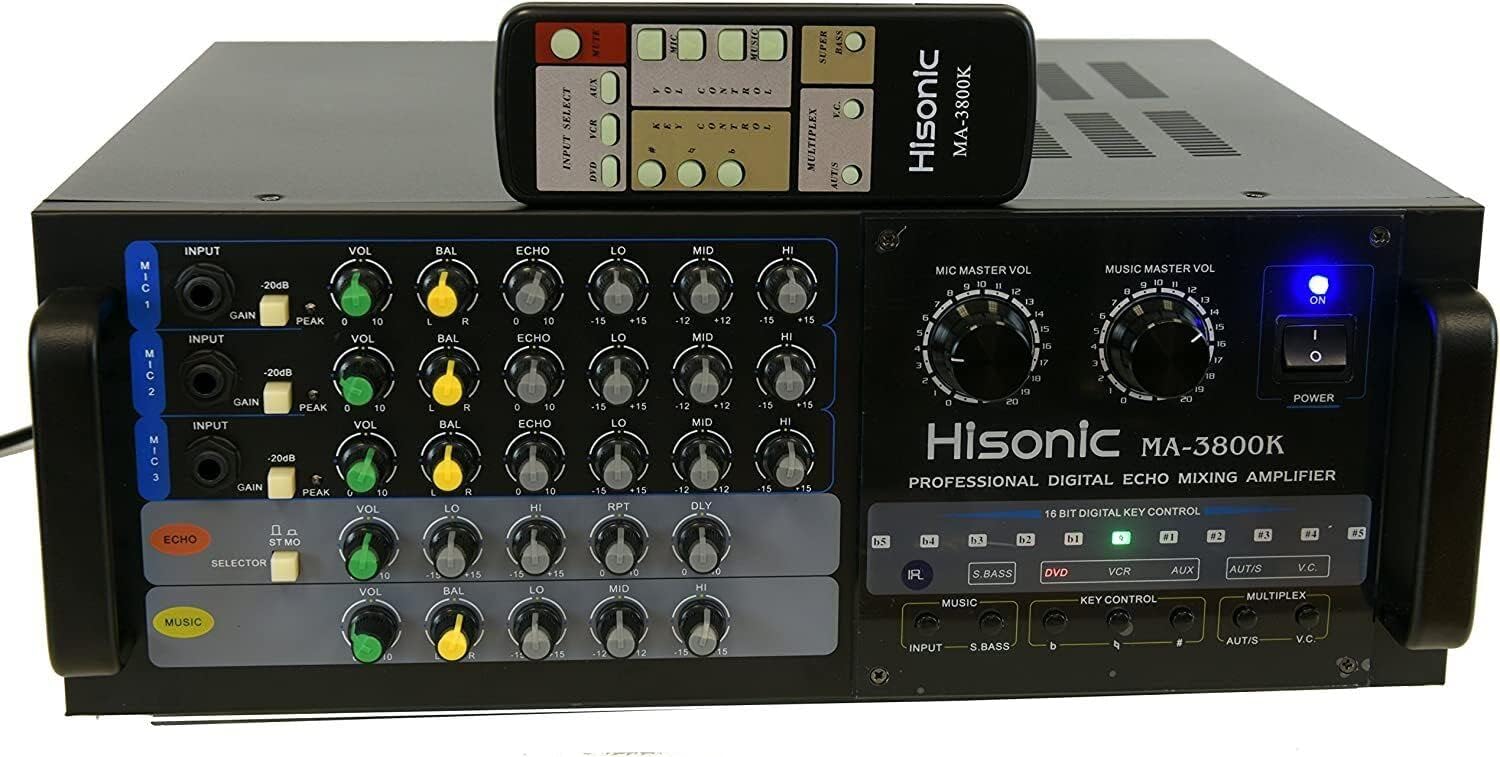
Image: Front view of the Hisonic MA-3800K amplifier with its remote control. The image highlights the various knobs and buttons for microphone and music volume, echo, tone controls, and input selection.
- MIC MASTER VOL: Adjusts the overall volume of all connected microphones.
- MUSIC MASTER VOL: Adjusts the overall volume of the music input.
- POWER Button: Turns the amplifier on or off.
- Microphone Inputs (MIC 1, MIC 2, MIC 3): 1/4" jacks for connecting microphones. Each input has individual controls:
- INPUT: Sensitivity adjustment.
- VOL: Individual microphone volume.
- BAL: Microphone balance (left/right).
- ECHO: Individual microphone echo depth.
- LO/MID/HI: Individual microphone bass, midrange, and treble tone controls.
- ECHO Section: Controls for the overall echo effect.
- MUSIC Section: Controls for music tone (VOL, BAL, LO, MID, HI).
- 16 BIT DIGITAL KEY CONTROL: Buttons for adjusting the musical key (e.g., #, b, KEY CONTROL).
- INPUT Selector: Buttons to select the audio source (DVD, VCR, AUX).
- MULTIPLEX Controls (AUT/S, V.C.): Functions for specific karaoke media, including auto singing-mate switch and vocal cancellation.
Rear Panel Connections
The rear panel houses all input and output connections for external devices.

Image: Rear view of the Hisonic MA-3800K amplifier, showing the various audio and video input/output ports, speaker terminals, and power input.
- VIDEO OUT: RCA output for video signal.
- AUX/VCR/DVD/MUSIC INPUT: RCA stereo audio inputs for connecting various audio sources.
- SPEAKER SYSTEM (A & B): Terminals for connecting speakers. Supports 8 Ohm impedance.
- FUSE: Fuse holder (15A).
- AC INPUT: Power cord connection.
- VOLTAGE SELECT: Switch for selecting 110V or 220V power input.
- EFFECT LOOP (OUTPUT/INPUT): RCA connections for external audio effects processors.
- MIC/MIX/PREOUT: Additional audio outputs.
Remote Control
The included remote control allows for convenient operation of key functions from a distance.

Image: Close-up of the Hisonic MA-3800K remote control, displaying buttons for input selection, mute, key control, volume control for microphone and music, multiplex functions, and super bass.
- INPUT SELECT (DVD, VCR, AUX): Selects the audio input source.
- MUTE: Mutes all audio output.
- KEY CONTROL (#, b): Adjusts the musical key up or down.
- VOL CONTROL (MIC, MUSIC): Adjusts microphone and music master volumes.
- MULTIPLEX (AUT/S, V.C.): Activates auto singing-mate and vocal cancellation functions for compatible media.
- SUPER BASS: Enhances bass frequencies.
Setup
- Unpacking and Placement: Carefully remove the amplifier from its packaging. Place it on a flat, stable surface with adequate ventilation around all sides.
- Voltage Selection: Before connecting the power cord, ensure the VOLTAGE SELECT switch on the rear panel is set to match your local power supply (110V or 220V). Incorrect voltage selection can damage the unit.
- Speaker Connection: Connect your speakers to the SPEAKER SYSTEM terminals on the rear panel. Ensure correct polarity (+ to + and - to -). The amplifier supports 8 Ohm speakers.
- Audio Source Connection: Connect your audio sources (e.g., DVD player, karaoke machine, computer) to the desired RCA INPUTs (DVD, VCR, AUX, MUSIC INPUT) on the rear panel using appropriate RCA cables.
- Microphone Connection: Plug your microphones into the 1/4" MIC 1, MIC 2, or MIC 3 inputs on the front panel.
- Power Connection: Once all connections are secure, plug the power cord into the AC INPUT on the rear panel and then into a wall outlet.
Operating Instructions
- Power On: Press the POWER button on the front panel. The power indicator light will illuminate.
- Select Input Source: Use the INPUT selector buttons (DVD, VCR, AUX) on the front panel or remote control to choose your desired music source.
- Adjust Music Volume: Slowly turn the MUSIC MASTER VOL knob clockwise to increase the music volume to a comfortable listening level. Use the individual MUSIC tone controls (LO, MID, HI) to adjust bass, midrange, and treble.
- Adjust Microphone Volume: Ensure the individual VOL knobs for each connected microphone are at a low setting. Speak into the microphone and slowly increase the MIC MASTER VOL and the individual microphone VOL knobs until your voice is audible and balanced with the music.
- Apply Echo and Tone: Use the individual ECHO knob for each microphone to add reverberation. Adjust the individual LO, MID, HI knobs for each microphone to fine-tune your vocal tone. The main ECHO section controls the overall echo characteristics.
- Key Control: For karaoke, use the 16 BIT DIGITAL KEY CONTROL buttons (# for sharp, b for flat) on the front panel or remote to adjust the musical key of the song to suit your vocal range.
- Multiplex Functions: If using multiplex karaoke media, the AUT/S (Auto Singing-mate) and V.C. (Vocal Cancellation) buttons on the front panel or remote can be used to activate these features.
- Power Off: When finished, turn down all volume controls and press the POWER button to turn off the amplifier.
Maintenance
- Cleaning: Regularly wipe the amplifier's exterior with a soft, dry cloth. Avoid using abrasive cleaners or solvents. Ensure the unit is powered off and unplugged before cleaning.
- Ventilation: Periodically check that the ventilation grilles are free from dust and obstructions. Proper airflow is crucial for preventing overheating and ensuring component longevity.
- Storage: If storing the amplifier for an extended period, disconnect it from power, clean it, and store it in a cool, dry place, preferably in its original packaging.
- Fuse Replacement: If the amplifier does not power on, check the fuse on the rear panel. Replace it only with a fuse of the same type and rating (15A). If the fuse blows repeatedly, consult qualified service personnel.
Troubleshooting
If you encounter issues with your Hisonic MA-3800K amplifier, refer to the following common problems and solutions:
| Problem | Possible Cause | Solution |
|---|---|---|
| No power | Power cord disconnected, power outlet faulty, fuse blown, voltage selector incorrect. | Check power cord connection. Test outlet with another device. Replace fuse (15A). Verify voltage selector matches local supply. |
| No sound output | Speakers not connected, speaker wires incorrect polarity, input source not selected, volume controls too low, MUTE activated. | Ensure speakers are correctly connected. Check speaker wire polarity. Select correct input source. Increase MASTER VOL and individual VOL knobs. Deactivate MUTE. |
| No microphone sound | Microphone not connected, individual MIC VOL too low, MIC MASTER VOL too low, faulty microphone. | Ensure microphone is securely plugged in. Increase individual MIC VOL and MIC MASTER VOL. Test with a different microphone. |
| Distorted sound | Volume too high, input signal too strong, speaker impedance mismatch. | Reduce MASTER VOL or individual VOL. Check input signal level. Ensure speakers are 8 Ohm. |
| Remote control not working | Batteries depleted, line of sight blocked, remote faulty. | Replace batteries. Ensure clear path between remote and amplifier. |
| Intermittent sound loss | Loose connections, overheating, internal fault. | Check all cable connections. Ensure adequate ventilation. If problem persists, contact support. |
Specifications
| Feature | Specification |
|---|---|
| Model | MA-3800K |
| Audio Output | 380W + 380W @ 8 Ohm (760W Total) |
| Microphone Input Sensitivity | 0 < 15mV |
| Frequency Response | 25Hz to 20kHz |
| Dimensions (W x H x D) | 430mm x 156mm x 335mm (16.9 x 6.1 x 13.2 inches approx.) |
| Electricity Consumption | 650W |
| Weight | 38 lbs (17.2 kg) |
| Microphone Inputs | 3 x 1/4" (front panel) |
| Key Control | 16 Bit Digital Key Control |
| Channels | 2 |
| Power Source | Corded Electric (110V/220V selectable) |
| Connectivity Technology | Aux, Power Cord |
| Manufacturer | Hisonic |
| UPC | 000000123044 |
| ASIN | B0032CXF28 |
| Date First Available | December 30, 2009 |
Warranty and Support
The Hisonic MA-3800K Karaoke Mixing Amplifier comes with a 30-day money-back guarantee and a 1-year limited warranty from the date of purchase. This warranty covers manufacturing defects and workmanship under normal use.
For warranty claims, technical support, or service inquiries, please contact your retailer or the Hisonic customer service department. Please have your purchase receipt and product model number (MA-3800K) available when contacting support.
Note: The warranty does not cover damage caused by misuse, accident, unauthorized modification, or improper installation.