
1. Introduction
Thank you for purchasing the Genius SP-HF500A 2.0 Channel Wood Speakers. These speakers are designed to provide clear audio and enhanced bass for your personal computer, MP3 player, or other audio devices. Featuring a classic wood finish and convenient front-panel controls, the SP-HF500A offers a balanced audio experience for various applications.
2. Package Contents
Please check the package contents carefully. If any items are missing or damaged, contact your retailer.
- Genius SP-HF500A Speakers (2 units)
- Audio Input Cable (3.5mm jack)
- Power Cable
- User Manual
3. Product Overview
The Genius SP-HF500A speakers feature a 2.0 channel configuration, delivering 14W RMS total output. Each speaker unit includes a 3-inch woofer and a 1-inch tweeter for balanced sound reproduction. The front panel of the primary speaker provides easy access to volume, tone, line-in, and headphone controls.

Image 1: Front View of SP-HF500A Speakers. This image displays the two speakers from the front, highlighting their black glossy finish, visible speaker cones, and the control panel on the right speaker. The wood grain sides are visible where the speakers meet.
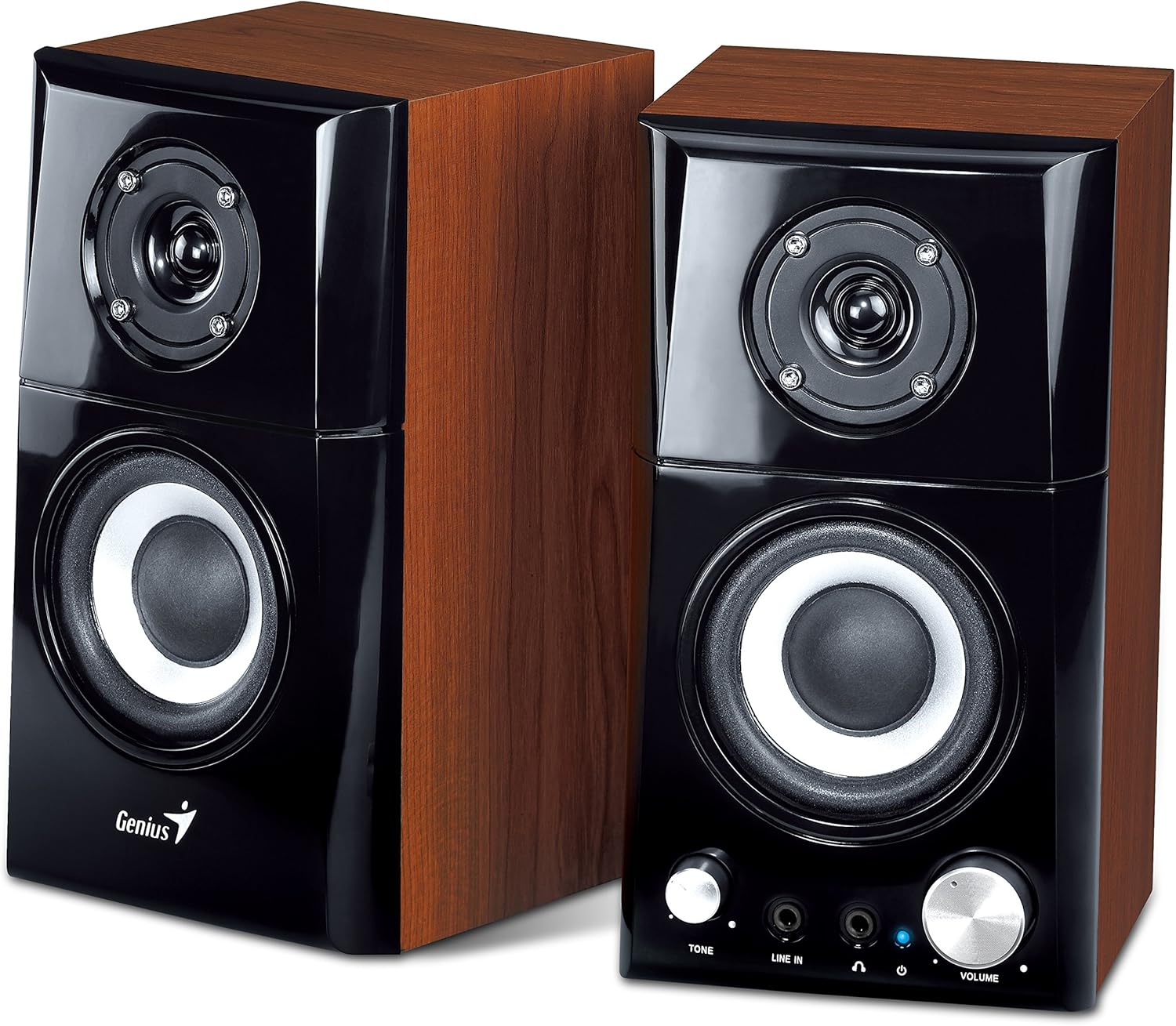
Image 2: Angled View of SP-HF500A Speakers. This image provides an angled perspective of both speakers, showcasing their compact design and the contrast between the black front panel and the wood-grain side panels. The controls on the right speaker are clearly visible.

Image 3: SP-HF500A Product Packaging. This image shows the retail box for the Genius SP-HF500A speakers, featuring product images and key specifications such as 14W power output and wood construction.
4. Setup
Follow these steps to set up your Genius SP-HF500A speakers:
- Placement: Place the two speakers on a stable, flat surface, ensuring they are positioned to provide optimal sound distribution for your listening area.
- Connect Speakers: Connect the audio cable extending from the primary speaker (the one with controls) to the secondary speaker. This cable typically has a specific connector for this purpose.
- Connect to Audio Source: Plug the 3.5mm audio input cable from the primary speaker into the audio output jack (headphone jack or line-out) of your computer, MP3 player, or other audio device.
- Connect Power: Plug the power cable into the power input on the primary speaker, then connect the other end to a standard electrical outlet.
- Power On: Locate the power switch, usually on the rear of the primary speaker, and switch it to the 'ON' position. The power indicator LED on the front panel should illuminate.
5. Operating Instructions
The SP-HF500A speakers are designed for straightforward operation:
- Power On/Off: Use the power switch located on the rear of the primary speaker to turn the unit on or off.
- Volume Control: Rotate the large 'VOLUME' knob on the front panel of the primary speaker clockwise to increase volume and counter-clockwise to decrease it.
- Tone Control: Use the 'TONE' knob to adjust the audio's tonal balance. Turning it clockwise typically increases treble, while counter-clockwise increases bass or reduces treble. Adjust to your preference.
- Line-In Jack: The 'LINE IN' 3.5mm jack on the front panel allows you to quickly connect an additional audio source, such as a smartphone or portable media player, without disconnecting your main audio source.
- Headphone Jack: Plug your headphones into the 'HEADPHONE' 3.5mm jack on the front panel. When headphones are connected, speaker output will typically be muted, and audio will be routed through the headphones. The volume and tone controls will affect the headphone output.
6. Maintenance
To ensure the longevity and optimal performance of your speakers, follow these maintenance guidelines:
- Cleaning: Use a soft, dry cloth to wipe the speaker surfaces. Avoid using abrasive cleaners, waxes, or solvents, as these can damage the finish.
- Dust: Regularly dust the speaker grilles and control knobs to prevent accumulation that could affect sound quality or control functionality.
- Environment: Keep the speakers away from direct sunlight, excessive heat, humidity, and strong magnetic fields. Ensure adequate ventilation around the units.
- Cables: Periodically check all cables for any signs of wear or damage. Replace damaged cables immediately to prevent electrical hazards or performance issues.
- Storage: If storing the speakers for an extended period, disconnect them from power and store them in a cool, dry place, preferably in their original packaging.
7. Troubleshooting
If you encounter issues with your Genius SP-HF500A speakers, refer to the following common problems and solutions:
| Problem | Possible Cause | Solution |
|---|---|---|
| No sound from speakers |
|
|
| Distorted or unclear sound |
|
|
| Only one speaker working |
|
|
| Power indicator not lit |
|
|
8. Specifications
Detailed technical specifications for the Genius SP-HF500A speakers:
| Model Name | SP-HF500A |
| Speaker Type | 2.0 Channel Wood Speakers |
| Output Power (RMS) | 14 Watts (7W per satellite) |
| Driver Unit | 3-inch Woofer (5 ohm), 1-inch Tweeter (8 ohm) per satellite |
| Frequency Response | 100Hz ~ 20KHz |
| Signal-to-Noise Ratio | 82dB |
| Connectivity | Auxiliary (3.5mm jack) |
| Controls | Power, Volume, Tone, Line-in, Headphone-out |
| Power Source | AC Power Cable |
| Dimensions (L x W x H) | 12 x 11.3 x 20.7 cm (approximately 4.7 x 4.4 x 8.1 inches) |
| Material | Wood (enclosure) |
| Color | Brown |
| Compatible Devices | PC, Laptops, Smartphones, Tablets, MP3 Players |
9. Warranty and Support
Manufacturer's Warranty: The Genius SP-HF500A speakers come with a 2-year manufacturer's warranty from the date of purchase. This warranty covers defects in materials and workmanship under normal use. Please retain your proof of purchase for warranty claims.
Warranty Exclusions: The warranty does not cover damage caused by misuse, accident, unauthorized modification, improper installation, power surges, or normal wear and tear.
Technical Support: For technical assistance, troubleshooting beyond this manual, or warranty service, please contact Genius customer support through their official website or the contact information provided with your product documentation. You may need to provide your product model number (SP-HF500A) and proof of purchase.
For more information, visit the official Genius website: www.geniusnet.com