
Introduction
The Intermatic T30404R Pool/Spa Control Panel is an integrated electrical control center designed for managing pool and spa equipment. This unit is engineered to streamline electrical requirements, potentially reducing installation costs by consolidating functions that might otherwise require separate junction boxes and service panels. It is compatible with various mechanisms, including the P1353ME, P4243ME, T100M, RC2000M, and PF1000M Series.
Key Features
- 100 Amp Load Center: Provides robust power distribution for pool and spa applications.
- Two T104M Mechanisms: Includes two integrated mechanical timers for scheduling equipment operation.
- 8-Breaker Spaces: Offers ample space for circuit breakers to protect connected devices.
- 240/240 VAC at 60 Hz: Designed for standard pool and spa electrical systems.
- NEMA 3R Enclosure: Provides protection against rain, sleet, snow, and external ice formation, suitable for outdoor installations.
- Durable Metal Construction: Ensures longevity and resistance to environmental factors.
- Four Circuits: Manages up to four distinct electrical circuits.
- Single Phase: Operates on a single-phase electrical supply.
Technical Specifications
| Specification | Value |
|---|---|
| Brand | Intermatic |
| Model Number | T30404R |
| AC Adapter Current | 100 Amps |
| Material | Metal |
| Number Of Circuits | 4 |
| Phase Type | Single Phase |
| Item Weight | 15 pounds |
| Product Dimensions | 8 x 8 x 8 inches |
| Enclosure Type | NEMA 3R |
| Included Components | T30404R (unit) |
Installation and Setup
Important Safety Information: Installation of this electrical control panel must be performed by a qualified electrician in accordance with all national and local electrical codes. Always disconnect power at the main breaker before beginning any installation or maintenance work to prevent electric shock.
Mounting the Enclosure
Select a suitable outdoor location for mounting the control panel. The NEMA 3R enclosure is designed for outdoor use, but it should be installed in a location that minimizes exposure to direct water spray or excessive moisture. Ensure the mounting surface is stable and capable of supporting the weight of the unit. Use appropriate fasteners to securely attach the enclosure to the wall or support structure.
Wiring Connections
After mounting, proceed with wiring the control panel. This involves connecting the incoming power supply, as well as the various loads such as pool pumps, heaters, and lighting, to the appropriate terminals within the panel. Refer to the detailed wiring diagram provided with your product packaging for specific connection points and instructions. Ensure all connections are tight and properly insulated. The panel is designed to accept various Intermatic mechanisms for customized control.
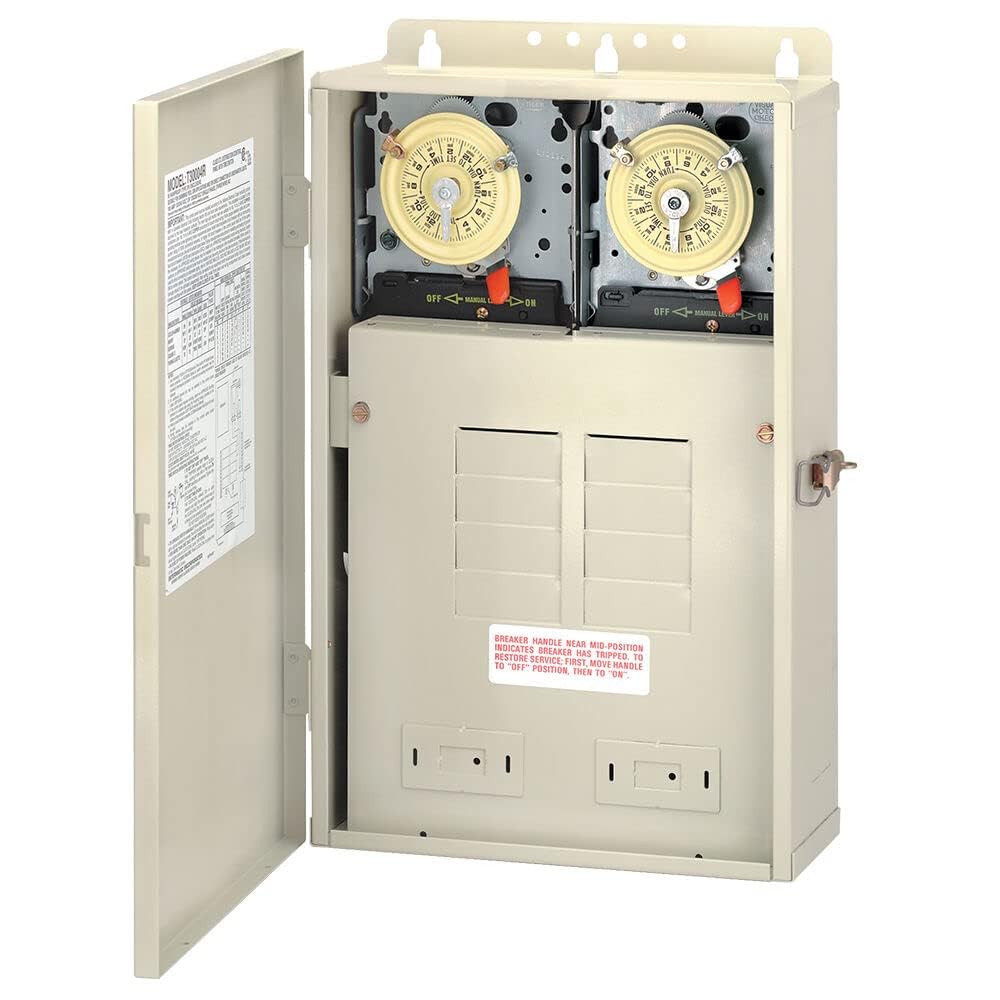
Image showing the beige exterior of the Intermatic T30404R Pool/Spa Control Panel, a durable NEMA 3R enclosure designed for outdoor use.
Operating Instructions
The Intermatic T30404R control panel features two T104M mechanical timers for automated control of your pool and spa equipment.
Setting the Timers
- Set Current Time: Rotate the entire timer dial clockwise until the current time of day aligns with the 'TIME SET' arrow located at the top of the timer mechanism.
- Set ON/OFF Periods: The timer dial has small pins or 'trippers' that control the ON and OFF cycles. Insert the 'ON' tripper (typically green) into the dial at the desired start time for your equipment. Insert the 'OFF' tripper (typically red) at the desired stop time. Ensure the trippers are securely fastened into the dial slots.
- Manual Override: Most T104M timers include a manual override lever. This allows you to temporarily turn the equipment ON or OFF without affecting the programmed schedule. Return the lever to the 'AUTO' position for normal timed operation.
- Repeat for Second Timer: If controlling a second piece of equipment, repeat the above steps for the second T104M timer mechanism.
Always ensure the timer mechanisms are clean and free from obstructions for accurate operation.
Maintenance
Regular maintenance helps ensure the longevity and reliable operation of your Intermatic T30404R control panel.
- Periodic Inspection: Annually, or more frequently in harsh environments, inspect the exterior of the enclosure for any signs of damage, corrosion, or loose mounting.
- Cleanliness: Keep the exterior of the control panel clean and free of dust, dirt, and debris. Use a soft, damp cloth for cleaning. Avoid using abrasive cleaners or solvents, which can damage the finish.
- Internal Check (Professional): For internal inspection of wiring, connections, and timer mechanisms, it is recommended to consult a qualified electrician. This should be done with power disconnected.
- Timer Trippers: Ensure the timer trippers are securely in place and not bent or damaged, as this can affect scheduling accuracy.
Troubleshooting Guide
This section provides solutions to common issues you might encounter with your control panel. For complex problems, always consult a qualified electrician.
| Problem | Possible Cause | Solution |
|---|---|---|
| Equipment not turning ON/OFF at scheduled times. | Incorrect timer settings or loose trippers. | Verify the current time is set correctly on the timer dial. Ensure ON/OFF trippers are firmly inserted at the desired times. Check if the manual override is engaged. |
| No power to the control panel or connected equipment. | Main power supply issue, tripped circuit breaker, or loose wiring. | Check your home's main electrical panel for tripped breakers. Inspect the circuit breakers within the control panel. If issues persist, contact a qualified electrician. |
| Timer dial is not rotating. | Motor failure or obstruction. | Ensure the timer is receiving power. Check for any physical obstructions preventing rotation. If the motor has failed, the timer mechanism may need replacement by a qualified technician. |
| Unusual noises or burning smell from the panel. | Electrical fault, overheating, or damaged components. | Immediately disconnect power to the unit at the main breaker. Do not attempt to open or repair. Contact a qualified electrician for urgent inspection and repair. |
Warranty Information
The Intermatic T30404R Pool/Spa Control Panel is covered by a 1-year limited warranty from the date of purchase. This warranty specifically covers the replacement of the unit itself in the event of manufacturing defects or component failure under normal use. Please note that this warranty does not cover labor costs associated with the removal or reinstallation of the unit. For full terms and conditions, please refer to the warranty documentation included with your product or contact Intermatic customer service.
Customer Support
Should you require technical assistance, have questions regarding installation, operation, or troubleshooting, or need to inquire about warranty service, please contact Intermatic customer support. It is recommended to have your product model number (T30404R) and date of purchase available when contacting support. You can typically find contact information on the Intermatic official website or in the documentation provided with your product.


