
Culligan US-600
Culligan Drink WTR Filter US-600 Instruction Manual
Model: US-600
Introduction
This manual provides detailed instructions for the installation, operation, and maintenance of your Culligan Drink WTR Filter US-600. Please read this manual thoroughly before beginning installation or use to ensure proper function and longevity of your filter system.
The Culligan US-600 is designed to provide clean, filtered drinking water by reducing various contaminants. It is suitable for both city and well water applications.
Product Overview
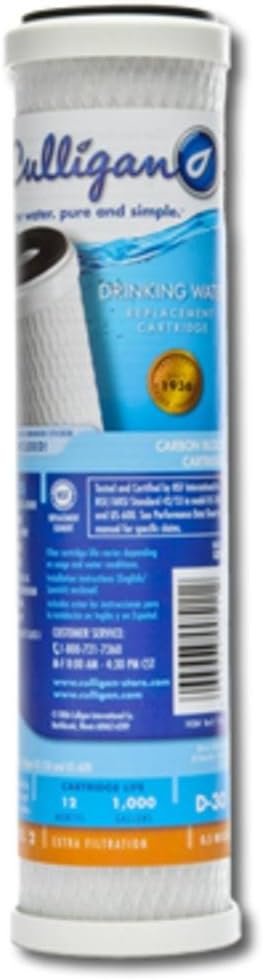
Image: The Culligan US-600 drinking water filter cartridge, a cylindrical white filter with a blue label. The label displays the Culligan logo, product name "DRINKING WATER REPLACEMENT CARTRIDGE", and key specifications like "12 MONTHS" and "1,000 GALLONS" filter life. The filter is designed for under-sink applications.
The Culligan US-600 is a replacement cartridge for under-sink drinking water filter systems. It is designed to filter up to 1,000 gallons of water or last for 12 months, whichever comes first. The filter utilizes carbon block technology to reduce impurities, providing improved taste and odor.
Key Features:
- Reduces various contaminants for cleaner, better-tasting water.
- Ideal for city and well water applications.
- Filter life of 12 months or 1,000 gallons.
- NSF certified for performance.
Setup and Installation
Before installation, ensure you have the necessary tools and that the water supply to the existing filter system is turned off. Refer to your existing filter system's manual for specific housing instructions.
- Turn off Water Supply: Locate the cold water supply line to your existing filter system and turn off the shut-off valve. If no valve is present, turn off the main water supply to your home.
- Depressurize System: Open the filtered water faucet to relieve pressure in the system. Allow water to drain until the flow stops.
- Remove Old Cartridge: Unscrew the filter housing sump (bottom part) from the filter head. Carefully remove the old filter cartridge. Dispose of the old cartridge responsibly.
- Clean Housing: Clean the inside of the filter housing sump with warm, soapy water. Rinse thoroughly. Inspect the O-ring for any damage or wear. Replace if necessary. Lubricate the O-ring with a thin layer of food-grade silicone grease if it appears dry.
- Insert New Cartridge: Remove the new Culligan US-600 filter cartridge from its packaging. Insert the new cartridge into the filter housing sump, ensuring it is properly seated.
- Reassemble Housing: Screw the filter housing sump back onto the filter head. Hand-tighten only. Do not overtighten.
- Restore Water Supply: Slowly turn on the cold water supply valve to the filter system.
- Flush System: Open the filtered water faucet and allow water to run for at least 5-10 minutes to flush out any carbon fines and air from the system. The water may appear cloudy initially; this is normal and will clear.
- Check for Leaks: Inspect all connections for leaks. If leaks occur, turn off the water, tighten connections, and recheck.
Operating Instructions
Once installed, the Culligan US-600 filter operates automatically as water flows through your under-sink system. Simply open your filtered water faucet to dispense filtered water.
Initial Use: After installation and flushing, the filter is ready for use. The initial flow rate might be slightly lower than unfiltered water, which is normal for filtration systems.
Water Quality: The filter is designed to improve the taste, odor, and clarity of your drinking water by reducing chlorine, sediment, and other common contaminants. Performance may vary depending on the quality of your incoming water supply.
Maintenance
Regular maintenance ensures optimal performance and extends the life of your Culligan US-600 filter system.
Filter Replacement
The Culligan US-600 filter cartridge should be replaced every 12 months or after filtering 1,000 gallons of water, whichever comes first. Reduced water flow or a noticeable change in water taste or odor are indicators that the filter may need to be replaced sooner.
Replacement Procedure: Follow the "Setup and Installation" steps for replacing the old cartridge with a new one.
Cleaning
Periodically clean the exterior of the filter housing with a soft cloth and mild soap. Do not use abrasive cleaners or solvents.
Troubleshooting
| Problem | Possible Cause | Solution |
|---|---|---|
| Reduced Water Flow | Clogged filter cartridge; Air in the system. | Replace filter cartridge; Flush system by running water for several minutes. |
| Water Tastes/Smells Bad | Expired filter cartridge; Contaminants not fully removed. | Replace filter cartridge; Ensure proper installation. |
| Leaks from Housing | Loose connections; Damaged O-ring; Cracked housing. | Tighten connections; Inspect and replace O-ring; Contact customer support if housing is cracked. |
| Cloudy Water (Initial) | Carbon fines from new filter. | Continue flushing the system until water runs clear. This is normal. |
Specifications
- Model: US-600 (Replacement Cartridge)
- Part Number: 43201-18419
- Material: Plastic
- Filter Life: 12 Months or 1,000 Gallons
- Certification: NSF Certified
- Dimensions (Item): Approximately 5 x 2.5 x 9.8 inches (L x W x H)
- Weight (Package): Approximately 0.35 Kilograms
- UPC: 033663005112
Warranty Information
Culligan products are backed by a manufacturer's warranty. For specific details regarding the warranty for your US-600 filter cartridge, please refer to the packaging or visit the official Culligan website. Keep your proof of purchase for warranty claims.
Note: The warranty typically covers defects in materials and workmanship under normal use and service. It does not cover damage resulting from improper installation, misuse, abuse, or neglect.
Customer Support
For technical assistance, replacement parts, or any questions regarding your Culligan Drink WTR Filter US-600, please contact Culligan Customer Service.
- Phone: 1-800-721-7360
- Hours: 8:00 AM - 4:30 PM CST
- Website: www.culligan.com
- Online Store: www.culligan-store.com
When contacting support, please have your product model (US-600) and any relevant purchase information ready.
Related documentsUS-600


Ask a question about this manual
Ask about setup, troubleshooting, compatibility, parts, safety, or missing instructions. Manuals+ will review the question and use this page’s manual context to help answer it.