
1. Product Overview
The Seco-Larm Enforcer SD-71051-V0 is a durable, stainless-steel slimline key switch plate designed for access control applications. It features a pre-wired N.C. (normally closed) keylock switch that connects to electromagnetic door locks, gate locks, or other access devices. This switch allows for temporary or permanent entry or exit by interrupting power to the connected device.
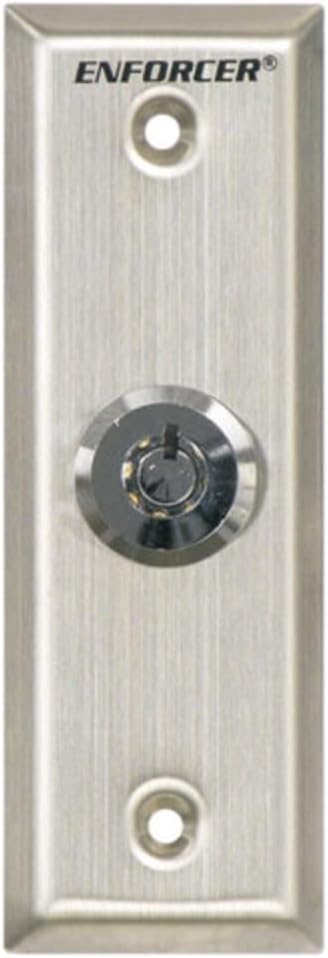
Figure 1: Seco-Larm Enforcer SD-71051-V0 Slimline Key Switch Plate. This image displays the brushed stainless steel plate with the 'ENFORCER' logo at the top, a central key cylinder, and two mounting screw holes.
2. Product Features
- Stainless-steel plate construction for durability.
- Includes a shunt ON, momentary OFF spring-loaded keylock switch.
- The switch maintains the ON position and springs back from the OFF position.
- Key is removable only from the ON position.
- Designed to temporarily or permanently allow entry or exit by cutting power to connected devices.
- Connects to electromagnetic door locks, gate locks, or other access control devices.
3. Setup and Installation
Important: Installation should be performed by qualified personnel in accordance with all local electrical codes and regulations. Disconnect power to the access control system before beginning installation.
- Mounting Location: Select a suitable, secure location for mounting the key switch plate, typically adjacent to the controlled access point. Ensure there is sufficient space for wiring behind the plate.
- Prepare Wiring: Route the necessary wiring from your access control panel or power supply to the mounting location. The key switch is pre-wired with leads for connection.
- Secure the Plate: Use appropriate screws to securely fasten the slimline key switch plate to the wall or door frame. Ensure the plate is level and firmly attached.
- Wire Connections: Connect the key switch leads to your access control system. The switch is Normally Closed (N.C.), meaning it interrupts the circuit when activated (key turned to open). Refer to your access control system's manual for specific wiring diagrams for N.C. devices.
- Test Functionality: After all connections are made and secured, restore power to the system and test the key switch operation. Verify that turning the key correctly activates and deactivates the connected access device.
4. Operating Instructions
The Seco-Larm Enforcer SD-71051-V0 key switch operates as follows:
- Default State: In its default, unactivated state (key not turned or in the 'OFF' position), the switch maintains a normally closed circuit, allowing power to flow to the connected access device (e.g., keeping a magnetic lock engaged).
- Activating the Switch: Insert the key into the cylinder. Turn the key to the 'ON' position. This action shunts the circuit, temporarily or permanently interrupting power to the connected access device, thereby allowing entry or exit.
- Momentary OFF Function: The switch is spring-loaded for a momentary OFF action. When the key is turned to the 'OFF' position, it will spring back to the 'ON' position.
- Key Removal: The key can only be removed when the switch is in the 'ON' position. This ensures that the access device remains in its activated state until the key is re-inserted and turned to the 'OFF' position (which then springs back to 'ON').
5. Maintenance
To ensure optimal performance and longevity of your Seco-Larm Enforcer key switch plate, follow these maintenance guidelines:
- Regular Cleaning: Periodically wipe the stainless-steel plate with a soft, damp cloth to remove dust and grime. Avoid abrasive cleaners or solvents that could damage the finish.
- Key Cylinder Care: If the key cylinder becomes stiff, a small amount of graphite lubricant can be applied. Do not use oil-based lubricants as they can attract dust.
- Inspect Connections: Annually, or as needed, inspect the wiring connections behind the plate to ensure they are secure and free from corrosion or damage.
- Check Operation: Regularly test the key switch operation to confirm it activates and deactivates the connected access device reliably.
6. Troubleshooting
If you encounter issues with your key switch plate, consider the following troubleshooting steps:
- Device Not Activating:
- Check all wiring connections for looseness or damage.
- Verify that power is supplied to the access control system.
- Ensure the key is fully inserted and turned to the correct 'ON' position.
- Confirm the connected access device (e.g., magnetic lock) is functioning correctly independently.
- Key Difficult to Turn or Remove:
- Ensure the key is fully inserted.
- Apply a small amount of graphite lubricant to the key cylinder if stiff.
- Remember the key is only removable from the 'ON' position.
- Intermittent Operation:
- Inspect wiring for any frayed insulation or intermittent shorts.
- Check for loose connections at the key switch terminals or the access control panel.
If problems persist after attempting these steps, contact Seco-Larm technical support or a qualified technician.
7. Specifications
| Specification | Detail |
|---|---|
| Manufacturer Part # | SD-71051-V0 |
| UPC | 676544002383 |
| Size | Slimline |
| Contact Rating | 1Amp @ 12VDC |
| Replacement Keys | SS-090KN (must specify key #) |
| Operation Mode | Manual |
| Connector Type | Wire Leads |
| Terminal | Quick-connect |
| Circuit Type | 1-way |
| Mounting Type | Surface Mount |
| Actuator Type | Key |
| International Protection Rating | IP00 |
| Number of Positions | 1 |
| Item Weight | 4.8 ounces |
| Package Dimensions | 5.94 x 3.78 x 1.73 inches |
8. Warranty and Support
Warranty: This Seco-Larm Enforcer key switch plate comes with a 1-year limited warranty from the date of purchase. This warranty covers defects in materials and workmanship under normal use. It does not cover damage resulting from misuse, accident, unauthorized modification, or improper installation.
Technical Support: For technical assistance, troubleshooting, or warranty claims, please contact Seco-Larm customer service. Refer to the official Seco-Larm website or product packaging for the most current contact information.


