
1. Introduction
The BioGreen TER2/US Thermo 2 Digital Greenhouse Thermostat is designed to provide precise temperature control for various heating, cooling, and ventilation devices in your greenhouse or other controlled environments. This manual will guide you through the setup, operation, and maintenance of your thermostat to ensure optimal performance and longevity.

The BioGreen TER2/US Thermo 2 Digital Greenhouse Thermostat in a greenhouse setting.
2. Safety Information
- Read all instructions before use.
- Ensure the thermostat is connected to a properly grounded power outlet.
- Do not immerse the thermostat unit in water. The probe is waterproof, but the main unit is not.
- Do not exceed the maximum load capacity of 3000 watts / 10,240 BTUs.
- Keep out of reach of children.
- Disconnect power before cleaning or performing any maintenance.
3. Product Overview
The BioGreen TER2/US Thermo 2 features a digital display, control buttons, and two power outlets for connecting your heating or cooling devices. A remote temperature probe monitors the environment.
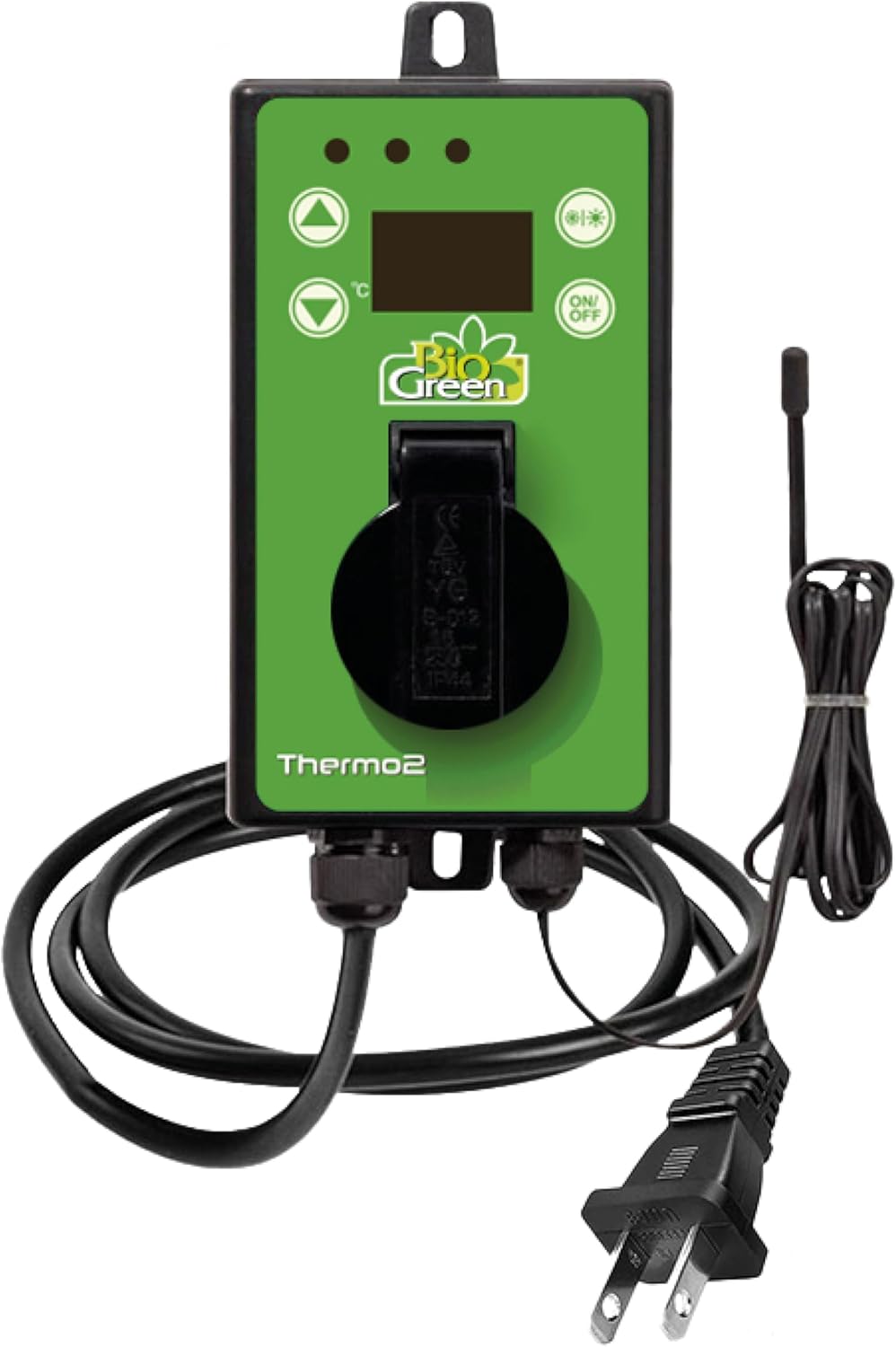
The BioGreen TER2/US Thermo 2 Digital Greenhouse Thermostat.

The thermostat features a 1.5 meter (approximately 5 ft) temperature sensor cable and supports appliances up to 3000W.
4. Setup Instructions
- Mounting: Securely mount the thermostat unit in a suitable location within your greenhouse or desired environment. Ensure it is protected from direct water exposure.
- Power Connection: Plug the thermostat's power cord into a standard 110 VAC outlet. The digital display will illuminate.
- Sensor Placement: Position the temperature sensor probe in the area where you want to monitor and control the temperature. For plants, placing it near the root zone or at plant level is recommended. The sensor cable is 1.5 meters long.
- Device Connection: Plug your heating, cooling, or ventilation devices into the designated outlets on the thermostat. The thermostat has two outlets, one for heating and one for cooling/ventilation.
Video demonstrating the setup and basic operation of the BioGreen Thermo 2 Digital Greenhouse Thermostat.
5. Operating Instructions
The thermostat allows you to set specific temperature thresholds for both heating and cooling functions. The robust digital display shows the current temperature and your set values.

The thermostat's digital display and control buttons for setting temperature.
- Power On/Off: Press the 'ON/OFF' button to power the unit on or off.
- Setting Temperature:
- Press the 'SET' button once to enter the setting mode.
- Use the 'Up' and 'Down' arrow buttons to adjust the desired temperature set point.
- Press 'SET' again to confirm and move to the next setting (e.g., differential value).
- Heating/Cooling Mode Selection: Press the 'C/H' button to switch between heating and cooling modes. The corresponding indicator light will illuminate.
- Temperature Unit: The thermostat can display temperature in Fahrenheit or Celsius. Refer to the full instruction manual for details on how to switch between these units.
6. Key Features
- Heating and Cooling Control: Designed for controlling both heating and cooling devices, as well as fans and electric greenhouse windows, ensuring optimal conditions.
- Wide Temperature Range: Offers an adjustment range from -58°F to +210°F (-50°C to +99°C), allowing for flexible climate management.
- Energy Savings: Precise temperature control helps avoid unnecessary heating or cooling, contributing to energy efficiency.
- High Power Capacity: Capable of switching up to 3000 watts / 10,240 BTUs, suitable for various high-power equipment.
- Easy Operation: Features a user-friendly interface with minimal buttons and a robust digital display for clear visibility of settings and readings.
- Splash-Proof Design: Rated IPX4, providing protection against splashing water.

The thermostat's IPX4 splash-proof design and energy-saving hysteresis function.
7. Specifications
| Feature | Specification |
|---|---|
| Brand | Bio Green |
| Model Name | Thermo 2 |
| Model Number | TER2-US |
| Product Dimensions | 1.6"D x 3.5"W x 5.7"H |
| Controller Type | Push Button |
| Temperature Range | -58°F to +210°F (-50°C to +99°C) |
| Power Capacity | Up to 3000 watts / 10,240 BTUs |
| Power Source | Corded Electric (110 VAC ±10%, 50/60 Hz) |
| Item Weight | 15.8 ounces |
| Display Type | LCD with Backlight |
| Sensor Cable Length | 1.5 meters (approx. 5 feet) |
| Protection Rating | IPX4 (Splash-proof) |

Dimensions and sensor cable length of the thermostat.
8. Maintenance
- Cleaning: Wipe the unit with a soft, damp cloth. Do not use abrasive cleaners or solvents. Ensure the unit is unplugged before cleaning.
- Sensor Care: Keep the temperature sensor probe clean and free from debris for accurate readings.
- Storage: If storing the unit for an extended period, ensure it is clean, dry, and stored in a safe place away from extreme temperatures.
9. Troubleshooting
For detailed troubleshooting steps and error code explanations, please refer to the comprehensive manual provided with your product or contact Bio Green customer support.
- No Power: Check the power connection and the wall outlet. Ensure the thermostat is properly plugged in.
- Incorrect Temperature Reading: Verify the sensor probe is correctly placed and clean. Ensure it is not in direct sunlight or near a heat source that could skew readings.
- Device Not Activating: Check the set temperature thresholds. Ensure the connected device is functioning correctly and is within the thermostat's power capacity.
10. Warranty and Support
The BioGreen TER2/US Thermo 2 Digital Greenhouse Thermostat comes with a 2-year warranty. For warranty claims, technical support, or any questions regarding your product, please contact Bio Green customer service through their official website or the contact information provided in your product packaging.