
Introduction
Thank you for choosing the Taylor Digital 10 lb Portion Control Scale TE10T. This precision instrument is designed for accurate weighing in various applications, including food portioning. It features a digital tower readout, a removable stainless steel platform, and multiple measurement units. Please read this manual thoroughly to ensure proper use and care of your scale.
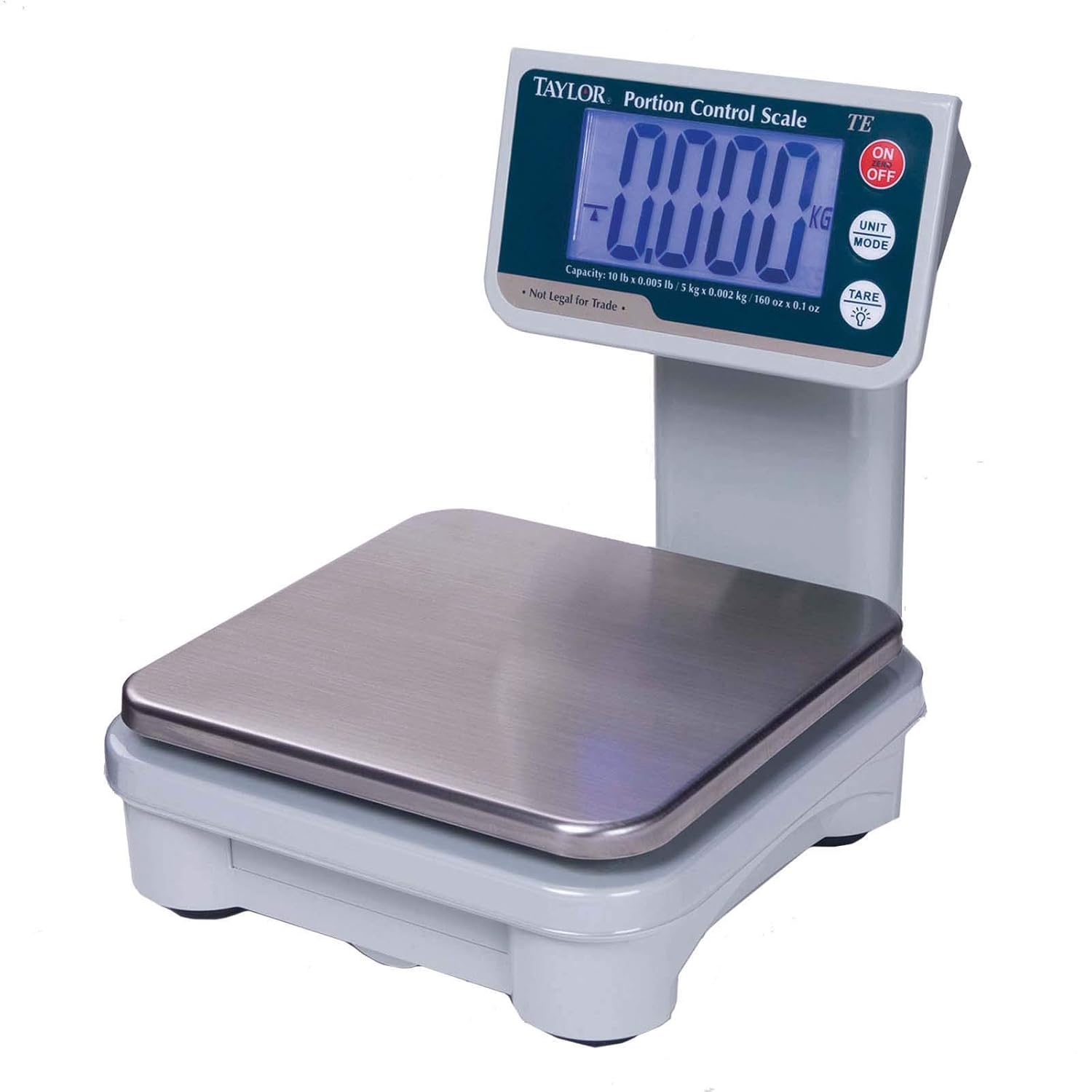
An image showing the Taylor Digital 10 lb Portion Control Scale. The scale features a white base, a silver stainless steel weighing platform, and a tower-style digital display. The display shows '0.000' and has buttons for 'ON/OFF', 'UNIT MODE', and 'TARE'. The capacity is also visible on the display panel.
Safety Information
- Do not immerse the scale in water or other liquids.
- Avoid exposing the scale to extreme temperatures or humidity.
- Do not drop or subject the scale to strong impacts, as this may damage internal components.
- Use the scale on a stable, flat surface to ensure accurate readings.
- Keep out of reach of children.
- If using batteries, ensure correct polarity and remove them if the scale will not be used for an extended period.
Package Contents
Verify that all items are present upon unpacking:
- Taylor Digital Portion Control Scale (Model TE10T)
- Removable Stainless Steel Platform
- AC Adapter
- User Manual (this document)
Note: (4) AA batteries are not included and must be purchased separately if battery operation is desired.
Setup
- Unpack the Scale: Carefully remove all components from the packaging.
- Place the Platform: Position the stainless steel weighing platform securely onto the scale base.
- Power Source:
- AC Adapter: Plug the included AC adapter into the scale's power input and then into a standard electrical outlet.
- Batteries (Optional): If using batteries, open the battery compartment (usually on the underside of the scale), insert four (4) AA batteries, ensuring correct polarity (+/-), and close the compartment.
- Placement: Place the scale on a firm, level, and stable surface, away from vibrations or drafts that could affect accuracy.
Operating Instructions
1. Power On/Off
- To turn the scale ON, press the ON/OFF button. The display will illuminate and show "0.000" when ready.
- To turn the scale OFF, press and hold the ON/OFF button for a few seconds until the display turns off. The scale also features an auto-off function to conserve power.
2. Unit Mode Selection
- Press the UNIT MODE button to cycle through the available measurement units: pounds (lb), ounces (oz), kilograms (kg), fluid ounces (fl. oz), and milliliters (ml). The selected unit will be indicated on the display.
3. Tare Function
- The Tare function allows you to subtract the weight of a container, so only the weight of the contents is measured.
- Place an empty container on the weighing platform.
- Press the TARE button. The display will reset to "0.000".
- Add items to the container; the display will show only the net weight of the items.
- To clear the Tare, remove all items from the platform and press TARE again, or turn the scale off and on.
4. Hold Feature
- The Hold feature allows the displayed weight to remain on the screen even after the item is removed. This is useful for weighing large or awkwardly shaped items that might obscure the display.
- Consult the scale's display or specific button labels for activating and deactivating the Hold function, as its operation may vary.
5. Backlight
- The 1-1/2" LCD display includes a backlight for improved readability in various lighting conditions. The backlight typically activates automatically when the scale is in use.
6. Field Calibration
- The scale features a field calibration function to maintain accuracy over time.
- Refer to the specific instructions provided with your scale for the exact procedure to perform field calibration, as it typically requires a known calibration weight.
Maintenance and Care
- Cleaning: Wipe the scale with a soft, damp cloth. Do not use abrasive cleaners or immerse the scale in water. The stainless steel platform is removable for easier cleaning.
- Storage: Store the scale in a cool, dry place. If storing for an extended period, remove batteries to prevent leakage.
- Platform: Ensure the stainless steel platform is clean and free of debris before each use to prevent inaccurate readings.
Troubleshooting
| Problem | Possible Cause | Solution |
|---|---|---|
| "Lo" or Low Battery Indicator | Batteries are low or depleted. | Replace the AA batteries or use the AC adapter. |
| "O-Ld" or Overload Indicator | Weight on the platform exceeds the scale's maximum capacity. | Remove excess weight immediately to prevent damage. The maximum capacity is 10 lb / 5 kg. |
| Inaccurate Readings | Scale not on a level surface, vibrations, or needs calibration. | Ensure scale is on a stable, level surface. Avoid vibrations. Perform field calibration if necessary. |
| Scale Does Not Turn On | No power, dead batteries, or AC adapter not connected properly. | Check battery installation/charge or AC adapter connection. |
Specifications
- Model: TE10T
- Dry Capacity: 10 lb x 0.002 lb / 160 oz x 0.5 oz / 5 kg x 0.001 kg
- Liquid Capacity: 169 fl. oz x 0.05 fl. oz / 5000 ml x 1 ml
- Platform Size: 7" x 6.5" removable stainless steel
- Display: 1-1/2" LCD with backlight
- Features: Tare, Hold, Auto-off, Low Battery Indicator, Overload Indicator, Field Calibration
- Power: AC adapter (included) or 4 x AA batteries (not included)
- Certifications: NSF
- Product Dimensions: 13 x 10 x 7 inches
- Item Weight: The provided source indicates 0.01 ounces, which is likely a typographical error. Please refer to the product packaging for accurate weight.
Warranty and Support
Taylor products are manufactured to high-quality standards. For specific warranty information or technical support, please refer to the warranty card included with your product or visit the official Taylor website. You may also contact Taylor customer service directly for assistance with product operation, troubleshooting, or parts replacement.
For further assistance, please visit the Taylor Store on Amazon.


