
Introduction
Thank you for choosing the TFA Galileo Thermometer. This elegant instrument utilizes the principle of buoyancy to indicate temperature, making it both a functional thermometer and a decorative piece. Please read this manual carefully to ensure proper setup, operation, and maintenance of your thermometer.
Product Overview
The TFA Galileo Thermometer consists of a sealed glass cylinder filled with a clear liquid, typically water or oil, and several glass spheres of varying densities. Each sphere has a small metal tag indicating a specific temperature. As the ambient temperature changes, the density of the liquid inside the cylinder changes, causing the spheres to rise or fall.
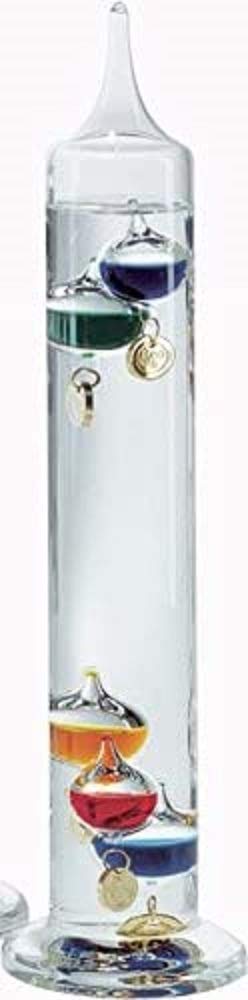
Figure 1: TFA Galileo Thermometer. This image shows the full thermometer, highlighting its clear glass structure and the colorful, weighted spheres suspended within the liquid.
Key Features:
- Glass Construction: Durable and aesthetically pleasing.
- Temperature Range: 18°C to 26°C (64°F to 79°F).
- Graduation: 2°C increments.
- Colored Spheres: Five distinct colored spheres with golden temperature tags.
- Dimensions: Approximately 8 cm (L) x 8 cm (W) x 34 cm (H).
Setup
- Unpacking: Carefully remove the thermometer from its packaging. Inspect for any signs of damage.
- Placement: Place the thermometer on a stable, flat surface away from direct sunlight, heat sources (like radiators or vents), and drafts. Extreme temperature fluctuations can affect accuracy and potentially damage the unit.
- Optimal Environment: For best performance, place the thermometer in a room with a relatively stable ambient temperature within its operating range.
Note: The thermometer is designed for indoor use only. Do not expose it to freezing temperatures, as this can cause the liquid to expand and crack the glass.
Operating Instructions
The Galileo Thermometer operates automatically based on the principle of liquid density changing with temperature. No manual adjustments are required.
Reading the Temperature:
To read the current temperature, observe the spheres floating within the liquid. The lowest floating sphere in the top group indicates the current temperature. If all spheres are at the bottom, the temperature is below the lowest marked sphere. If all spheres are at the top, the temperature is above the highest marked sphere.
- Example: If spheres marked 18°C, 20°C, and 22°C are floating at the top, and spheres marked 24°C and 26°C have sunk to the bottom, the current temperature is 22°C.
The thermometer provides an approximate temperature reading within its specified range. It is not intended for precision measurements.
Maintenance
- Cleaning: To clean the glass, gently wipe it with a soft, damp cloth. Do not use abrasive cleaners or solvents, as these can damage the glass or the internal components.
- Handling: Handle the thermometer with care. It is made of glass and can break if dropped or subjected to strong impacts.
- Storage: If storing the thermometer, ensure it is in a stable, upright position in a temperature-controlled environment to prevent damage.
Troubleshooting
| Problem | Possible Cause | Solution |
|---|---|---|
| All spheres at the bottom. | Room temperature is below 18°C. | Move the thermometer to a warmer location. |
| All spheres at the top. | Room temperature is above 26°C. | Move the thermometer to a cooler location. |
| Spheres not moving or stuck. | Sudden temperature change or physical impact. | Allow time for the thermometer to stabilize. Gently tap the base to dislodge any stuck spheres. If the glass is cracked, the unit is damaged and cannot be repaired. |
| Liquid appears cloudy or discolored. | Contamination or internal damage. | This indicates internal damage. The unit cannot be repaired and should be replaced. |
Specifications
- Model Number: 18.1000.01.53
- Brand: TFA
- Material: Glass, Liquid, Metal
- Temperature Range: +18°C to +26°C (64°F to 79°F)
- Graduation: 2°C
- Dimensions (L x W x H): Approximately 8 cm x 8 cm x 34 cm (3.15 in x 3.15 in x 13.39 in)
- Weight: Approximately 611 grams (1.35 lbs)
- Color: Multicolored spheres
Warranty and Support
Information regarding specific warranty terms and conditions for the TFA Galileo Thermometer is typically provided with the product packaging or can be obtained from the retailer where the product was purchased. Please retain your proof of purchase for warranty claims.
For technical support or inquiries, please contact your local TFA distributor or the retailer. Contact information may be available on the product packaging or the official TFA website.
Note: Due to the delicate nature of glass products, damage from drops or impacts is generally not covered under warranty.


