
1. Introduction
The Nokia E72 is an unlocked smartphone designed for communication and productivity. It features a full QWERTY keyboard, advanced email capabilities, GPS navigation, and a 5-megapixel camera. This manual provides instructions for setting up, operating, and maintaining your device.
2. Package Contents
Verify that your package contains the following items:
- Nokia E72 Handset
- Rechargeable Battery (BP-4L)
- Charger (AC-5U)
- Connectivity Cable (CA-101)
- Headset (HS-47)
- Lanyard
- Pouch
- Printed Documentation
- 4 GB microSD card (pre-installed or included separately)
3. Setup
3.1. Installing the SIM Card and Battery
- Remove the back cover of the phone.
- Insert your GSM SIM card into the designated slot. Ensure the gold contacts face downwards and the cut corner is correctly aligned.
- Insert the BP-4L battery, aligning the contacts.
- Replace the back cover until it clicks into place.
Note: This phone requires a SIM card from a compatible GSM network service provider for cellular functionality.
3.2. Charging the Battery
- Connect the charger (AC-5U) to a power outlet.
- Connect the charger cable to the micro-USB port on your phone.
- Allow the battery to charge fully before initial use. The charging indicator will show the battery status.
3.3. Powering On/Off
- To power on, press and hold the power button located on the top of the device until the Nokia logo appears.
- To power off, press and hold the power button, then select "Power off" from the options.
4. Operating the Device
4.1. Basic Navigation

Figure 4.1: Nokia E72 Front View with Home Screen
- QWERTY Keyboard: Use the full QWERTY keyboard for text input, including messages, emails, and web searches.
- Optical Navi Key: The central navigation key can be used as an optical trackpad for scrolling through menus and web pages, or as a traditional directional pad.
- Soft Keys: Context-sensitive keys located below the screen perform actions displayed on the screen directly above them.
- Home Screen: Customize your home screen with active stand-by plug-ins and application shortcuts. Switch between Business and Personal modes for different layouts.
4.2. Calling and Messaging
- Making Calls: Enter the phone number using the keyboard and press the green call key.
- Sending SMS/MMS: Navigate to the Messaging application, select "New message," enter the recipient and your message. Attach media for MMS.
- Voice Commands: The device supports voice commands for various functions.
4.3. Email and Instant Messaging
The E72 offers robust email and instant messaging features:
- Email: Supports Microsoft Mail for Exchange, IBM Lotus Notes Traveler, and up to 10 personal email accounts via pre-installed Nokia Messaging. Easily set up multiple email accounts.
- Instant Messaging: Connect to services like Windows Live, Yahoo!, Google, and Ovi Chat directly from the home screen for real-time conversations.
- Document Viewing: Download and view email attachments, including Word, Excel, PowerPoint, and PDF files.
4.4. Camera Operation

Figure 4.2: Nokia E72 Rear View with Camera
- The device features a 5-megapixel auto-focus camera with an LED flash and 5x digital zoom.
- Still Images: Access the camera application, frame your shot, and press the camera button to capture. Features include panorama mode, sequence mode, multiple scene modes, and light sensitivity settings.
- Video Recording: Record videos up to 640 x 480 resolution at 15 frames per second, with up to 10x digital zoom.
- A front camera is available for video calling (network dependent).
4.5. Connectivity
- Cellular Network: Supports quad-band GSM (850/900/1800/1900 MHz) and 3G (850/1900/2100 MHz UMTS/HSDPA) for high-speed data and voice services.
- Wi-Fi: Connect to wireless networks (802.11b/g) for internet access at home, work, or hotspots. Supports WPA2-Enterprise, WPA2-Personal, WPA-Enterprise, and WPA-Personal security protocols.
- Bluetooth: Version 2.0 with Enhanced Data Rate. Supports profiles for communication headsets, hands-free car kits, and A2DP for stereo music streaming.
- USB: Micro-USB connector supports charging and data transfer.
4.6. GPS and Ovi Maps
The Nokia E72 includes an integrated assisted GPS (A-GPS) receiver with free Ovi Maps for navigation.
- Navigation Features: Offers turn-by-turn voice guidance for both driving and walking. Includes lane assistance, traffic information (where available), safety camera, and speed warnings.
- Offline Maps: Ovi Maps works offline, allowing navigation without a cellular network connection, which can save on data charges and extend battery life.
- Global Coverage: Maps for over 180 countries and voice-guided navigation in over 70 countries.
- Additional Content: Access Lonely Planet and Michelin travel guides, real-time weather information, and discover local events.
- Electronic Compass: Keep moving in the correct direction with the integrated electronic compass.
4.7. Media Playback
- Audio: Supports AAC, AAC+, eAAC+, MP3, AMR-NB, WMA file formats. Features an FM radio (87.5-108 MHz with RDS support) and a 3.5 mm audio connector.
- Video: Supports .mp4, AVC/H.264, .wmv, RV, Flash Video, H.263/3GPP file formats for playback and streaming.
4.8. Applications and Tools
- Pre-loaded Apps: Includes Flash Lite 3.0, Windows (MSN) Live instant messaging, Quick Office viewers and editors, PDF Viewer, Bloomberg, Nokia Ovi Suite, and Nokia PC Suite.
- Organizer: Calendar, alarm clock, notes, to-do lists, countdown timer, and converter.
- Games: Pre-loaded games such as Block Cascade and Top Hits Solitaire Collection.
5. Maintenance
- Cleaning: Use a soft, dry cloth to clean the device. Avoid harsh chemicals or abrasive materials.
- Battery Care: To prolong battery life, avoid exposing the device to extreme temperatures. Charge the battery regularly, but avoid overcharging or letting it fully discharge frequently.
- Software Updates: Periodically check for software updates from Nokia to ensure optimal performance and access to the latest features.
- Storage: The device has 250 MB of internal user-accessible memory and supports microSD cards up to 16 GB. Manage your storage to maintain performance.
6. Troubleshooting
If you encounter issues with your Nokia E72, consider the following:
- Device Not Powering On: Ensure the battery is correctly installed and sufficiently charged. Try connecting the charger.
- No Network Connection: Verify that your SIM card is properly inserted and active. Check network coverage in your area. Ensure "Airplane mode" is not enabled.
- Call/Message Issues: Confirm you have sufficient credit or an active plan with your service provider. Check network signal strength.
- Internet Connectivity Problems: For Wi-Fi, ensure you are connected to the correct network and have entered the password correctly. For cellular data, verify your data plan is active and APN settings are correct (consult your service provider).
- Applications Not Responding: Close and restart the application. If the issue persists, restart the phone.
- Slow Performance: Clear unnecessary applications running in the background. Delete old files or applications to free up internal memory.
- GPS Accuracy: Ensure you have a clear view of the sky for optimal GPS signal reception. A-GPS requires a data connection for faster positioning.
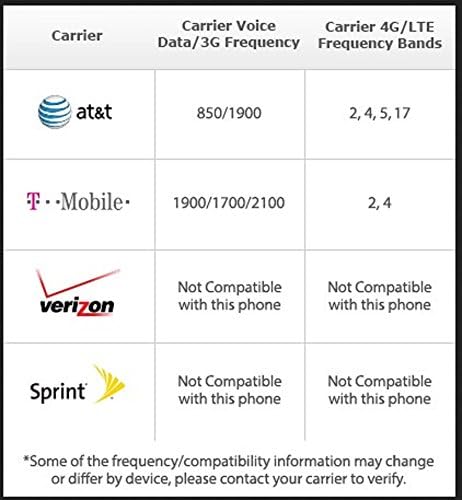
Figure 6.1: Carrier Compatibility Information
Important: Some features and services may vary by carrier and region. Data charges may apply for certain services like map downloads or streaming.
7. Specifications
| Feature | Detail |
|---|---|
| Model | Nokia E72 (002M1S1) |
| Operating System | Symbian OS version 9.3 with S60 3rd Edition Feature Pack 2 |
| Dimensions | 4.48 x 2.34 x 0.39 inches (113.8 x 59.4 x 10.2 mm) |
| Weight | 4.51 ounces (128 grams) |
| Display | 2.36-inch TFT, 320 x 240 pixels, 16 million colors |
| Camera | 5-megapixel auto-focus with LED flash, 5x digital zoom; Front camera for video calls |
| Video Recording | Up to 640 x 480 at 15fps |
| Internal Memory | 250 MB user accessible |
| Expandable Memory | microSD card slot, supports up to 16 GB (4 GB card included) |
| Cellular Networks | GSM 850/900/1800/1900 MHz; UMTS/HSDPA 850/1900/2100 MHz |
| Wi-Fi | 802.11b/g |
| Bluetooth | Version 2.0 with EDR, A2DP support |
| GPS | Integrated A-GPS receiver with Ovi Maps |
| Audio Jack | 3.5 mm |
| Battery | 1500 mAh Lithium-ion (BP-4L) |
| Talk Time (GSM) | Up to 12.5 hours |
| Talk Time (3G) | Up to 5.9 hours |
| Standby Time | Up to 576 hours (24 days) |
8. Warranty and Support
The Nokia E72 comes with a full manufacturer's warranty. For detailed warranty terms and conditions, please refer to the documentation included in your product package or visit the official Nokia support website.
For technical assistance, troubleshooting, or further information, please contact Nokia customer support or visit their online support resources.


