
1. Introduction
The Crown CTs 2000 is a professional two-channel power amplifier designed for installed sound applications. Building on the legacy of the Com-Tech Series, it offers exceptional flexibility and value, integrating seamlessly into various fixed installation designs. This manual provides comprehensive information on its features, setup, operation, and maintenance to ensure optimal performance and longevity.
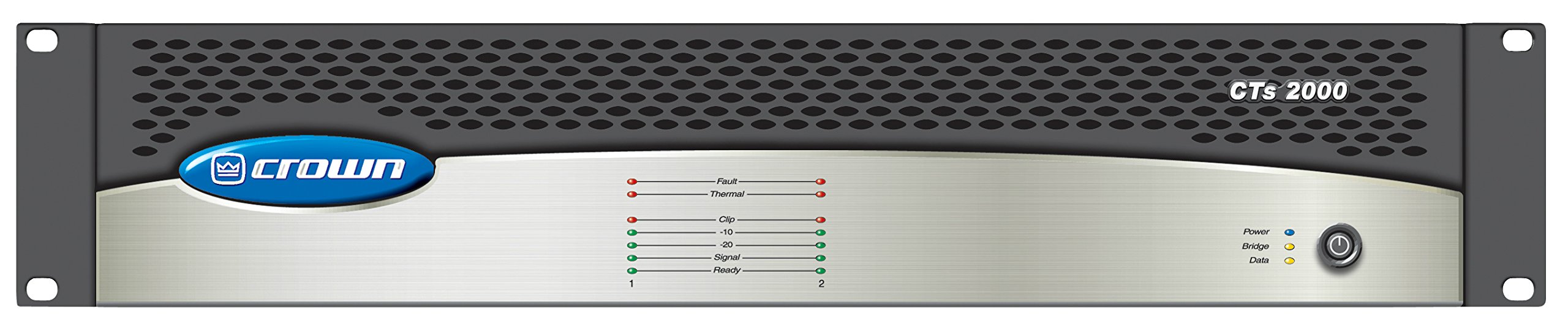
Figure 1: Front view of the Crown CTs 2000 Power Amplifier.
2. Product Features
- High Power Density: Housed in a compact 2RU chassis.
- Crown Switching Power Supply: Ensures lighter weight and efficient operation.
- Flexible Impedance Operation: Selectable Constant-Voltage (70V/100V) or low-impedance (4/8 Ohm) operation per channel.
- Direct Outputs: Features 100V direct outputs.
- Reliable Output Topologies: Utilizes legendary Crown Class-I (BCA) and AB+B output topologies for enhanced reliability.
- Comprehensive Indicators: Provides accurate diagnostics through various LED indicators (Clip, Signal, Protect).
- LCD Display: Displays decibel levels and temperature for each channel (CHA, CHB).
- Rack Mountable: Equipped with rack ears for easy installation in standard equipment racks.
- Input/Output Connectivity: Features combo jacks (XLR and 1/4") for inputs and Speakon/Binding Post terminals for outputs.
- Mode Selection: Includes a mode switch for Stereo, Parallel, and Bridged operation.
- Crossover Settings: Built-in crossover switch with Bypass, Sub 160Hz, and Sub 80Hz options.
- Cooling System: Features a super quiet cooling fan for optimal thermal management.
3. Setup and Connections
3.1 Power On/Off
Locate the power switch on the front panel of the amplifier. Flip the switch to the 'ON' position to power on the unit. The LCD display will illuminate, indicating the amplifier is active.
3.2 Input Connections
The CTs 2000 features combo jacks for Channel A and Channel B inputs, accepting both XLR and 1/4" cables. Connect your audio source (e.g., mixer, preamplifier) to the appropriate input jacks.
3.3 Output Connections
Speaker outputs are provided via Speakon connectors and binding post terminals. For bare wire or banana plug connections, use the binding post terminals. For Speakon connections, insert the Speakon cable and twist to lock.
3.4 Rack Mounting
The amplifier is designed for 2RU rack mounting. Use the integrated rack ears on the sides of the unit to secure it into a standard 19-inch equipment rack.
3.5 Mode Selection
Use the 'MODE' switch on the rear panel to select the desired operation mode:
- Stereo Mode: Traditional left and right channel operation. Ideal for stereo audio mixes where left and right signals are distinct.
- Parallel Mode: Both channels receive the same mono input signal. Useful for driving multiple speakers with the same audio content.
- Bridged Mode: Combines the power of both channels into a single, higher-power output. Typically used for driving a single, high-power speaker or subwoofer.
3.6 Crossover Settings
The 'CROSS OVER' switch on the rear panel allows you to filter frequencies:
- Bypass: Sends a full-range signal to your speakers.
- Sub 160Hz: Applies a 160Hz low-pass filter, ideal for subwoofers that handle frequencies up to 160Hz.
- Sub 80Hz: Applies an 80Hz low-pass filter, suitable for subwoofers focusing on very low frequencies.
Video 1: Demonstration of amplifier setup and connections (RPA12, RPA14, RPA16 models shown, similar functionality).
4. Operation
4.1 Front Panel Controls and Indicators
- Volume Knobs: Adjust the output level for Channel A and Channel B independently. The LCD display shows the decibel (dB) level for precise adjustment.
- LCD Display: Shows the current decibel output (e.g., 50dB) and internal temperature (e.g., 73°F) for both Channel A (CHA) and Channel B (CHB).
- LED Indicators:
- Clip LED: Illuminates when the input signal is too high, causing clipping. Reduce the input level to prevent distortion.
- Signal LED: Illuminates when an audio signal is present on the respective channel.
- Protect LED: Illuminates if the amplifier enters protection mode due to issues like overheating, short circuits, or impedance mismatch.
Video 2: Demonstration of amplifier features and operation (RPA14 model shown, similar functionality).
5. Maintenance
To ensure the longevity and optimal performance of your Crown CTs 2000 amplifier, regular maintenance is recommended:
- Keep the amplifier in a well-ventilated area to prevent overheating.
- Regularly clean the cooling fan vents to prevent dust buildup.
- Avoid exposing the unit to moisture or extreme temperatures.
- Ensure all connections are secure and free from damage.
6. Troubleshooting
If you encounter issues with your amplifier, refer to the following common troubleshooting steps:
- No Power: Check the power cable connection, ensure the power switch is ON, and verify the power outlet is functional.
- No Sound: Verify all input and output cables are correctly connected. Check the volume levels on the amplifier and your audio source. Ensure the correct mode (Stereo, Parallel, Bridged) is selected.
- Distorted Sound: Check if the Clip LED is illuminated. If so, reduce the input level from your audio source or the amplifier's volume knobs. Ensure speaker impedance matches the amplifier's capabilities.
- Protection Mode (Protect LED illuminated): Disconnect all speakers and power off the amplifier. Allow it to cool down. Check for short circuits in speaker cables or speakers. Verify speaker impedance is within the amplifier's safe operating range.
- Overheating: Ensure the cooling fan vents are clear and the amplifier has adequate ventilation. The LCD display shows the temperature for monitoring.
7. Specifications
| Specification | Value |
|---|---|
| Power Output (Dual mode, 8 ohms) | 1000W per channel |
| Power Output (Dual mode, 4 ohms) | 1000W per channel |
| Power Output (Dual mode, 16 ohms) | 625W per channel |
| Power Output (Dual mode, 70V or 100V) | 1000W per channel |
| Power Output (Bridge mode) | 2000W |
| Frequency Response (at 1 watt, 20Hz-20kHz) | +/-0.25dB |
| Signal to Noise Ratio (20Hz to 20kHz) | 105dB A-weighted |
| Total Harmonic Distortion (THD) | Less than 0.03% |
| Damping Factor (10Hz to 100Hz) | >3000 |
| Crosstalk (20Hz to 1kHz) | >80dB |
| Common Mode Rejection (CMR, 20Hz to 1kHz) | 50 dB |
| Input Impedance (nominal) | 10 kilohms balanced, 5 kilohms unbalanced |
| Maximum Input Level | +20dBu before input compression, +32dBu absolute maximum |
| Load Impedance (safe with all types of loads) | Stereo: 2/4/8/16 ohms, 70V, 100V. Bridge Mono: 4/8/16 ohms, 140V, 200V |
| Voltage Gain (at maximum level setting) | 63.9:1 (36dB) |
| Cooling | Continuously variable speed forced air, front-to-back airflow |
| Dimensions (W x H x D) | 19" x 3.5" x 14.25" |
| Weight (Net) | 27 lbs |
| Weight (Shipping) | 32 lbs |
8. Warranty and Support
For warranty information and technical support, please refer to the documentation included with your product at the time of purchase or visit the manufacturer's official website. Keep your proof of purchase for warranty claims.


