
Introduction
This manual provides comprehensive instructions for the setup, operation, and maintenance of your Taylor Biggest Loser 5768BL Body Fat Monitor Scale. This device is designed to measure body weight, body fat percentage, body water percentage, muscle mass, and bone mass, and to estimate daily caloric intake. Please read this manual thoroughly before use to ensure accurate readings and safe operation.
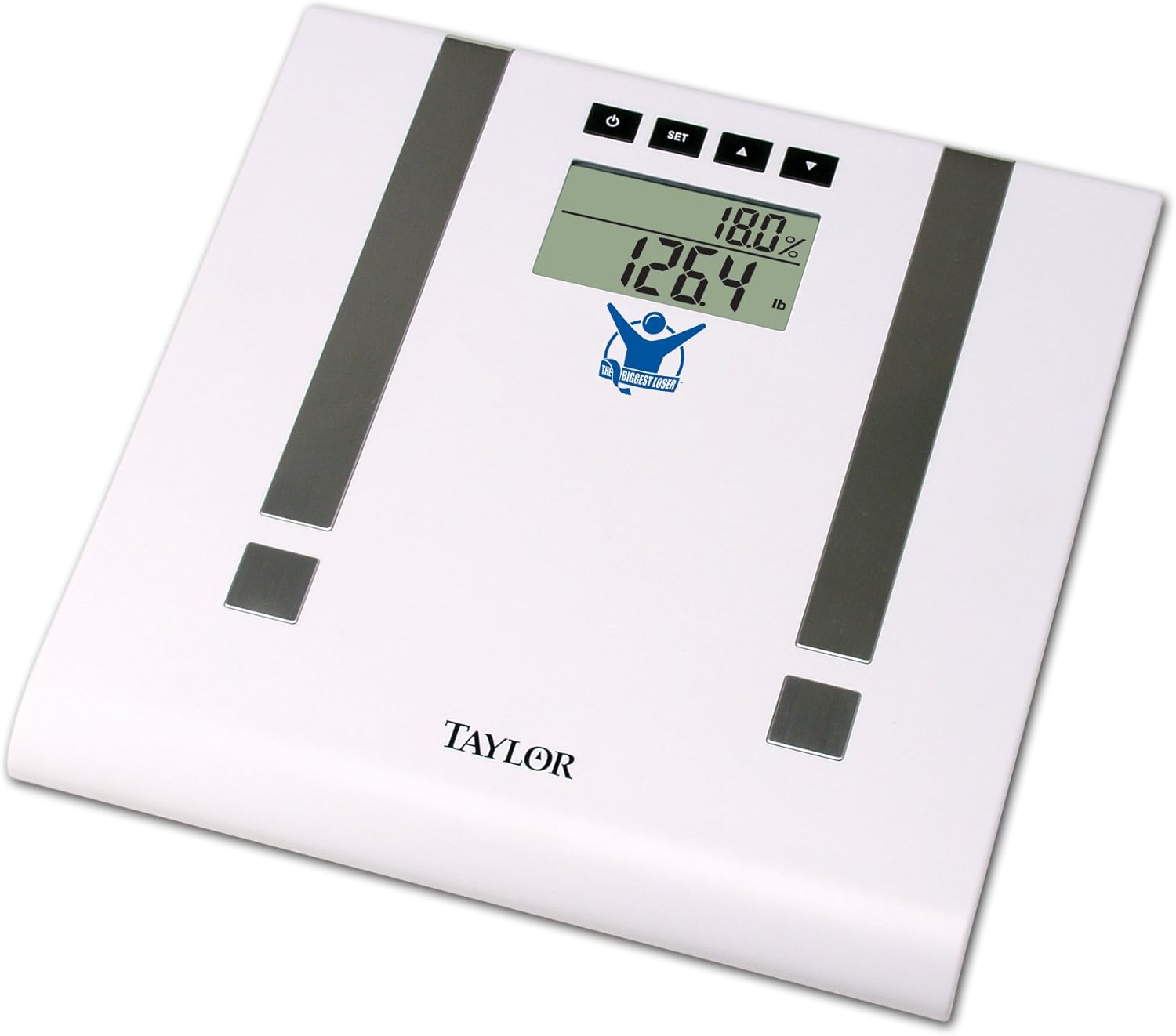
Image Description: This image displays the Taylor Biggest Loser 5768BL Body Fat Monitor Scale. The scale is white with two gray metallic electrode strips running vertically. The digital display shows '18.0%' for body fat percentage and '126.4 lb' for weight. Below the display is the 'The Biggest Loser' logo, and at the bottom center, the 'TAYLOR' brand name is visible. There are four buttons above the display: a power button, a SET button, and up and down arrow buttons.
Safety Information
- Do not use if you have a pacemaker or other internal medical device.
- Consult your physician before beginning any weight loss or exercise program.
- The scale is not intended for use by pregnant women.
- Always place the scale on a hard, flat surface for accurate readings. Avoid carpets or uneven flooring.
- Do not immerse the scale in water or use abrasive cleaners.
- Keep out of reach of children.
Setup
1. Battery Installation
- Locate the battery compartment on the underside of the scale.
- Open the battery compartment cover.
- Insert the required batteries (typically AAA or AA, refer to the compartment label) ensuring correct polarity (+/-).
- Close the battery compartment cover securely.
2. Initial Placement
Place the scale on a firm, flat, and level surface. Avoid soft surfaces like carpets, which can affect accuracy. Ensure the scale is stable before use.
Operating Instructions
1. Basic Weight Measurement (Scale Only Mode)
- Gently tap the scale with your foot to activate it. The display will show "0.0".
- Step onto the scale with bare feet, standing still and centered.
- Your weight will be displayed. The scale will automatically turn off after a few seconds.
- To switch between pounds (lb) and kilograms (kg), locate the unit switch on the underside of the scale.
2. Setting Up User Profiles (12 Memories)
The scale can store data for up to 12 users. Follow these steps to set up a profile:
- Press the SET button to enter user setup mode. The user number will flash.
- Use the UP or DOWN arrow buttons to select a user number (P1-P12). Press SET to confirm.
- The gender icon will flash. Use the arrow buttons to select male or female. Press SET to confirm.
- The height will flash. Use the arrow buttons to adjust your height. Press SET to confirm.
- The age will flash. Use the arrow buttons to adjust your age. Press SET to confirm.
- The scale will display "0.0" and is ready for measurement.
3. Body Composition Measurement
To measure body fat, body water, muscle mass, and bone mass:
- Select your user profile by pressing the UP or DOWN arrow buttons until your user number appears.
- Wait for the display to show "0.0".
- Step onto the scale with bare feet, ensuring your feet are positioned on the metallic electrode strips. Stand still.
- The scale will first display your weight, then cycle through body fat percentage, body water percentage, muscle mass, bone mass, and estimated daily caloric intake.
- The readings will flash several times before the scale turns off.
Understanding Your Measurements
The Taylor 5768BL scale uses Bioelectrical Impedance Analysis (BIA) to estimate body composition. These measurements are estimates and should be used as a guide for tracking progress over time.
- Body Fat Percentage: The proportion of fat to total body weight.
- Body Water Percentage: The proportion of water to total body weight. Hydration levels can affect this reading.
- Muscle Mass: The total weight of muscle in your body.
- Bone Mass: The total weight of bone in your body.
- Daily Caloric Intake: An estimated number of calories needed to maintain your current weight, based on your profile data. This is a guideline for dietary planning.
Maintenance and Care
- Clean the scale with a damp cloth and mild detergent. Do not use abrasive cleaners or immerse in water.
- Store the scale in a dry place at room temperature.
- If the scale will not be used for an extended period, remove the batteries to prevent leakage.
- Avoid dropping the scale or subjecting it to strong impacts.
Troubleshooting
| Problem | Solution |
|---|---|
| "Lo" displayed | Low battery. Replace batteries immediately. |
| "Err" displayed | Overload or measurement error. Step off the scale, wait for it to reset, and try again. Ensure weight does not exceed 400 lbs (180 kg). |
| Inconsistent readings | Ensure the scale is on a hard, flat, level surface. Avoid moving the scale between measurements. Ensure bare feet are making good contact with electrodes for body composition. |
| No display | Check battery installation and ensure batteries are not depleted. |
Specifications
- Model: 5768BL
- Brand: Taylor
- Capacity: Up to 400 lbs (180 kg) in scale-only mode
- Measurement Increments: 0.1% for body fat/water, 0.1 lb/kg for weight
- Display: 2-inch dual line readout
- User Memories: 12
- Functions: Body Weight, Body Fat, Body Water, Muscle Mass, Bone Mass, Daily Calorie Intake
- Power: (Battery type not specified, assuming common scale batteries)
- Product Dimensions: 4.45 x 31.75 x 31.5 cm; 1.59 kg
Warranty and Support
For warranty information or technical support, please refer to the documentation included with your purchase or visit the official Taylor Scales website. Contact information for customer service can typically be found on the manufacturer's website or product packaging.


