
Heil Sound PR28
Heil Sound PR28 Dynamic Microphone User Manual
Model: PR28
Introduction
This user manual provides comprehensive instructions for the setup, operation, and maintenance of your Heil Sound PR28 Dynamic Microphone. Please read this manual thoroughly before using the product to ensure optimal performance and longevity.
The Heil Sound PR28 is a small form-factor dynamic microphone designed to accurately capture the nuances of drums and toms. Its dual suspension element reinforces the natural frequency spectrum while minimizing unwanted noise and vibration.
Key Features
- Output Connection: 3 pin XLR
- Element Type: Dynamic
- Frequency Response: 55 Hz – 18 kHz
- Polar Pattern: Cardioid
- Rear Rejection @ 180 degrees off axis: -35 dB
- Impedance: 600 ohms balanced
- Output Level: -51 dB @ 1 kHz
- Weight: 9.6 oz
- Max SPL: 142 dB
Package Contents
Upon unboxing your Heil Sound PR28 Dynamic Microphone, please ensure all the following items are present:
- Heil Sound PR28 Microphone
- Carrying Case
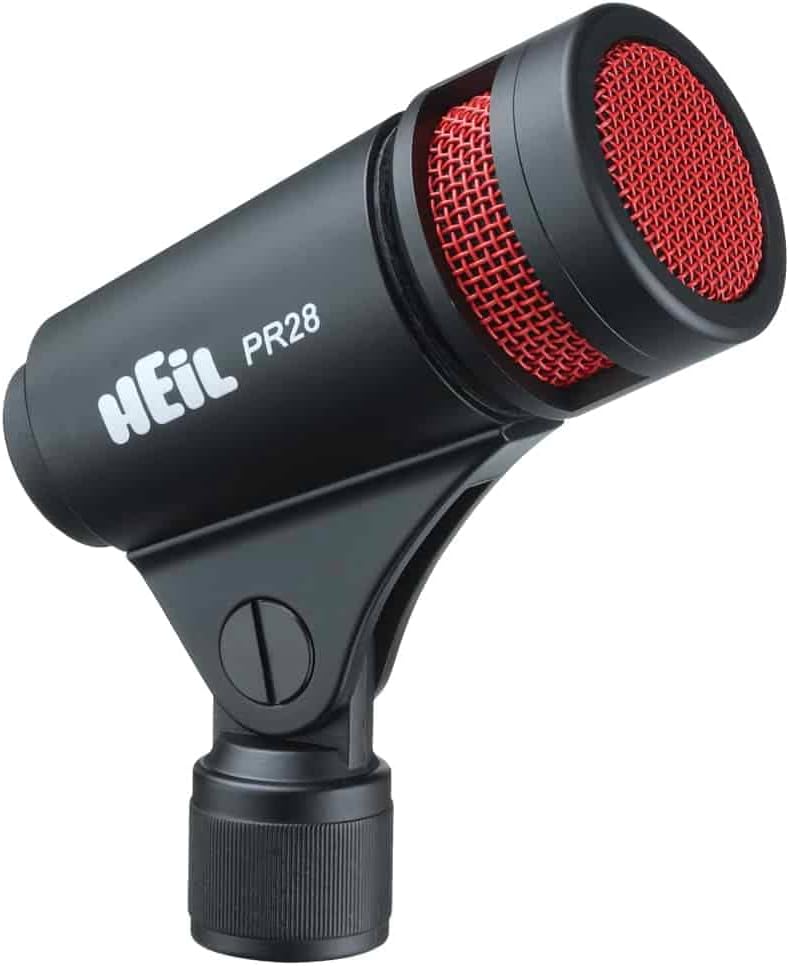
Image: The Heil Sound PR28 Dynamic Microphone, typically supplied with a protective carrying case for transport and storage.
Setup Guide
1. Connecting the Microphone
The PR28 features a 3-pin XLR output connection. To connect the microphone:
- Ensure your audio interface, mixer, or amplifier is powered off.
- Connect one end of a standard 3-pin XLR cable (not included) to the XLR output on the base of the PR28 microphone.
- Connect the other end of the XLR cable to an available microphone input on your audio device.
- Secure the microphone to a suitable microphone stand or drum mount using its integrated stand adapter.

Image: The Heil Sound PR28 microphone shown mounted on a drum, illustrating the typical setup with an XLR cable connected to its base.
2. Positioning for Optimal Sound
The PR28 is designed for close-miking applications, particularly for drums and percussion. Its cardioid polar pattern provides excellent off-axis rejection, minimizing bleed from other instruments.
- For toms: Position the microphone 1-3 inches from the drum head, aiming towards the center for more attack or towards the rim for more resonance.
- For snare drums: Angle the microphone to capture both the drum head and the snare wires, typically positioned above the rim.
- Experiment with placement to achieve the desired tonal characteristics.

Image: A polar pattern diagram illustrating the cardioid pickup pattern of the Heil Sound PR28, showing its sensitivity to sounds from the front and rejection from the rear.
Operating Instructions
Gain Staging
Once the microphone is connected and positioned, power on your audio device. Adjust the input gain (preamp gain) on your mixer or interface. Start with the gain low and gradually increase it until you achieve a strong signal level without clipping (distortion). The PR28 has a high maximum SPL (142 dB), making it suitable for loud sound sources like drums.
Frequency Response Characteristics
The PR28 offers a frequency response from 55 Hz to 18 kHz. This range is optimized for capturing the full body and attack of drums. While the microphone is designed to sound excellent flat, minor EQ adjustments on your mixer or DAW can further tailor the sound to your preference or the specific instrument.

Image: A frequency response chart for the Heil Sound PR28, showing its sensitivity across different frequencies at 0 and 180 degrees off-axis.
Maintenance and Care
- Cleaning: Use a soft, dry cloth to wipe down the microphone body. For the grille, a soft brush can be used to remove dust or debris. Do not use liquid cleaners directly on the microphone.
- Storage: When not in use, store the PR28 in its provided carrying case to protect it from dust, moisture, and physical damage.
- Handling: Avoid dropping the microphone or subjecting it to severe impacts, as this can damage the internal components.
- Environment: Do not expose the microphone to extreme temperatures, high humidity, or direct sunlight for extended periods.
Troubleshooting
No Sound Output
- Check Connections: Ensure all XLR cables are securely connected at both the microphone and the audio device.
- Input Selection: Verify that the correct input channel is selected on your mixer or audio interface.
- Gain Level: Increase the input gain on your audio device.
- Cable Test: Try a different XLR cable to rule out a faulty cable.
- Device Power: Confirm that your audio interface or mixer is powered on.
Distorted Sound
- Reduce Gain: Lower the input gain on your audio device to prevent clipping.
- Microphone Placement: If the sound source is extremely loud, try increasing the distance between the microphone and the source slightly.
- Check Cables: A damaged cable can sometimes cause distortion.
Excessive Background Noise / Bleed
- Microphone Placement: Ensure the microphone is positioned to utilize its cardioid pattern, pointing directly at the desired sound source and away from unwanted noise.
- Room Acoustics: Consider acoustic treatment for your recording space if background noise is a persistent issue.
- Gain Staging: Ensure your gain is set appropriately; too much gain can amplify ambient noise.
Technical Specifications
| Specification | Value |
|---|---|
| Output Connection | 3 pin XLR |
| Element Type | Dynamic |
| Frequency Response | 55 Hz – 18 kHz |
| Polar Pattern | Cardioid (Unidirectional) |
| Rear Rejection @ 180 degrees off axis | -35 dB |
| Impedance | 600 ohms balanced |
| Output Level | -51 dB @ 1 kHz |
| Weight | 9.6 oz (272 g) |
| Max SPL | 142 dB |
| Dimensions (L x W x H) | 6.75 x 4.5 x 4.5 inches |
| Material | Metal |
| Color | Black |
Warranty and Support
Heil Sound products are manufactured to the highest standards. For information regarding warranty coverage, technical support, or service, please visit the official Heil Sound website or contact their customer service department.
Related documentsPR28


Ask a question about this manual
Ask about setup, troubleshooting, compatibility, parts, safety, or missing instructions. Manuals+ will review the question and use this page’s manual context to help answer it.