
Introduction
This manual provides essential instructions for the safe and effective use of your Cameron Sino replacement battery. This battery is designed for compatibility with various Sony MDR-RF series wireless headphones, including models such as MDR-RF860, MDR-RF4000, MDR-RF970, MDR-RF970RK, and MDR-RF925. Please read this manual thoroughly before installation and use.
Safety Information
- Do not attempt to disassemble, open, or service the battery pack.
- Replace only with the battery pack designated for this product.
- Do not crush, puncture, short external contacts, or dispose of in fire or water.
- Do not store above 60°C (140°F).
- Keep out of reach of children.
Package Contents
- 1 x Cameron Sino Replacement Ni-MH Battery (Model: FBA_4894128037163)
Setup and Installation
Follow these steps to properly install the replacement battery into your compatible Sony MDR-RF series wireless headphones.
- Identify Battery Compartment: Locate the battery compartment on your Sony wireless headphones. This is typically found on one of the earcups. Consult your original headphone manual if you are unsure.
- Remove Old Battery: Carefully open the battery compartment cover. Remove the old battery, noting its orientation.
- Insert New Battery: Insert the Cameron Sino replacement battery into the compartment, ensuring the polarity (+ and - terminals) matches the markings inside the compartment. The battery is designed to fit in one specific direction.
- Close Compartment: Securely close the battery compartment cover.
- Initial Charge: Place your headphones on their charging base or connect them to their charger. Allow the battery to charge fully before first use. This may take several hours.
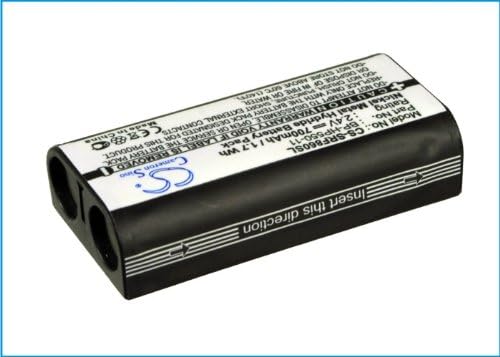
Image: Cameron Sino Replacement Battery. This image shows the general appearance of the battery, which is designed to fit specific Sony MDR-RF series headphones.
Operating Instructions
Once installed, the battery operates in conjunction with your headphone's charging system.
- Charging: Always use the original charging base or adapter provided with your Sony headphones to charge the battery. Ensure the headphones are correctly placed on the charging base or connected to the charger.
- Full Charge: For optimal performance, allow the battery to reach a full charge before disconnecting from the charger.
- Discharge: The battery is designed for regular use. It is generally recommended to allow the battery to discharge significantly before recharging to maintain its capacity over time, though Ni-MH batteries are less prone to memory effect than older battery types.

Image: Side view of the Cameron Sino Replacement Battery. This angle highlights the compact design and connection points.
Maintenance
Proper maintenance can extend the lifespan of your replacement battery.
- Regular Charging: Charge the battery regularly, even if the headphones are not in frequent use, to prevent deep discharge.
- Storage: If storing the battery or headphones for an extended period, ensure the battery is partially charged (around 50%) and stored in a cool, dry place. Avoid extreme temperatures.
- Cleaning: Keep the battery contacts and headphone charging terminals clean and free of dust or debris. Use a dry, soft cloth for cleaning.
- Disposal: Do not dispose of the battery in household waste. Follow local regulations for proper disposal of rechargeable batteries. Many electronics retailers and recycling centers accept used batteries.
Troubleshooting
If you encounter issues with your replacement battery, consider the following:
- Battery Not Charging:
- Ensure the headphones are correctly seated on the charging base or the charging cable is securely connected.
- Verify that the charging base or adapter is receiving power.
- Check for any debris or corrosion on the charging contacts of both the headphones and the charger.
- Shortened Battery Life:
- Ensure the battery is fully charged before use.
- Over time, all rechargeable batteries experience a decrease in capacity. If the battery life is significantly shorter than expected after prolonged use, it may be nearing the end of its lifespan.
- Extreme temperatures can affect battery performance.
- Headphones Not Powering On:
- Confirm the battery is correctly installed and fully charged.
- If the issue persists, the problem might be with the headphones themselves rather than the battery.
Specifications
| Model Number | FBA_4894128037163 (CS-SRF860SL) |
| Part Number | BP-HP550-11 |
| Battery Type | Ni-MH (Nickel Metal Hydride) |
| Voltage | 2.4V |
| Capacity | 700mAh (1.7 Wh) |
| Dimensions | 1.7 x 1.41 x 0.26 inches (approx.) |
| Weight | 0.05 Pounds (approx.) |
| Certifications | ISO9001, CE, RoHS |

Image: Close-up of the Cameron Sino Replacement Battery label. This shows the model number, part number, rating, and important safety warnings.
Warranty Information
This Cameron Sino replacement battery comes with a 12-month warranty from the date of purchase. This warranty covers manufacturing defects. It does not cover damage caused by misuse, accident, unauthorized modification, or normal wear and tear. Please retain your proof of purchase for warranty claims.
Support
For further assistance or inquiries regarding your Cameron Sino replacement battery, please refer to the retailer where the product was purchased or visit the official Cameron Sino website for contact information.
Online Resources: Cameron Sino Store on Amazon
