
1. Introduction
The Aiphone LEF-5 is a surface mount selective call open voice master station designed to facilitate communication within a system of up to 6 intercom stations. This manual provides essential information for the proper installation, operation, and maintenance of your LEF-5 system, ensuring reliable performance and longevity.
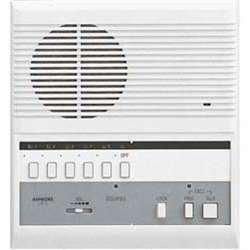
Image showing the front view of the Aiphone LEF-5 master station, a white surface-mount unit with control buttons and a speaker/microphone.
2. Setup and Installation
The LEF-5 master station is designed for surface mounting. Proper installation is crucial for optimal performance. The system operates on corded electric power and utilizes wired connectivity for reliable communication between the master station and up to 5 additional intercom stations.
2.1 Components Included
- LEF-5 Master Station
- Necessary mounting hardware (check product packaging)
- Installation manual with wiring diagrams (refer to physical documentation)
2.2 Installation Steps (General)
- Mounting: Securely mount the LEF-5 master station to a suitable surface using the provided hardware. Ensure the mounting location allows for easy access and clear audio transmission.
- Wiring: Connect the power supply and communication lines to the master station and all connected intercom stations. Refer to the detailed wiring diagrams in the separate installation guide for precise connections. Ensure all connections are secure and correctly polarized.
- Power Connection: Connect the corded electric power source to the master station.
- System Test: After installation, perform a system test to ensure all stations can communicate effectively.
3. Operating Instructions
The Aiphone LEF-5 system features selective call and open voice communication, allowing for efficient and clear interaction.
3.1 Making a Call
- Select Station: Press the button corresponding to the desired intercom station you wish to call.
- Speak: Speak clearly into the master station's microphone. The system operates in an open voice style, meaning communication is hands-free once the connection is established.
3.2 Receiving a Call
When an intercom station calls the master station, an audible alert will sound. To respond, simply speak into the master station. The open voice feature allows for immediate, hands-free communication.
3.3 Volume Adjustment
Adjust the volume using the dedicated volume controls on the master station to ensure comfortable listening and clear speaking levels.
4. Maintenance
Proper maintenance ensures the longevity and optimal performance of your LEF-5 intercom system.
- Cleaning: Regularly clean the exterior surfaces of the master station and intercom stations with a soft, dry, lint-free cloth. Do not use abrasive cleaners, solvents, or chemical sprays, as these can damage the finish and internal components.
- Connections: Periodically check all wiring connections to ensure they remain secure and free from corrosion.
- Servicing: The LEF-5 contains no user-serviceable parts. For any repairs or internal maintenance, contact a qualified Aiphone service technician.
5. Troubleshooting
This section addresses common issues you might encounter with your Aiphone LEF-5 system.
| Problem | Possible Cause | Solution |
|---|---|---|
| No power to master station | Power cord disconnected; outlet malfunction | Check power cord connection; test outlet with another device. |
| No communication with intercom station | Loose or incorrect wiring; faulty station | Verify all wiring connections according to the installation manual. Test individual stations if possible. |
| Poor audio quality (static, low volume) | Volume too low; microphone/speaker obstructed; wiring issue | Adjust volume settings. Ensure microphone and speaker are clear. Recheck wiring connections. |
| Intermittent communication | Loose wiring connection; interference | Inspect all wiring for loose connections. Ensure proper cable routing away from sources of electrical interference. |
If troubleshooting steps do not resolve the issue, contact Aiphone customer support or a qualified service technician.
6. Specifications
| Feature | Detail |
|---|---|
| Brand | Aiphone |
| Model | LEF-5 |
| Installation Type | Surface Mount |
| Connectivity Technology | Wired |
| Power Source | Corded Electric |
| Compatible Devices | Up to 6 Intercom Stations (1 Master, 5 Subs) |
| Control Method | Voice |
| Item Weight | 0.01 Ounces |
| Included Components | Master station, 5 intercom stations |
| Color | White |
| UPC / GTIN | 696969385014, 089565193143 |
7. Warranty and Support
For detailed warranty information, please refer to the warranty card or documentation included with your Aiphone LEF-5 product. Warranty terms and conditions may vary by region and purchase date.
For technical support, service inquiries, or to purchase replacement parts, please visit the official Aiphone website or contact their customer service department directly. Contact information is typically provided in the product packaging or on the manufacturer's website.