
1. Introduction
Thank you for purchasing the MOBICOOL T07DC Portable Hot/Cold Box. This device is a versatile 7-liter capacity unit designed to keep items cool or warm, suitable for various applications such as picnics, drives, and general storage. It operates using a 12V DC power supply, typically from a vehicle's cigarette lighter socket. An optional AC/DC adapter allows for use with a 100V AC household power supply.
Please read this manual thoroughly before using the product to ensure safe and optimal performance. Keep this manual for future reference.
2. Safety Instructions
- Power Source: Only connect the unit to a 12V DC power source (car cigarette lighter socket) when the vehicle engine is running. Using it with the engine off may drain the car battery. If using an optional AC/DC adapter, ensure it is compatible with 100V AC household power.
- Ventilation: Ensure adequate ventilation around the unit. Do not block the ventilation openings.
- Liquid Contact: Do not immerse the unit in water or expose it to excessive moisture. Clean with a damp cloth only.
- Flammable Materials: Do not store flammable materials or explosives inside the unit.
- Children: Keep out of reach of children.
- Damage: Do not operate the unit if the power cable or the unit itself is damaged. Contact customer support for assistance.
- Disassembly: Do not attempt to disassemble or repair the unit yourself. This may void the warranty and pose a safety risk.
- Temperature Extremes: Avoid placing the unit in direct sunlight or extremely hot environments, as this can affect its performance and lifespan.
3. Package Contents
Please check that all items are present in the package:
- MOBICOOL T07DC Portable Hot/Cold Box
- 12V DC Cigarette Lighter Power Cable
- User Manual (Japanese instruction manual included)
Note: Optional AC/DC adapter (MPA-5012) is sold separately and is not included in the standard package.
4. Setup
- Placement: Place the hot/cold box on a stable, flat surface in your vehicle or desired location. Ensure there is enough space around the ventilation grilles for proper airflow.
- Power Connection (Vehicle):
- Ensure your vehicle's engine is running.
- Insert the 12V DC cigarette lighter plug firmly into your vehicle's cigarette lighter socket.
- Power Connection (Household - Optional):
- If using the optional AC/DC adapter (MPA-5012, sold separately), connect the adapter to a standard 100V AC household outlet.
- Connect the 12V DC output of the adapter to the power input of the hot/cold box.
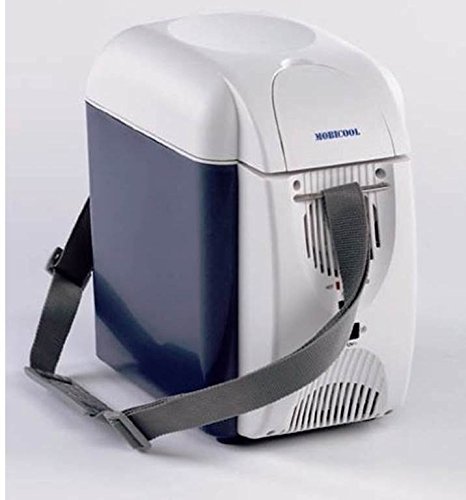
Image 1: The MOBICOOL T07DC Portable Hot/Cold Box, showing its compact design and the 12V DC power cable for vehicle use.
5. Operating Instructions
The MOBICOOL T07DC offers both cooling and warming functions. A switch on the unit controls the operating mode.
- Power On: Once connected to a power source, locate the power switch on the unit.
- Select Mode:
- To cool items, set the switch to the "COOL" position. The internal temperature will decrease relative to the ambient temperature.
- To warm items, set the switch to the "HEAT" position. The internal temperature will increase to keep items warm.
- Loading Items:
- For best cooling results, pre-chill items before placing them in the unit.
- For best warming results, pre-heat items before placing them in the unit.
- Do not overload the unit. Ensure the lid closes properly.
- Power Off: To turn off the unit, set the switch to the "OFF" position and disconnect the power cable from the source.

Image 2: Interior view of the MOBICOOL T07DC, demonstrating its 7-liter capacity suitable for drinks and small food items.
6. Maintenance
- Cleaning:
- Always disconnect the power before cleaning.
- Wipe the interior and exterior surfaces with a damp cloth and mild detergent.
- Do not use abrasive cleaners or solvents.
- Ensure the unit is completely dry before reconnecting power.
- Storage:
- When not in use for extended periods, clean the unit and store it in a dry, well-ventilated area.
- Keep the lid slightly ajar to prevent odors and mildew.
- Ventilation Grilles: Regularly check and clean the ventilation grilles to ensure they are free from dust and debris, which can impede performance.
7. Troubleshooting
| Problem | Possible Cause | Solution |
|---|---|---|
| Unit does not power on. |
|
|
| Unit is not cooling/warming effectively. |
|
|
| Unusual noise from the fan. |
|
|
8. Specifications
| Feature | Detail |
|---|---|
| Brand | MOBICOOL |
| Model | T07DC |
| Capacity | 7 Liters |
| Power Input | 12V DC (via car cigarette lighter socket) |
| Optional Power Input | 100V AC (with optional AC/DC adapter MPA-5012) |
| Functions | Cooling, Warming |
| Color | Blue, Mixed Color |
| Chamber Depth | 25 Centimeters |
| Special Features | Portable design |
9. Official Product Videos
No official product videos from the seller are available for embedding at this time.
10. Warranty and Support
For warranty information and customer support, please refer to the documentation included with your purchase or visit the official MOBICOOL website. Keep your proof of purchase for warranty claims.
Note: Specific warranty terms and support contact details may vary by region.