
1. Introduction
This manual provides instructions for the Redi-Remote replacement remote control, designed specifically for use with Sylvania television models LD155SC8, NF603UD, and LD200SL9. This remote is a custom-built replacement and is not an original Sylvania product. It is engineered to perform all essential functions of the original remote for the specified Sylvania units without requiring any programming.
Please read this manual thoroughly before operating your new remote control to ensure proper functionality and to familiarize yourself with its features.
2. Safety Information
- Do not mix old and new batteries.
- Do not mix alkaline, standard (carbon-zinc), or rechargeable (nickel-cadmium) batteries.
- Always remove exhausted batteries promptly to prevent leakage and damage to the remote.
- Dispose of batteries according to local regulations.
- Keep the remote control away from moisture, direct sunlight, and extreme temperatures.
- Avoid dropping the remote or subjecting it to strong impacts.
3. Package Contents
Your Redi-Remote replacement remote control package should contain the following items:
- 1 x Redi-Remote Replacement Remote Control (Model RTNF603UD)
- 4 x AAA Batteries
4. Setup: Battery Installation
To begin using your remote control, you must first install the included AAA batteries.
- Locate the battery compartment cover on the back of the remote control.
- Slide the cover downwards or press the latch and lift to open the compartment.
- Insert four (4) AAA batteries, ensuring that the positive (+) and negative (-) terminals align correctly with the markings inside the compartment.
- Replace the battery compartment cover by sliding it back into place until it clicks securely.
The remote is now ready for use. No programming is required.
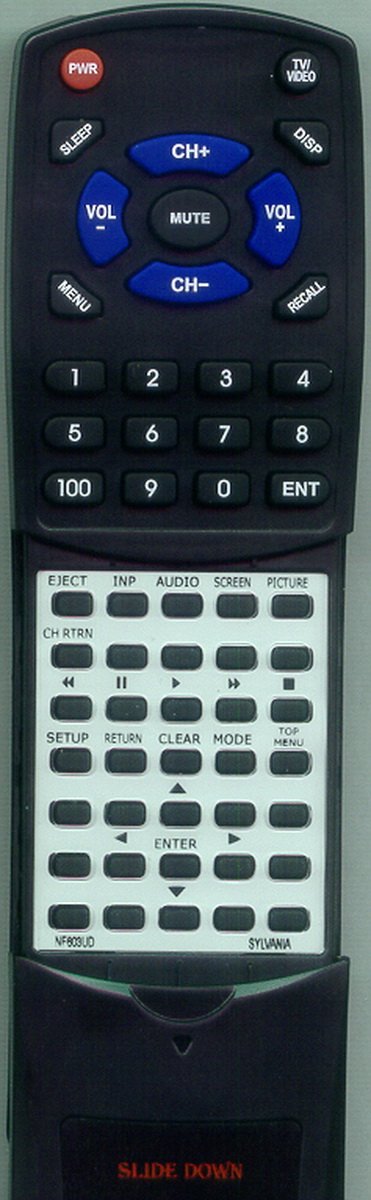
Image 1: Redi-Remote Replacement Remote Control. This image displays the front view of the remote control, highlighting its button layout and overall design.
5. Operating Instructions
This Redi-Remote is designed to replicate the functions of your original Sylvania remote. Simply point the remote at your Sylvania television and press the desired button.
Basic Functions:
- POWER: Turns the television on or off.
- VOLUME +/-: Adjusts the volume level.
- CHANNEL +/-: Changes the television channel.
- MUTE: Silences the television audio.
- INPUT/SOURCE: Cycles through available input sources (e.g., HDMI, AV).
- NUMBER PAD (0-9): Directly enters channel numbers.
Accessing Lower Buttons:
The remote features a sliding cover over the lower half of the remote. To access additional functions such as menu navigation, playback controls, or specific feature buttons, gently slide this cover downwards. Once revealed, these buttons will provide access to the full range of functions supported by your Sylvania unit.
For detailed information on specific advanced functions or menu navigation, please refer to your original Sylvania television user manual.
6. Maintenance
- Cleaning: Use a soft, dry cloth to clean the remote control. Do not use liquid cleaners or abrasive materials.
- Battery Replacement: Replace all four AAA batteries when the remote's performance degrades or stops working. Always replace all batteries at the same time with new ones.
- Storage: If the remote will not be used for an extended period, remove the batteries to prevent potential leakage.
7. Troubleshooting
| Problem | Possible Cause | Solution |
|---|---|---|
| Remote not responding. | Dead or incorrectly installed batteries. | Replace batteries with new ones, ensuring correct polarity (+/-). |
| Remote has short range or intermittent response. | Weak batteries; obstruction between remote and TV; remote sensor on TV is blocked. | Replace batteries. Ensure a clear line of sight to the TV's IR sensor. Remove any obstructions. |
| Certain buttons do not work. | Buttons are under the sliding cover; remote is not compatible with a specific function. | Slide down the cover to reveal all buttons. This remote is designed for the specified Sylvania models; some advanced functions not present on the original remote may not be supported. |
| Remote does not control auxiliary devices. | Redi-Remotes are not designed for auxiliary device control. | This remote is specifically for the Sylvania TV models listed. It cannot be programmed to control other devices. |
8. Specifications
- Model Number: RTNF603UD
- Compatible Sylvania Models: LD155SC8, NF603UD, LD200SL9
- Dimensions: 7 x 2.5 x 1 inches (approximately 17.8 x 6.35 x 2.54 cm)
- Item Weight: 4.5 ounces (approximately 127.57 grams)
- Batteries Required: 4 x AAA (included)
- Connectivity Technology: Infrared (IR)
- Special Feature: No Programming Required
- Max Number of Supported Devices: 1 (Television)
9. Warranty and Support
Redi-Remote products are designed for reliability and performance. For any concerns with the remote after purchase, please contact the manufacturer or seller directly for assistance.
Please retain your proof of purchase for any warranty claims or support inquiries.