
1. Product Overview
The DEWALT DW2166 45-Piece Screwdriver Bit Set is designed for various screwdriving applications, offering durability and organization. This set features a range of commonly used screwdriver accessories housed within the innovative ToughCase+ system, which optimizes storage space and keeps bits organized and secure.
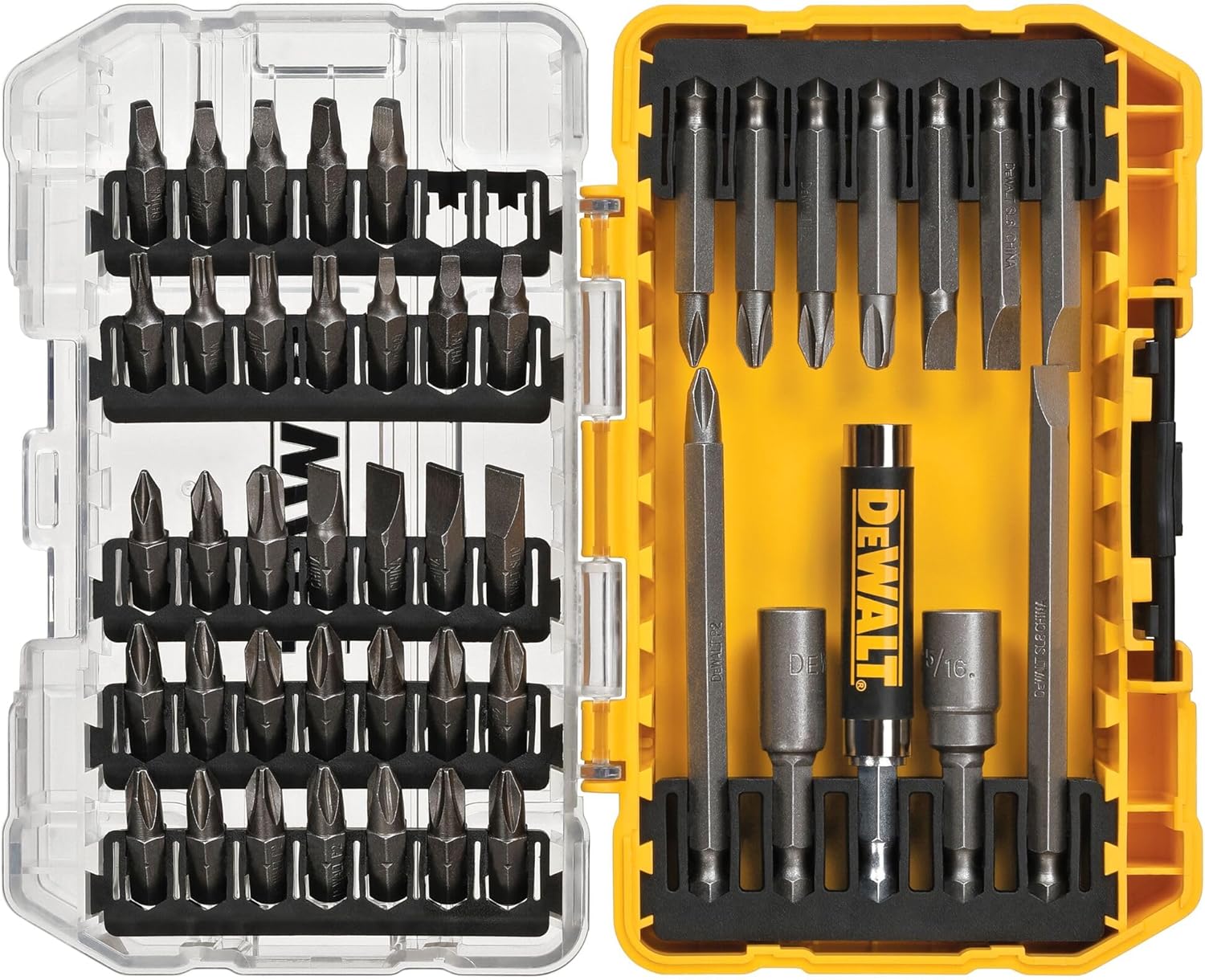
Figure 1: DEWALT DW2166 45-Piece Screwdriver Bit Set in its ToughCase+.
2. What's Included
The DW2166 set includes 45 pieces, comprising various screwdriver bits, nut drivers, and a magnetic drive guide, all contained within a ToughCase+.
- Screwdriving Bits: A comprehensive selection of Phillips, Square, Slotted, and Double-ended bits in various lengths (1", 2", 3.5").
- Nut Drivers: Includes 1/4" and 5/16" nut drivers, both featuring magnetic retention.
- Magnetic Drive Guide: A specialized bit holder designed to reduce wobble and securely hold screws during driving.
- ToughCase+ System: A durable, clear-lidded case with customizable bit-bar design for organized storage.

Figure 2: Detailed breakdown of bit types and quantities in the DW2166 set.
3. Setup and Organization
The ToughCase+ system is designed for optimal organization and customization.
- Opening the Case: Locate the clip latch on the side of the case and open it to reveal the bits. The clear lid allows for quick identification of contents.
- Customizable Bit-Bar Design: The patented bit-bar design allows for easy removal and customizable placement of bits. You can rearrange the bit rails to suit your specific needs for a task.
- Connectable System: The ToughCase+ is part of a connectable accessory storage system. Small Bulk Storage cases (like the DW2166) fit inside Small and Medium ToughCase+ units (sold separately), allowing you to stack and lock multiple cases together for a consolidated and organized tool setup.

Figure 3: The DW2166 ToughCase+ opened, displaying the organized bit layout.

Figure 4: Illustration of the connectable ToughCase+ system for expanded storage.
4. Operating Instructions
This bit set is compatible with most drills and hand tools that accept hex shank bits.
- Selecting a Bit: Choose the appropriate bit type (Phillips, Slotted, Square, etc.) and size for your fastener.
- Inserting a Bit: Insert the hex shank of the chosen bit into your drill chuck or screwdriver handle. Ensure it is securely fastened.
- Using the Magnetic Drive Guide: For enhanced stability and reduced wobble, especially with longer screws, utilize the included magnetic drive guide.
- Insert the desired bit into the magnetic drive guide.
- Place the screw onto the bit, allowing the magnetic guide to hold it in place.
- Proceed with driving the screw, benefiting from improved control and reduced cam-out.
- Nut Drivers: The 1/4" and 5/16" nut drivers are magnetic, providing a secure grip on nuts and bolts during fastening or loosening.

Figure 5: The magnetic drive guide in use, demonstrating its ability to hold a bit securely.
5. Maintenance
Proper maintenance ensures the longevity and performance of your DEWALT screwdriver bits.
- Cleaning: After each use, wipe down bits to remove any debris, dust, or residue. A dry cloth is usually sufficient.
- Storage: Always store bits in their ToughCase+ to prevent loss, corrosion, and damage. The case protects the bits from environmental elements and impacts.
- Inspection: Regularly inspect bits for signs of wear, such as rounding of tips, cracks, or excessive corrosion. Worn bits can damage fasteners and reduce efficiency. Replace damaged or excessively worn bits promptly.
- Lubrication: While not typically required for screwdriver bits, ensure that the magnetic drive guide mechanism remains clean and free of obstructions for smooth operation.

Figure 6: The DW2166 ToughCase+ closed, ready for secure storage.
6. Troubleshooting
Addressing common issues with screwdriver bits.
| Issue | Possible Cause | Solution |
|---|---|---|
| Bit slips or "cams out" from fastener head | Incorrect bit size/type, worn bit, insufficient pressure, excessive speed. | Ensure correct bit for fastener. Replace worn bits. Apply firm, consistent pressure. Use appropriate tool speed. Utilize magnetic drive guide. |
| Bit breaks or chips easily | Excessive torque, improper angle, manufacturing defect, using non-impact rated bits in impact driver. | Use appropriate torque settings. Maintain straight alignment. Ensure bits are impact-rated for impact drivers. Contact support if defect is suspected. |
| Difficulty removing bits from holder/chuck | Debris in chuck, bit stuck due to heat/pressure. | Clean chuck regularly. Allow bit to cool. Use pliers if necessary, taking care not to damage the bit or chuck. |
7. Specifications
- Brand: DEWALT
- Model Number: DW2166
- Number of Pieces: 45
- Material: High Speed Steel
- Finish Type: Painted
- Drive System: Assorted Set
- Drive Bit Shank Style: Hex Shank
- Bit Compatibilities: Drill, Hand Tool
- Item Weight: 1.28 Pounds
- UPC: 028877528144
8. Warranty and Support
For warranty information, product support, or to inquire about replacement parts, please refer to the official DEWALT website or contact DEWALT customer service directly. Keep your purchase receipt as proof of purchase.
Visit the DEWALT Store for more products and information.