
DEWALT DS306
DeWalt DS306 6' Replacement Cable for DS300 User Manual
Model: DS306
1. Product Overview
The DeWalt DS306 is a 6-foot replacement cable specifically designed for use with the DeWalt DS300 SITELOCK system. This cable ensures reliable connectivity and performance for your equipment.
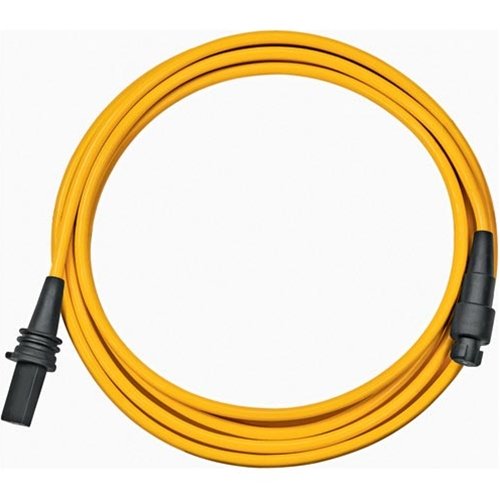
Image: The DeWalt DS306 6-foot replacement cable, shown coiled. It features a durable yellow outer jacket and robust black connectors at both ends, designed for secure and reliable attachment to compatible DeWalt DS300 SITELOCK units.
2. Setup Instructions
Follow these steps to properly connect your DeWalt DS306 replacement cable:
- Identify Compatible Ports: Locate the cable input and output ports on your DeWalt DS300 SITELOCK unit and the device you wish to connect. Ensure they are clean and free of debris.
- Connect First End: Insert one end of the DS306 cable firmly into the designated port on your DeWalt DS300 SITELOCK unit. Ensure the connection is secure and fully seated.
- Connect Second End: Insert the other end of the DS306 cable firmly into the corresponding port on the peripheral device or another DS300 unit. Verify a secure connection.
- Test Connection: After connecting, perform a functional test to ensure proper operation of the connected devices.
Note: Always ensure power is off to devices before connecting or disconnecting cables to prevent electrical damage.
3. Operating Guidelines
The DeWalt DS306 cable is a passive component designed for data and/or power transmission within the DeWalt SITELOCK system. Its operation is dependent on the devices it connects.
- Cable Routing: Route the cable in a manner that avoids sharp bends, pinching, or exposure to excessive heat or chemicals.
- Environmental Conditions: While durable, avoid prolonged exposure to extreme temperatures, direct sunlight, or moisture unless the connected devices are rated for such conditions.
- Secure Connections: Periodically check that both ends of the cable remain securely connected to prevent intermittent signal loss or power interruptions.
4. Maintenance
Proper maintenance extends the life of your DS306 cable:
- Cleaning: Use a soft, dry cloth to wipe down the cable and connectors. Do not use abrasive cleaners or solvents.
- Storage: When not in use, coil the cable loosely and store it in a cool, dry place away from direct sunlight and heavy objects that could crush it. Avoid tight coiling or kinking.
- Inspection: Regularly inspect the cable for any signs of wear, cuts, fraying, or damage to the connectors. Discontinue use if damage is observed.
5. Troubleshooting
If you experience issues with your DeWalt DS306 cable, consider the following:
| Problem | Possible Cause | Solution |
|---|---|---|
| No connection/signal | Loose connection; Damaged cable; Incompatible device. | Ensure both ends are fully seated. Inspect cable for visible damage. Verify compatibility with DS300 system. |
| Intermittent connection | Partially loose connection; Minor cable damage; Environmental interference. | Reseat connections. Check for subtle kinks or wear. Ensure cable is not near strong electromagnetic fields. |
| Physical damage to cable | Abrasion, cuts, or crushing. | Discontinue use immediately. Replace with a new DeWalt DS306 cable. |
If issues persist after troubleshooting, contact DeWalt customer support.
6. Specifications
- Model: DS306
- Length: 6 feet (approximately 1.83 meters)
- Compatibility: Designed for DeWalt DS300 SITELOCK systems
- Color: Yellow
- Manufacturer: DeWALT
- ASIN: B002JUOVI6
- UPC: 028877496870
7. Warranty and Support
For information regarding warranty coverage, product registration, or technical support for your DeWalt DS306 cable, please refer to the official DeWalt website or contact their customer service department directly.
DeWalt Official Website: www.dewalt.com
Customer Service: Refer to the contact information provided on the official DeWalt website for your region.
Ask a question about this manual
Ask about setup, troubleshooting, compatibility, parts, safety, or missing instructions. Manuals+ will review the question and use this page’s manual context to help answer it.