
1. Introduction
This manual provides instructions for the MOBO Wireless Earphone Accessory Kit. This kit is designed to enhance the protection, portability, and usability of your wireless earphones, specifically compatible with Apple AirPods. Please read this manual thoroughly before using the product to ensure proper handling and longevity.
2. Product Components
The MOBO Wireless Earphone Accessory Kit includes the following items:
- Silicone Protective Case: A soft, durable silicone case designed to fit your earphone charging case, offering protection against scratches and minor impacts.
- Anti-Loss Strap: A flexible silicone strap that connects your two wireless earphones, preventing them from falling and getting lost during activities.
- Ear Hooks: Ergonomically designed silicone ear hooks that provide a more secure fit for your earphones, ideal for sports or active use.
- Compact Zippered Storage Case: A small, hard-shell case with a zipper closure for storing the silicone case, earphones, and other accessories when not in use.

Image 1: Overview of the MOBO Wireless Earphone Accessory Kit, showing the black zippered storage case, the white silicone protective case for earphones, and the white anti-loss strap with ear hooks.
3. Setup and Installation
3.1 Installing the Silicone Protective Case
- Ensure your earphone charging case is clean and free of dust.
- Gently slide your earphone charging case into the silicone protective case, aligning the charging port and indicator light with the corresponding cutouts.
- Press firmly to ensure a snug fit.

Image 2: A close-up view of the open white silicone protective case, showing the interior molding designed to hold the earphone charging case securely.
3.2 Attaching the Anti-Loss Strap and Ear Hooks
- For the anti-loss strap, carefully insert the stem of each earphone into the silicone loops at the ends of the strap.
- For the ear hooks, slide each earphone into the designated opening on the ear hook until it is securely seated. The ear hook should rest comfortably over the earlobe.
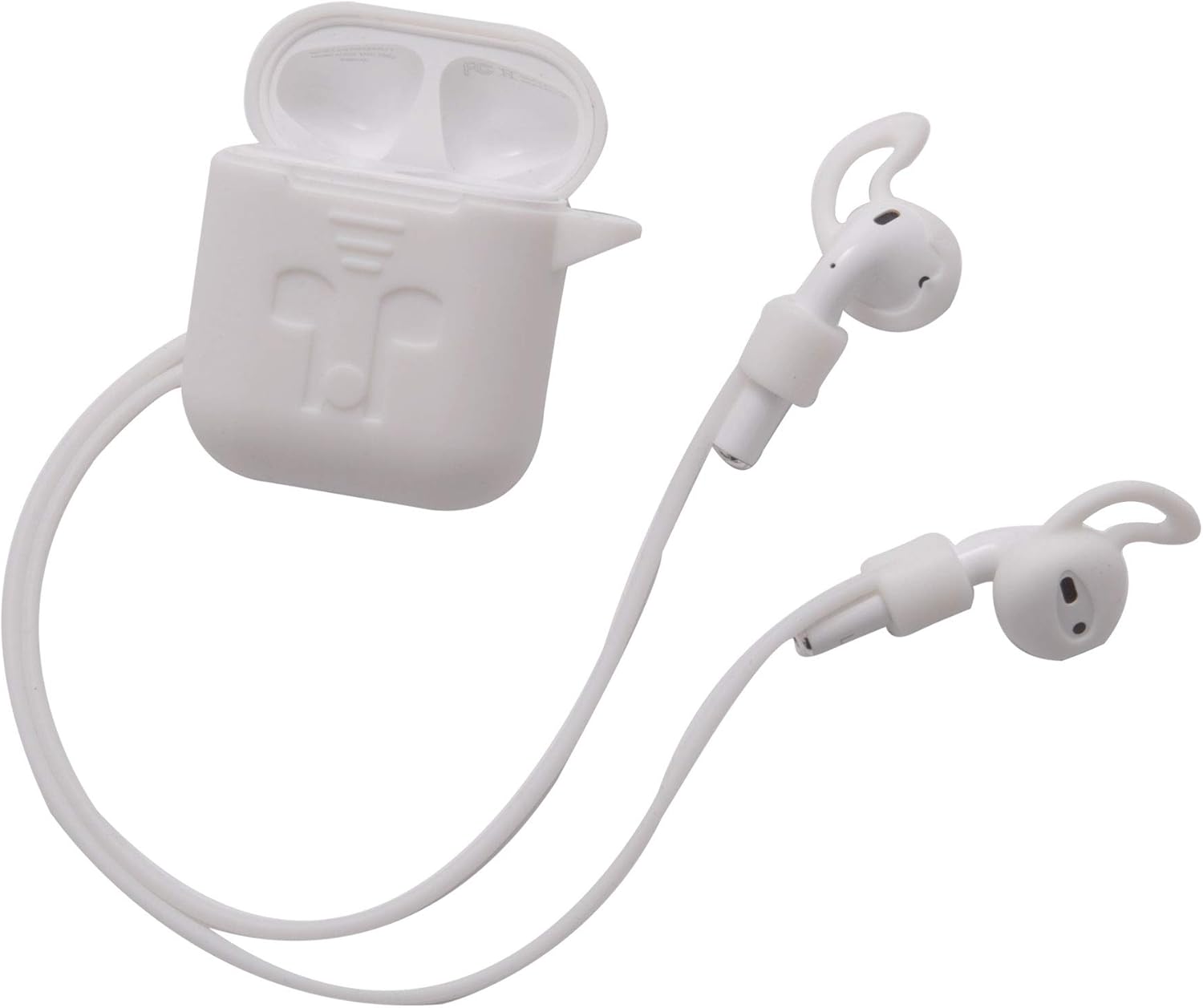
Image 3: The white silicone protective case is shown with wireless earphones inserted. The earphones are connected by a white anti-loss strap, and each earphone has a white ear hook attached for a more secure fit.
4. Operating Instructions
4.1 Using the Silicone Protective Case
Once installed, the silicone case provides continuous protection. To access your earphones, simply open the lid of the silicone case as you would your original charging case. The case allows for wireless charging and wired charging without removal.
4.2 Using the Anti-Loss Strap
When engaging in physical activities or in environments where earphones might easily fall, attach the anti-loss strap. Wear your earphones as usual, and the strap will hang around your neck, preventing the earphones from dropping to the ground if they come loose from your ears.
4.3 Using the Ear Hooks
For enhanced stability, especially during exercise, attach the ear hooks. Position the ear hooks so they gently curve over the top of your ear, securing the earphones in place. Adjust for comfort and a firm fit.
4.4 Using the Compact Zippered Storage Case
Use the zippered storage case to keep all your accessories and earphones organized and protected when traveling or not in use. Place the silicone-cased earphones, strap, and ear hooks inside before zipping it closed.
5. Maintenance and Care
To ensure the longevity and cleanliness of your MOBO Accessory Kit, follow these guidelines:
- Cleaning the Silicone Case, Strap, and Ear Hooks: Wipe with a soft, damp cloth. For stubborn dirt, use a mild soap solution and rinse thoroughly with water. Allow to air dry completely before re-attaching to earphones.
- Cleaning the Zippered Storage Case: Wipe the exterior with a damp cloth. Do not immerse in water.
- Avoid Harsh Chemicals: Do not use abrasive cleaners, solvents, or strong detergents, as these can damage the materials.
- Storage: Store the kit in a cool, dry place away from direct sunlight and extreme temperatures.
6. Troubleshooting
- Issue: Silicone case does not fit properly.
Solution: Ensure the silicone case is designed for your specific earphone model (e.g., Apple AirPods). Remove any debris from the earphone case before insertion. - Issue: Ear hooks feel uncomfortable or do not secure earphones.
Solution: Adjust the position of the ear hooks on your earphones and over your ear. Ensure the earphones are fully inserted into the ear hooks. Experiment with slight rotations for a better fit. - Issue: Accessories become dirty.
Solution: Refer to the 'Maintenance and Care' section for cleaning instructions. Regular cleaning prevents buildup.
7. Specifications
| Feature | Description |
|---|---|
| Brand | MOBO |
| Model | Wireless Earphone Accessory Kit |
| Compatible Devices | Apple AirPods |
| Material | Silicone (Case, Strap, Ear Hooks), Fabric/EVA (Zippered Case) |
| Color | White (Silicone components), Black (Zippered Case) |
| Package Dimensions | Approximately 15 x 10 x 3.4 cm |
| Package Weight | Approximately 80 g |
8. Warranty and Support
For warranty information or technical support regarding your MOBO Wireless Earphone Accessory Kit, please refer to the retailer where the product was purchased or visit the official MOBO website. Keep your proof of purchase for any warranty claims.