
1. Introduction
The Geemarc Amplipower60 is an ultra-amplified corded telephone designed to provide clear and loud communication, especially beneficial for individuals with hearing impairments. This manual provides detailed instructions for setting up, operating, and maintaining your telephone to ensure optimal performance.

Figure 1: Geemarc Amplipower60 Ultra Amplified Corded Telephone
This image shows the main view of the Geemarc Amplipower60 telephone, highlighting its large keypad and ergonomic design.
2. Product Features
The Amplipower60 telephone is equipped with several features to enhance usability and accessibility:
- Amplified Landline Phone: Specifically designed to help hard of hearing individuals make and hear phone calls easier, and prevent missing incoming calls.
- Loud Ringer & Strobe Notification: Features a loud ringer and an extra bright flashing incoming call strobe for visual alerts.
- Extra-Large Keypad: Equipped with easy-to-read numbers for convenient dialing.
- Quick Dialing: Includes 3 color-coded buttons for quick access to emergency services or family members, and 9 quick dial keys for frequently used contacts.
- Extra Loud & Hearing Aid Compatible: Provides up to 65dB of extra clear TrueSound, up to 15dB for the speakerphone, and up to 95dB for the ringer. It is also hearing aid compatible.
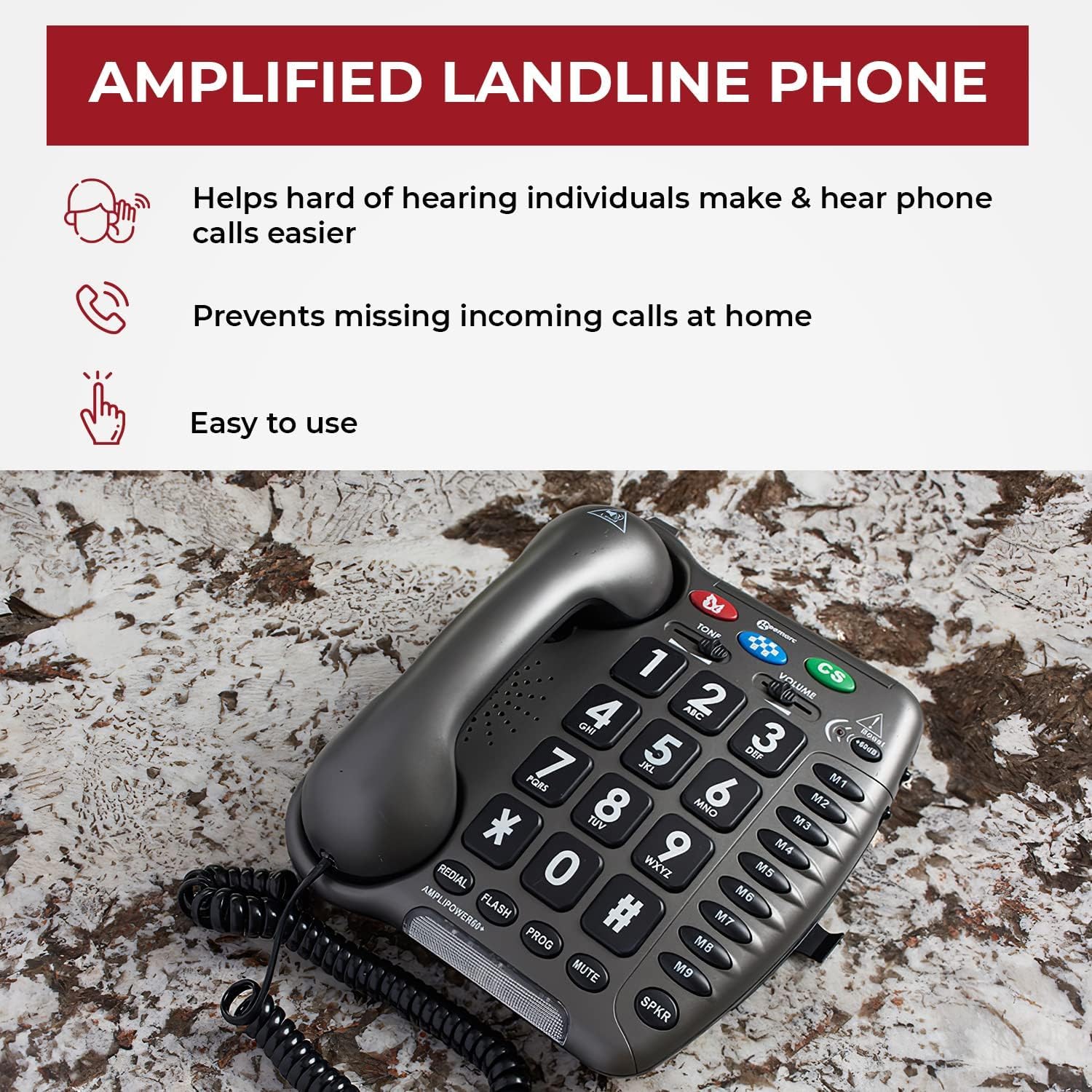
Figure 2: Key Benefits of the Amplified Landline Phone
This image illustrates the primary advantages of the Amplipower60, including ease of use, assistance for the hard of hearing, and preventing missed calls.

Figure 3: Sound Amplification and Compatibility
This image details the sound amplification capabilities of the phone, including up to 65dB TrueSound, 15dB speakerphone, and 95dB ringer, along with its hearing aid compatibility.

Figure 4: Dialing Convenience
This image highlights the large numbers and quick dial buttons (M1-M9) that make dialing easy and convenient for users.
3. Setup Guide
Follow these steps to set up your Geemarc Amplipower60 telephone:
- Unpack Contents: Carefully remove all components from the packaging. Ensure you have the telephone base, handset, coiled handset cord, line cord, and power adapter.
- Install Batteries: The phone requires 4 AAA batteries (not included) for certain functions like memory retention during power outages. Locate the battery compartment on the underside of the phone, insert the batteries according to the polarity markings, and close the compartment.
- Connect Handset: Plug one end of the coiled handset cord into the handset and the other end into the jack labeled 'HANDSET' on the side or back of the telephone base.
- Connect Line Cord: Plug one end of the line cord into the jack labeled 'LINE' on the telephone base and the other end into your telephone wall jack.
- Connect Power Adapter: Plug the small end of the power adapter into the 'DC IN' jack on the telephone base and the other end into a standard electrical outlet.
- Initial Test: Lift the handset. You should hear a dial tone. If not, recheck all connections.
4. Operating Instructions
4.1 Making a Call
- Lift the handset or press the SPKR button to activate the speakerphone.
- Listen for a dial tone.
- Dial the desired telephone number using the large keypad.
- To end the call, replace the handset or press the SPKR button again if on speakerphone.
4.2 Receiving a Call
When the phone rings and the strobe light flashes:
- Lift the handset to answer the call.
- Alternatively, press the SPKR button to answer on speakerphone.
4.3 Using Amplification
The Amplipower60 is designed to provide significant sound amplification. The amplification is typically active by default or can be adjusted:
- Handset Volume: Use the VOLUME slider on the side of the phone to adjust the incoming call volume through the handset. This can provide up to 65dB of clear TrueSound.
- Speakerphone Volume: When using the speakerphone, the volume can be adjusted to provide up to 15dB of sound.
- Ringer Volume: The ringer can be set to provide up to 95dB of sound. Adjust the ringer volume switch on the side or back of the phone.
- Tone Control: Use the TONE button to adjust the frequency response for clearer sound, especially for certain types of hearing loss.
4.4 Speed Dial / Memory Buttons
The phone features 3 color-coded emergency buttons (M, CS) and 9 quick dial memory buttons (M1-M9).
- Programming Memory Buttons: Refer to the detailed programming instructions in the full manual for setting up emergency and quick dial numbers. Typically, this involves pressing a PROG button, then the memory button, dialing the number, and pressing PROG again.
- Using Memory Buttons: Lift the handset or press SPKR, then press the desired memory button (M, CS, M1-M9) to dial the stored number.
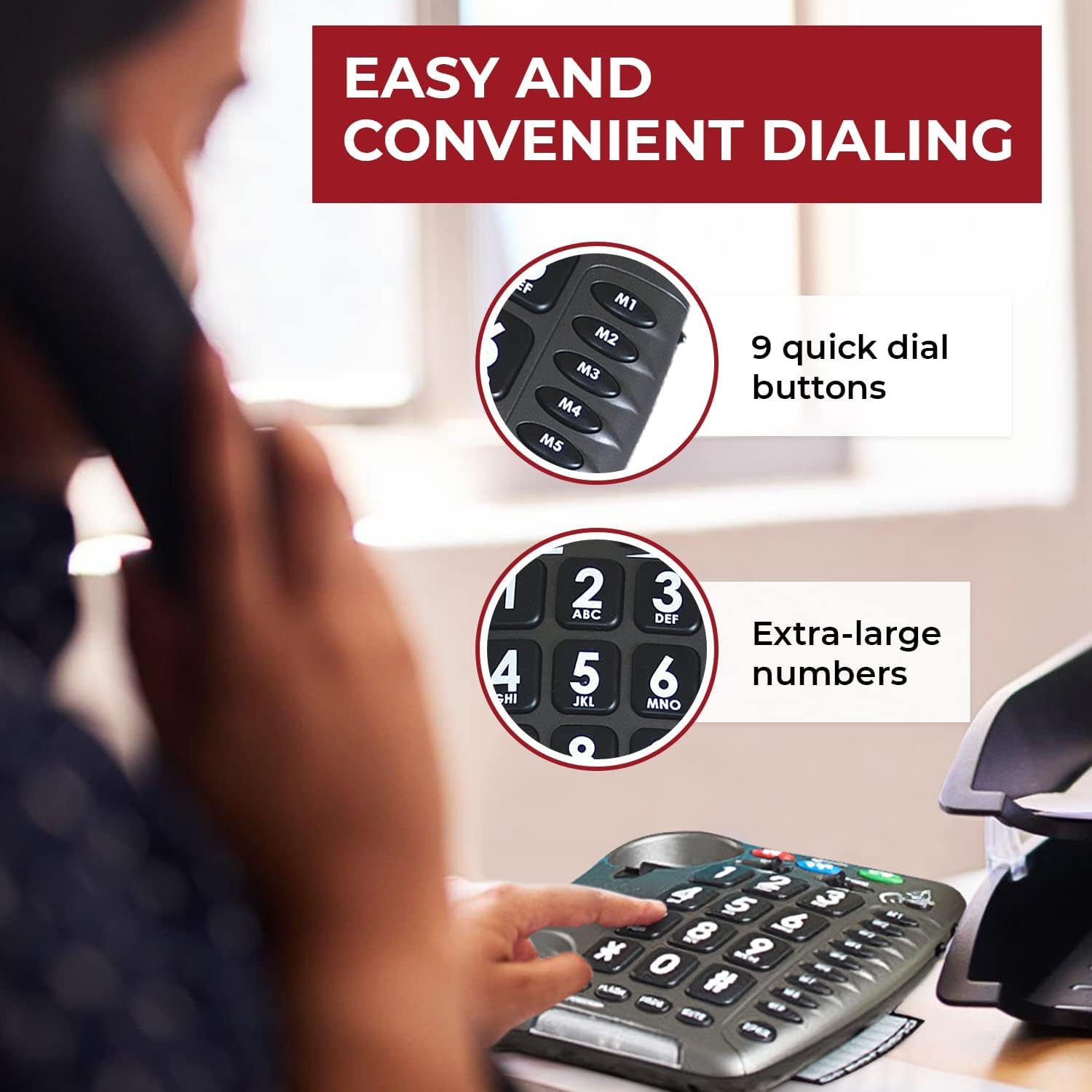
Figure 5: User Experience with Amplified Sound
This image depicts a woman comfortably using the Amplipower60, illustrating the clarity and ease of communication provided by its amplified features.
5. Maintenance
To ensure the longevity and optimal performance of your Geemarc Amplipower60 telephone, follow these maintenance guidelines:
- Cleaning: Use a soft, damp cloth to clean the telephone's surface. Do not use abrasive cleaners, waxes, or solvents.
- Avoid Liquids: Keep the telephone away from water and other liquids. If liquid spills on the phone, immediately unplug it and allow it to dry completely before reconnecting.
- Temperature and Humidity: Store and operate the phone in a dry environment, away from extreme temperatures and high humidity.
- Battery Replacement: Replace the AAA batteries periodically (e.g., once a year) to ensure memory retention functions properly during power outages.
- Cord Care: Avoid tangling or stretching the handset and line cords excessively, as this can damage the internal wiring.
6. Troubleshooting
If you experience issues with your Amplipower60 telephone, refer to the following common problems and solutions:
| Problem | Possible Cause | Solution |
|---|---|---|
| No dial tone | Line cord or power adapter not connected properly. | Ensure all cords are securely plugged into the phone and wall jacks. Check power outlet. |
| Cannot hear caller / Low volume | Volume setting is too low; amplification not active. | Adjust the VOLUME slider. Ensure the tone control is set appropriately. |
| Caller cannot hear me / Muffled sound | Handset or speakerphone microphone issue; speaking too far from microphone. | Ensure handset cord is fully inserted. Speak directly into the microphone. Test with another phone if possible. |
| Static or Hissing sound | Line interference; high amplification setting. | Check phone line for damage. Try adjusting the volume or tone control. If persistent, contact your telephone service provider. |
| Ringer not working or too quiet | Ringer volume set too low or off. | Adjust the ringer volume switch on the phone. |
If the problem persists after trying these solutions, please contact Geemarc customer support or your retailer for further assistance.
7. Specifications
| Feature | Detail |
|---|---|
| Manufacturer | Geemarc |
| Brand | Geemarc |
| Model Number | Amplipower60 |
| Item Weight | 2.5 pounds |
| Product Dimensions | 8.75 x 7.5 x 1.5 inches |
| Batteries Required | 4 AAA batteries (for memory retention) |
| Color | Black |
| Material Type | Other materials |
| Telephone Type | Corded |
| Power Source | Corded Electric |
| Dialer Type | Single Keypad |
| Answering System Type | Digital |
| Amplification (Handset) | Up to 65dB TrueSound |
| Amplification (Speakerphone) | Up to 15dB |
| Ringer Volume | Up to 95dB |
8. Warranty and Support
For warranty information and customer support, please refer to the documentation included with your purchase or contact the manufacturer, Geemarc, directly. You may also reach out to the seller, Sonic Alert MI, for assistance.
Keep your purchase receipt as proof of purchase for any warranty claims.


