
Introduction
Welcome to the user manual for your new DEGEN DE15 Ultra-thin AM, FM, Shortwave DSP Radio. This manual provides detailed instructions on how to set up, operate, and maintain your radio to ensure optimal performance and longevity. Please read this manual thoroughly before using the device.
Product Overview
The DEGEN DE15 is a versatile and portable digital PLL world band receiver featuring DSP (Digital Signal Processing) technology. Its ultra-thin design makes it highly portable, weighing less than 3 ounces without batteries and measuring only half an inch thick. It supports a comprehensive frequency range including FM, AM (MW), and Shortwave (SW) bands.
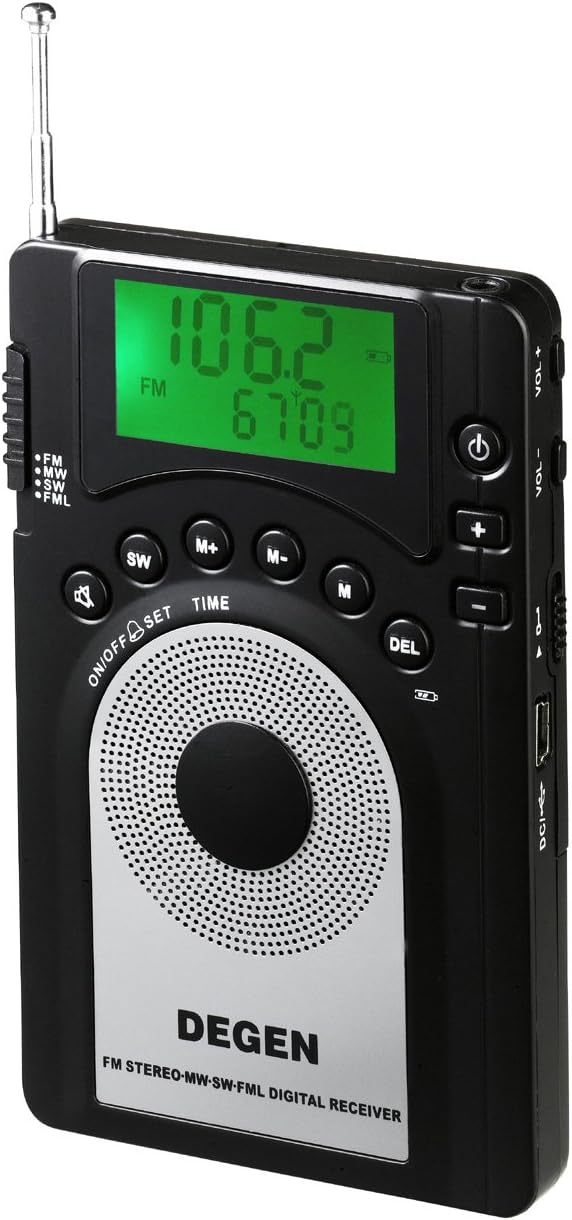
Figure 1: Front view of the DEGEN DE15 radio, showcasing its display, speaker, and control buttons.

Figure 2: Angled view of the DEGEN DE15 radio, highlighting its slim profile and side controls.

Figure 3: Detailed view of the side of the DEGEN DE15 radio, showing the earphone jack, USB port, and volume controls.

Figure 4: The DEGEN DE15 radio displayed with its accessories, including earphones, USB cable, power adapter, rechargeable batteries, and carrying pouch, alongside its retail packaging.
Setup
1. Battery Installation
The DE15 radio is powered by three AAA batteries. To install:
- Locate the battery compartment cover on the back of the radio.
- Slide the cover open.
- Insert three AAA batteries, ensuring correct polarity (+/-) as indicated inside the compartment.
- Close the battery compartment cover securely.
2. Charging the Batteries
The DE15 features a built-in automatic battery charger for the included rechargeable AAA batteries. To charge:
- Connect the provided USB cable to the radio's USB port.
- Connect the other end of the USB cable to the included AC wall plug adapter.
- Plug the AC adapter into a standard wall outlet (100-250V).
- The charging indicator on the radio will illuminate. Charging typically takes several hours.
- Alternatively, you can connect the USB cable to a computer's USB port for charging.
3. Initial Power On
Press and hold the ON/OFF button located on the front panel to power on the radio. The display will light up, showing the current frequency.
Operating Instructions
1. Band Selection
Press the FM/MW/SW button repeatedly to cycle through the available frequency bands: FM, MW (AM), and SW (Shortwave).
2. Tuning Methods
The DE15 offers four primary tuning methods:
- Auto Scan: Press and hold the SCAN button. The radio will automatically scan and stop at the next strong station.
- Manual Tuning: Use the +/- buttons on the side of the radio to manually adjust the frequency up or down in small increments.
- Digital Tuning: Enter the desired frequency directly using the numeric keypad (if available, or through a combination of buttons not explicitly detailed in the provided description, typically involving the 'M' or 'TIME' buttons for direct input).
- ATS (Auto Tuning Storage): Press and hold the ATS button. The radio will automatically scan and store all strong stations into memory presets.
3. Memory Presets
The radio can store up to 245 preset stations. To save a station:
- Tune to the desired station.
- Press the M+ or M- button to select a memory location.
- Press the M button to confirm and save the station.
To recall a saved station, use the M+ or M- buttons to navigate through your stored presets.
4. Volume Control
Adjust the volume using the VOL+ and VOL- buttons located on the side of the radio.
5. Sleep Timer & Alarm Clock
The DE15 features a sleep timer (5-90 minutes) and an alarm clock function. Refer to the specific button labels (e.g., TIME or SET) on your device for detailed instructions on setting these features.
6. Listening Options
You can listen to the DE15 via its built-in D50mm speaker or by plugging in the included stereo earphones into the headphone jack on the side of the radio.
Features
- Portable AM/FM/SW radio with DSP (Digital Signal Processing) Technology for enhanced reception.
- Ultra-thin design measuring 1/2" thick and weighing less than 3 Oz for maximum portability.
- Wide FM frequency coverage from 64-108 MHz.
- MW (AM) frequency coverage: 520-1710 MHz.
- SW (Shortwave) frequency coverage: 2.3-23.0 MHz.
- Multiple tuning options: Auto Scan, Manual Tuning, Digital Tuning, and ATS (Auto Tuning Storage).
- Memory function to store up to 245 preset stations.
- 5-90 minutes sleep timer for automatic power-off.
- Integrated alarm clock function.
- Built-in automatic battery charger for rechargeable AAA batteries.
- Equipped with a D50mm speaker and a 3.5mm earphone jack for private listening.
Specifications
| Feature | Specification |
|---|---|
| Model Number | DE15 |
| Dimensions (L x W x H) | 11.43 x 1.27 x 6.99 cm (4.5 x 0.5 x 2.75 inches) |
| Weight (without batteries) | 81.65 g (2.88 ounces) |
| Power Source | 3 x AAA batteries (rechargeable included), USB power (DC 5V) |
| FM Frequency Range | 64.0 - 108.0 MHz |
| MW (AM) Frequency Range | 520 - 1710 KHz |
| SW (Shortwave) Frequency Range | 2.3 - 23.0 MHz |
| Tuner Technology | DSP (Digital Signal Processing) |
| Connectivity | USB |
| Special Features | Portable, Sleep Timer, Alarm Clock, Auto Tuning Storage (ATS) |
| Material | Plastic |
| Color | Black |
Maintenance
- Cleaning: Use a soft, dry cloth to clean the radio's exterior. Do not use abrasive cleaners or solvents.
- Storage: When not in use for extended periods, remove the batteries to prevent leakage. Store the radio in a cool, dry place away from direct sunlight and extreme temperatures.
- Battery Care: If using rechargeable batteries, ensure they are fully charged before long storage. Avoid overcharging or completely draining the batteries frequently to prolong their lifespan.
- Water Exposure: This radio is not waterproof. Avoid exposing it to water or high humidity.
Troubleshooting
- No Power:
- Check if batteries are inserted correctly with proper polarity.
- Replace with fresh batteries or ensure rechargeable batteries are fully charged.
- Verify the power adapter and USB cable connections if charging or operating via USB.
- Poor Reception / Static:
- Extend the telescopic antenna fully for FM and Shortwave bands.
- For AM (MW) reception, try rotating the radio for better signal alignment.
- Move away from electronic devices that may cause interference (e.g., computers, TVs, fluorescent lights).
- Try tuning manually to fine-tune the station.
- No Sound from Speaker:
- Check the volume level and increase if necessary.
- Ensure earphones are not plugged in if you intend to use the speaker.
- Buttons Not Responding:
- Power off the radio and then power it back on to reset.
- Ensure batteries have sufficient charge.
Package Contents
Upon unboxing, please ensure all the following items are included in your package:
- DEGEN DE15 Radio Unit
- Stereo Earphones
- USB Cable
- AC Wall Plug Power Adapter (100-250V, 2 prongs US standard)
- 3 x AAA Rechargeable Batteries
- Carrying Pouch
- User Manual (this document)
Warranty and Support
For warranty information and customer support, please refer to the warranty card included in your product packaging or visit the official DEGEN website. Keep your purchase receipt as proof of purchase for warranty claims.
