
1. Product Overview
The Zoom R16 is a versatile multi-track tabletop recorder, audio interface, and DAW control surface designed for musicians, producers, and podcasters. It offers simultaneous 8-track recording and 16-track playback, built-in stereo condenser microphones, and a wide array of effects, all in a portable unit.
This manual provides essential information to help you get started and make the most of your R16 device.

Figure 1: Front view of the Zoom R16 Multi-Track Tabletop Recorder, showcasing its faders, knobs, and display screen.
2. What's in the Box
Upon unboxing your Zoom R16, please ensure all the following items are present:
- Zoom R16-Digital Multi-Track Recorder
- 1GB SD Memory Card
- AC Adapter
- USB Cable
- Cubase LE Install Disc
- User's Manual (this document)
3. Setup
3.1 Powering the R16
The R16 offers flexible power options:
- AC Adapter: Connect the supplied AC adapter to the DC 5V 1A input on the rear panel and plug it into a wall outlet.
- AA Batteries: Insert six AA/LR6 batteries into the battery compartment on the underside of the unit. A set of batteries provides approximately 4.5 hours of operation.
- USB Bus Power: When connected to a computer via USB, the R16 can be powered directly from the USB bus, especially when functioning as an audio interface or control surface.
3.2 SD Card Installation
The R16 uses SD and SDHC memory cards (up to 32 GB) as its recording media. Insert the SD card into the slot on the side panel. Ensure it clicks into place. If using a new card, it is recommended to format it via the R16's menu system before recording.

Figure 2: Side view of the Zoom R16, highlighting the SD card slot and USB ports for host and device connections.
3.3 Connecting Inputs and Outputs
The R16 features eight combination mic/line input jacks, allowing connection of microphones or line-level signals. Phantom power (+48V) is available on channels 5 and 6 for condenser microphones. Channel 1 includes a Hi-Z switch for direct connection of guitars or basses.
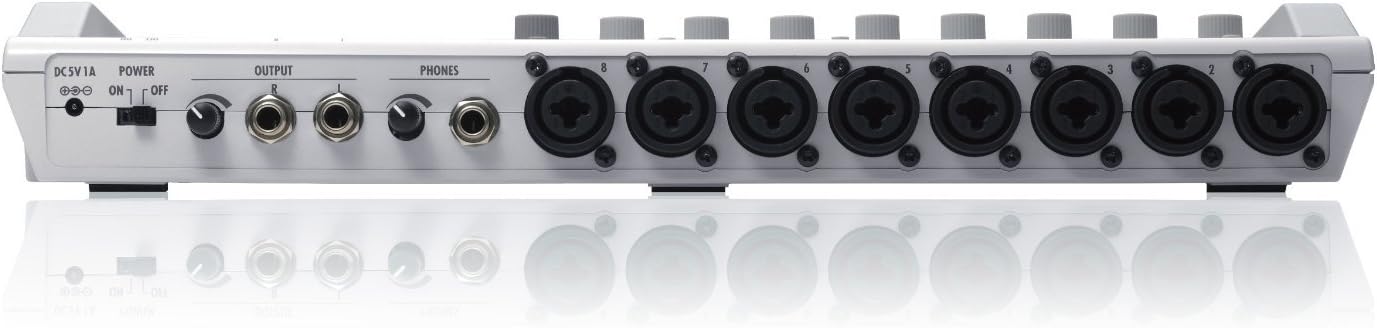
Figure 3: Rear panel of the Zoom R16, displaying the eight combination XLR/TRS input jacks, output jacks, and headphone outputs.
Connect your headphones to the dedicated headphone jack for monitoring. Line outputs (L/R) are available for connecting to external mixers or speakers.
3.4 USB Connection to Computer
The R16 can function as a USB audio interface and DAW control surface. Connect the R16 to your computer using the supplied USB cable. The device supports 24-bit/96kHz encoding for high-quality audio transfer. In audio interface mode, you can use the R16's internal DSP effects on your computer tracks if the sampling rate is 44.1kHz.
4. Operating the R16
4.1 Recording and Playback
The R16 allows simultaneous recording on up to 8 tracks and playback of up to 16 tracks. Audio is captured in 16/24-bit linear WAV format at a 44.1kHz sampling rate. The built-in high-sensitivity stereo microphones are ideal for quick capture of ideas or ambient sounds.

Figure 4: A person holding the Zoom R16, illustrating its compact and portable design for on-the-go recording.
4.2 DSP Effects
The R16 comes preprogrammed with 135 types of digital effects for recording, mixing, and mastering. These include algorithms optimized for guitar, bass, and vocals, as well as models of 18 different guitar amps and 6 bass amps. You can use up to three effects simultaneously (seven modules for insert effects, plus two send/return effects).
4.3 Tuner and Metronome
A built-in tuner assists with instrument tuning. The metronome provides a click track for timing during recording and practice. The metronome sound can be routed to headphones for monitoring.
4.4 Locate Function and Editing
Set up to 100 marker points for quick navigation. Convenient editing functions include A-B repeat playback and auto punch-in/out for re-tracking specific parts of a recording.
4.5 Master Track and Mixdown
A dedicated master track allows for final mixdown directly on the R16. Sequence play enables mastering multiple projects together, and playlists can be created for finished songs.
4.6 File Transfer and USB Host
The USB 2.0 Hi-Speed compatible port ensures quick file transfer to a computer for editing with DAW software or burning CDs. The R16 also features USB host capability, allowing you to connect a USB flash drive or external hard disk for quick backups or sharing recordings.
Video 1: This video demonstrates the process of importing files from the Zoom R16 to your computer, highlighting the ease of transferring recorded audio for further editing or archiving.
4.7 Bundled Software
The R16 includes Cubase LE 4, a powerful music production system for audio and MIDI recording, editing, and mixing. It shares the same audio engine as higher-level Cubase versions, providing a solid foundation for computer-based music production.
5. Maintenance
To ensure the longevity and optimal performance of your Zoom R16, follow these maintenance guidelines:
- Cleaning: Use a soft, dry cloth to clean the unit. Avoid abrasive cleaners or solvents.
- Storage: Store the R16 in a cool, dry place away from direct sunlight, extreme temperatures, and high humidity.
- Battery Care: If using batteries, remove them if the unit will not be used for an extended period to prevent leakage.
- SD Card: Handle SD cards carefully. Avoid bending or exposing them to static electricity.
6. Troubleshooting
If you encounter issues with your R16, consider the following basic troubleshooting steps:
- No Power: Check AC adapter connection, ensure batteries are correctly inserted and charged, or verify USB bus power connection.
- No Sound: Verify input connections, check input gain levels, ensure output cables are connected, and confirm headphone volume.
- Recording Issues: Ensure an SD card is inserted and formatted. Check available recording time. Verify track arming for recording.
- Computer Connection: Ensure the USB cable is securely connected. Check computer's audio settings to confirm R16 is selected as the input/output device.
- Distorted Audio: Reduce input gain levels. Check for proper impedance matching (e.g., Hi-Z for guitar).
For more detailed troubleshooting, refer to the comprehensive user manual provided on the install disc or available from the manufacturer's website.
7. Specifications
| Feature | Specification |
|---|---|
| Item Weight | 2.87 pounds |
| Product Dimensions | 14.8 x 9.33 x 2.06 inches |
| Item Model Number | R16 |
| Batteries | 4 AA batteries required. (included) |
| Compatible Devices | Windows, Mac |
| Connector Type | USB |
| Hardware Interface | USB |
| Supported Software | DAW |
| Battery Type | Alkaline |
| Media Format | Digital |
| Screen Size | 2.1 inches |
| Brand | Zoom |
| Microphone Form Factor | Built-In |
| Headphones Jack | 3.5 millimeters |
| Memory Storage Capacity | 32 GB |
8. Warranty and Support
The Zoom R16 is covered by a manufacturer's warranty. Please refer to the warranty information included with your product packaging for specific terms and conditions. For technical support, product registration, or additional resources, visit the official Zoom website or contact their customer service department.


