
Mintcraft JL-45891-3L
ProSource JL-45891-3L Digital Electronic Safe User Manual
Model: JL-45891-3L
Brand: Mintcraft
1. Introduction
This manual provides detailed instructions for the safe and efficient operation, setup, and maintenance of your ProSource JL-45891-3L Digital Electronic Safe. Please read this manual thoroughly before using the product and retain it for future reference.
The ProSource JL-45891-3L Digital Electronic Safe is designed to provide secure storage for your valuables. It features a digital electronic keypad for access and is constructed from solid steel with a powder coating finish for durability.
2. Safety Information
WARNING:
- This safe is NOT fireproof. Do not store highly flammable materials inside.
- Keep emergency backup keys in a secure location away from the safe.
- Ensure the safe is securely mounted to prevent unauthorized removal.
- Do not attempt to force the safe open if the electronic lock malfunctions. Refer to the troubleshooting section or contact support.
- Keep batteries out of reach of children.
3. Package Contents
Verify that all items listed below are included in your package:
- 1 x Digital Electronic Safe (Model: JL-45891-3L)
- 4 x AA Batteries
- 2 x Emergency Back-Up Keys
- 4 x Anchor Bolts
- 1 x User Manual (this document)
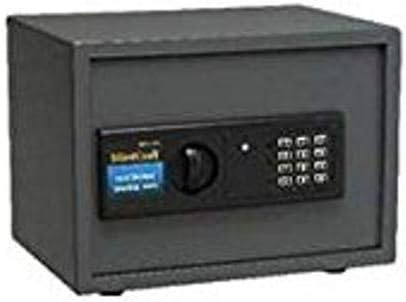
Figure 1: Mintcraft Digital Electronic Safe, showing the main unit with its electronic keypad and manual override knob.
4. Setup
4.1. Battery Installation
- Locate the battery compartment on the inside of the safe door.
- Insert 4 AA batteries, ensuring correct polarity (+/-).
- Close the battery compartment cover.
4.2. Initial Code Setting
- With the safe door open, press the red reset button located on the inside of the door near the hinge. A beep will sound, and the indicator light will flash.
- Enter your desired 3 to 8 digit code on the keypad.
- Press the "E" or "#" button to confirm. The light will flash green, indicating the code is set.
- Test the new code with the door open before closing it.
4.3. Mounting the Safe
The safe can be mounted to a wall or floor using the provided anchor bolts. Choose a secure, discreet location.
- Mark the desired drilling points through the pre-drilled holes on the back or bottom of the safe.
- Drill pilot holes in the wall or floor using an appropriate drill bit.
- Align the safe with the drilled holes and secure it using the anchor bolts.
- Ensure the safe is firmly attached and cannot be easily removed.
5. Operating Instructions
5.1. Opening the Safe with Digital Code
- Enter your 3 to 8 digit personal code on the keypad.
- Press the "E" or "#" button.
- If the code is correct, the green light will illuminate. Within 5 seconds, turn the knob clockwise to open the door.
- If the code is incorrect, the yellow light will flash, and a beep will sound.
5.2. Opening the Safe with Emergency Key
In case of battery failure or forgotten code, the safe can be opened using the emergency key.
- Locate the keyhole cover, usually hidden behind the keypad or a removable panel.
- Remove the cover.
- Insert the emergency key and turn it counter-clockwise while simultaneously turning the knob clockwise to open the door.
- Once opened, replace the keyhole cover.
5.3. Closing and Locking the Safe
To lock the safe, simply close the door and turn the knob counter-clockwise. The safe will automatically lock.
6. Maintenance
- Battery Replacement: Replace batteries annually or when the low battery indicator light (if present) illuminates. Always use 4 new AA batteries.
- Cleaning: Wipe the exterior of the safe with a soft, damp cloth. Do not use abrasive cleaners or solvents.
- Keypad Care: Avoid pressing the keypad buttons with excessive force. Keep the keypad dry and free from dust.
- Lubrication: Periodically apply a small amount of lubricant to the door hinges and locking mechanism to ensure smooth operation.
7. Troubleshooting
| Problem | Possible Cause | Solution |
|---|---|---|
| Safe does not open with code. | Incorrect code entered; Batteries are low or dead; Keypad malfunction. | Re-enter code carefully. Replace batteries. Use emergency key to open, then reset code. |
| Keypad does not respond. | Dead batteries; Loose battery connection. | Replace batteries. Ensure batteries are correctly inserted. |
| Door will not close or lock properly. | Obstruction in door frame; Locking bolts misaligned. | Check for obstructions. Gently push the door inward while turning the knob. |
| Emergency key does not work. | Key not fully inserted; Internal mechanism jammed. | Ensure key is fully inserted and turned correctly. Do not force. Contact support if issue persists. |
8. Specifications
| Feature | Detail |
|---|---|
| Model Number | JL-45891-3L |
| External Dimensions (H x W x D) | 9-7/8 in x 13-3/4 in x 9-7/8 in (25.08 cm x 34.93 cm x 25.08 cm) |
| Product Dimensions (L x W x H) | 12.25 x 12.5 x 15.88 inches (31.12 x 31.75 x 40.34 cm) |
| Weight | 30.8 lb (13.97 kg) |
| Lock Type | Digital Electronic with Emergency Key |
| Code Length | 3 to 8 digits |
| Material | Solid Steel with Powder Coating Finish |
| Power Source | 4 x AA Batteries (included) |
| Mounting Type | Wall Mount |
| Fireproof | No |
| Water Resistance Level | Not Water Resistant |
9. Warranty Information
Please refer to the product packaging or contact the manufacturer directly for specific warranty details. Typically, products are covered against defects in materials and workmanship for a limited period from the date of purchase.
10. Customer Support
For technical assistance, replacement parts, or any questions regarding your Mintcraft Digital Electronic Safe, please contact your retailer or the manufacturer directly.
Note: Specific contact information may be found on the product packaging or the manufacturer's official website.
Ask a question about this manual
Ask about setup, troubleshooting, compatibility, parts, safety, or missing instructions. Manuals+ will review the question and use this page’s manual context to help answer it.