
Hurricane 736507
Hurricane Supreme Series 16-Inch Oscillating Stand Fan User Manual
Model: 736507
1. Important Safety Instructions
Please read and save these important safety instructions before using this fan. Failure to follow these instructions may result in electric shock, fire, or injury.
- Always unplug the fan before cleaning or servicing.
- Do not operate the fan with a damaged cord or plug. If the cord or plug is damaged, contact qualified service personnel.
- Do not run the power cord under carpeting. Do not cover the cord with throw rugs, runners, or similar coverings. Arrange the cord away from traffic areas where it will not be tripped over.
- This fan is intended for indoor use only. Do not use outdoors.
- Do not immerse the fan in water or other liquids.
- Keep fingers and other objects away from the fan blades and openings during operation.
- Ensure the fan is placed on a stable, level surface to prevent tipping.
- This appliance has a polarized plug (one blade is wider than the other). To reduce the risk of electric shock, this plug is intended to fit into a polarized outlet only one way. If the plug does not fit fully into the outlet, reverse the plug. If it still does not fit, contact a qualified electrician. Do not attempt to defeat this safety feature.
2. Package Contents
Verify that all components are present before assembly:
- Fan Head Assembly (includes motor, blades, front and rear grills)
- Adjustable Stand Pole
- Round Base
- Remote Control
- Mounting Hardware (screws, washers, etc.)

Image: Product packaging for the Hurricane 16-inch Oscillating Stand Fan, showing key features and branding.
3. Assembly Instructions
Follow these steps to assemble your Hurricane Stand Fan:
- Attach the Stand Pole to the Base: Securely fasten the adjustable stand pole to the heavy-duty round base using the provided hardware. Ensure it is stable and upright.
- Mount the Fan Head: Carefully attach the fan head assembly to the top of the adjustable stand pole. Ensure all connections are tight and secure.
- Secure the Grills: The fan features a powder-coated steel grill for durability. Ensure both the front and rear grills are properly aligned and secured around the fan blades. This typically involves a retaining ring and a screw to hold the cage together.

Image: A fully assembled Hurricane 16-inch Oscillating Stand Fan, showcasing its complete structure.
4. Operating Instructions
Your Hurricane Stand Fan offers multiple settings for optimal comfort.
Power and Speed Settings
The fan features 3-speed settings. Use the control panel on the fan body or the remote control to select your desired speed:
- Speed 1 (Low): For a gentle breeze and quiet operation.
- Speed 2 (Medium): For moderate airflow.
- Speed 3 (High): For maximum airflow and cooling.

Image: A detailed view of the fan's control panel, showing buttons for speed settings and a rotary dial for timer functions.
Oscillation Function
The fan can oscillate 90 degrees to distribute air across a wider area. To activate or deactivate oscillation, use the dedicated button on the control panel or remote. The fan can also be locked in a non-oscillating position for direct airflow.
Adjustable Height and Tilt
The fan's height is adjustable from 41 inches to 55 inches. To adjust the height, loosen the locking collar on the stand pole, raise or lower the pole to the desired height, and then securely tighten the collar. The fan head can also be tilted vertically to direct airflow upwards or downwards.

Image: Two Hurricane Stand Fans side-by-side, illustrating the adjustable height range from 41 inches to 55 inches.
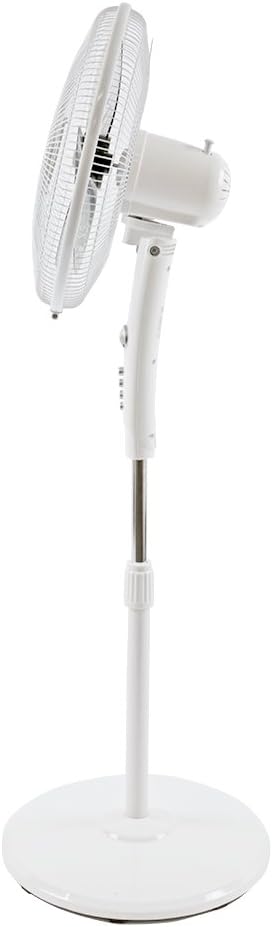
Image: Side view of the Hurricane Stand Fan, demonstrating its ability to tilt the fan head upwards for varied airflow direction.
5. Maintenance
Regular cleaning ensures optimal performance and longevity of your fan.
- Cleaning: Always unplug the fan before cleaning. Use a soft, damp cloth to wipe the exterior surfaces. Do not use abrasive cleaners or chemicals. For cleaning the blades, carefully remove the front grill (refer to assembly instructions for reverse steps) and wipe the blades with a soft cloth. Ensure all parts are dry before reassembling and operating.
- Storage: When not in use for extended periods, store the fan in a cool, dry place, preferably in its original packaging to protect it from dust.
6. Troubleshooting
If you encounter issues with your fan, refer to the following common problems and solutions:
| Problem | Possible Cause | Solution |
|---|---|---|
| Fan does not turn on. | Not plugged in; power outlet not working; circuit breaker tripped. | Ensure the fan is securely plugged into a working outlet. Check your circuit breaker. |
| Weak airflow. | Fan speed set too low; dirty blades or grill. | Increase the fan speed. Clean the fan blades and grills as per maintenance instructions. |
| Fan is noisy. | Loose parts; fan not on a level surface; debris in blades. | Check for any loose screws or components. Place the fan on a stable, level surface. Unplug and inspect blades for debris. |
| Oscillation not working. | Oscillation function deactivated; internal mechanism issue. | Ensure the oscillation button is pressed. If the issue persists, contact customer support. |
7. Specifications
- Model: 736507
- Brand: Hurricane
- Fan Type: Stand Fan
- Blade Diameter: 16 Inches
- Speed Settings: 3
- Oscillation: 90 Degrees (switchable)
- Adjustable Height: 41 inches to 55 inches
- Power Source: 120V AC
- Wattage: 35 watts
- Control Method: Manual buttons, Remote Control
- Grill Material: Powder Coated Steel
- Indoor/Outdoor Usage: Indoor
- Color: White
8. Warranty and Support
This Hurricane Stand Fan comes with a One-Year Limited Warranty from the date of purchase. This warranty covers defects in materials and workmanship under normal use. It does not cover damage resulting from misuse, accident, modification, or unauthorized repair.
For warranty claims, technical support, or replacement parts, please contact Hurricane customer service. Refer to the product packaging or the official Hurricane website for current contact information.
For more information and product registration, visit: www.hurricane-fans.com
Related documents736507


Ask a question about this manual
Ask about setup, troubleshooting, compatibility, parts, safety, or missing instructions. Manuals+ will review the question and use this page’s manual context to help answer it.