
Introduction
This manual provides essential instructions for the safe installation, operation, and maintenance of your Lithonia Lighting 2GT8 2 U316 A12 MVOLT GEB10IS Fluorescent Troffer. Please read all instructions carefully before proceeding with installation or use. Retain this manual for future reference.
Safety Information
- Always disconnect power at the circuit breaker before installing, servicing, or cleaning the fixture.
- Installation should be performed by a qualified electrician in accordance with all applicable national and local electrical codes.
- Ensure the fixture is properly grounded to avoid potential electrical shock.
- Do not install near combustible materials.
- Wear appropriate personal protective equipment (PPE) during installation and maintenance.
Setup
Installation
The Lithonia Lighting 2GT8 troffer is designed for recessed installation in grid ceilings. Follow these general steps:
- Prepare the Ceiling Opening: Ensure the ceiling grid opening matches the fixture dimensions (24 x 24 inches).
- Wiring: Route electrical supply wires to the fixture location. Connect the fixture's wiring to the building's electrical system according to local codes. Ensure proper grounding.
- Mounting: Carefully lift the troffer into the ceiling grid opening. The fixture is designed for lay-in grid installation. Secure the fixture to the grid using appropriate clips or hangers as required by local codes.
- Bulb Installation: Install two (2) U31W T8 fluorescent bulbs (not included) into the fixture's sockets. Ensure bulbs are seated correctly.
- Lens Installation: Close and secure the hinged steel door with the acrylic patterned lens.
Refer to the mounting data and dimensions diagram below for detailed measurements and installation guidance.

Image: A technical diagram illustrating the mounting data and dimensions of the Lithonia Lighting 2GT8 troffer. It shows various measurements in inches and millimeters for the fixture's depth, width, and mounting points, along with a small diagram of a lay-in grid installation.
Operating
Basic Operation
Once installed and wired correctly, the Lithonia Lighting 2GT8 troffer operates by a standard wall switch connected to the electrical circuit. Ensure the correct T8 fluorescent bulbs are installed before restoring power.
Bulb Replacement
To replace bulbs:
- Disconnect Power: Turn off power to the fixture at the circuit breaker.
- Open Lens: Unlatch and open the hinged steel door to access the bulbs.
- Remove Old Bulbs: Carefully twist and remove the old T8 fluorescent bulbs.
- Install New Bulbs: Insert new U31W T8 fluorescent bulbs, ensuring they are securely seated in the sockets.
- Close Lens: Close and secure the hinged steel door.
- Restore Power: Turn power back on at the circuit breaker.
Maintenance
Cleaning
Regular cleaning helps maintain optimal light output and appearance.
- Disconnect Power: Always turn off power before cleaning.
- Clean Exterior: Wipe the exterior surfaces with a soft, damp cloth. Avoid abrasive cleaners.
- Clean Lens: The acrylic patterned lens can be cleaned with a mild, non-abrasive cleaner specifically designed for plastics. Open the hinged door for easier access.
- Ensure all parts are dry before restoring power.
Lens Replacement
The hinged steel door allows for easy replacement of the acrylic patterned lens if it becomes damaged or discolored. Contact Lithonia Lighting customer support for replacement lens options.
Troubleshooting
If you encounter issues with your fluorescent troffer, refer to the following common problems and solutions:
- Light Does Not Turn On:
- Check if the circuit breaker is tripped.
- Verify that bulbs are correctly installed and not faulty.
- Ensure all wiring connections are secure.
- Light Flickers:
- Replace old or faulty fluorescent bulbs.
- Check for loose bulb connections.
- A failing ballast may cause flickering; consult a qualified electrician for inspection.
- Reduced Light Output:
- Clean the lens and bulbs to remove dust and debris.
- Bulbs may be nearing the end of their lifespan and require replacement.
For persistent issues, contact customer support or a qualified electrician.
Specifications
Key specifications for the Lithonia Lighting 2GT8 2 U316 A12 MVOLT GEB10IS Fluorescent Troffer:
| Feature | Detail |
|---|---|
| Brand | Lithonia Lighting |
| Model Number | 2GT8 2 U316 A12 MVOLT GEB10IS |
| Light Source Type | Fluorescent |
| Number of Light Sources | 2 |
| Bulb Type | U31W T8 (not included) |
| Voltage | MVOLT (Multi-Voltage) |
| Wattage | 32 watts (per bulb, total 64W) |
| Brightness | 5600 Lumens (total) |
| Material | Steel (housing), Acrylic (lens) |
| Finish Type | Gloss White |
| Installation Type | Recessed (Lay-in Grid) |
| Product Dimensions | 24 x 24 x 4.25 inches |
| Item Weight | 11.5 pounds |
| Indoor/Outdoor Usage | Indoor |
| Special Feature | Energy Efficient |
For additional technical details, refer to the product datasheet below.
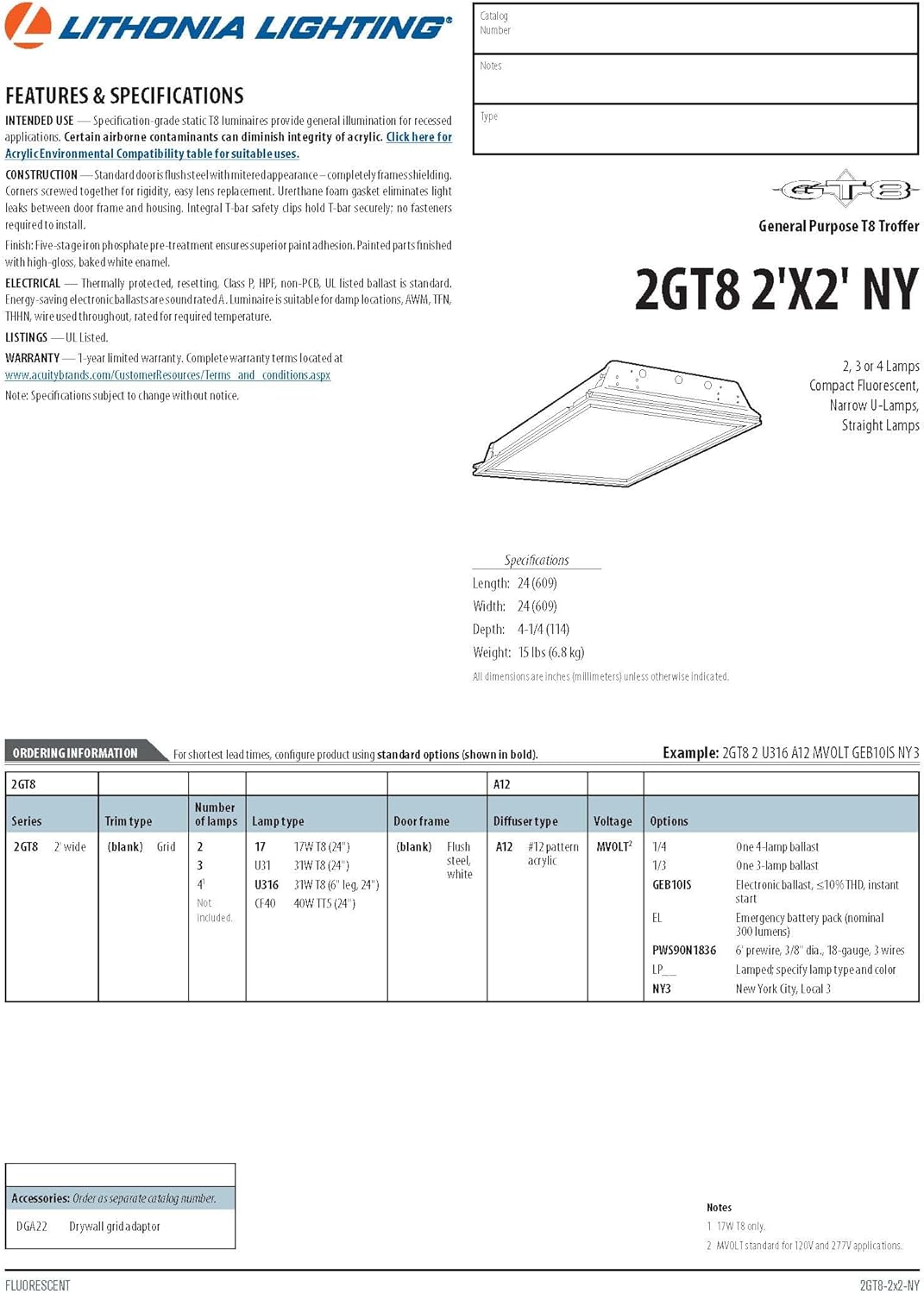
Image: A section of the Lithonia Lighting 2GT8 product datasheet, detailing features, specifications, and ordering information for various configurations of the 2GT8 series troffer, including the 2GT8 2 U316 A12 MVOLT GEB10IS model.
Warranty Information
This Lithonia Lighting product is covered by a 3-year limited warranty. This warranty covers defects in materials and workmanship under normal use. For specific terms and conditions, please refer to the official warranty documentation provided with your purchase or visit the Lithonia Lighting website.
Customer Support
For technical assistance, replacement parts, or warranty claims, please contact Lithonia Lighting customer support.
- Manufacturer: Acuity Brands Lighting Inc.
- Online Support: Visit the official Lithonia Lighting Store for more information and resources.


