
Product Overview
The Moen 104408 Commercial AC Adapter is designed to provide reliable power for Moen commercial faucet systems, specifically models 8306 and 8308. This multi-unit adapter delivers 7.5 Volts and 3.0 Amps, capable of powering up to 10 faucets simultaneously. It includes hardware for both wall and deck mounting, offering flexible installation options for various commercial and institutional environments.
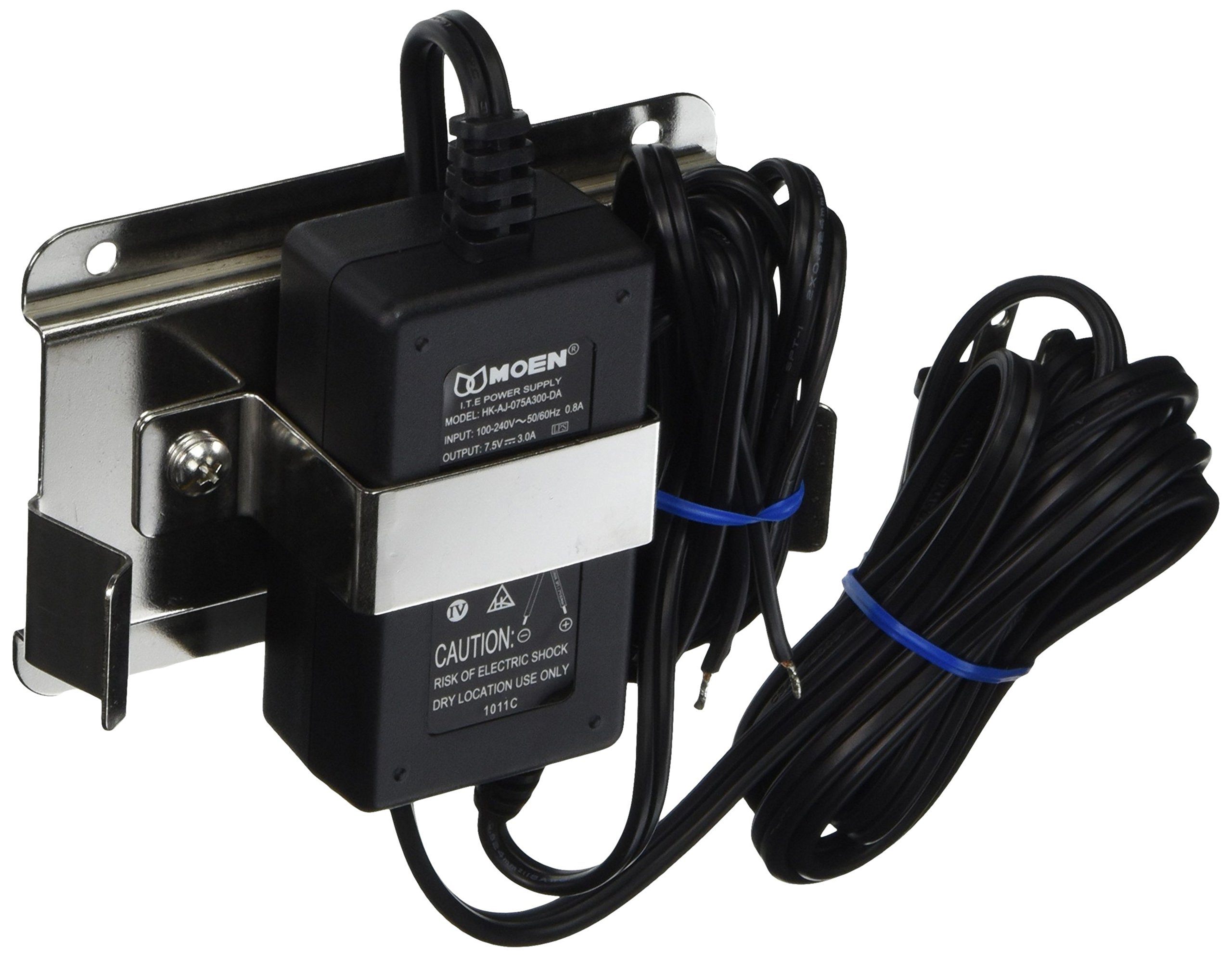
Image: Moen 104408 Commercial AC Adapter. This image shows the compact design of the adapter unit.
Safety Information
Please read all instructions carefully before installation and operation. Failure to follow these instructions may result in electric shock, fire, or other hazards. Keep this manual for future reference.
- Ensure the power supply is disconnected before any installation or maintenance.
- This adapter is designed for indoor use only.
- Do not expose the adapter to moisture or extreme temperatures.
- Use only with specified Moen commercial faucet models (8306, 8308).
- Do not attempt to open or repair the adapter. Refer to qualified service personnel.
Setup and Installation
The Moen 104408 adapter can be mounted on a wall or deck. Choose a location that is dry, protected from physical damage, and allows for proper ventilation.
Required Tools:
- Drill
- Screwdriver
- Measuring tape
- Pencil
Installation Steps:
- Select Mounting Location: Identify a suitable location near the faucets to be powered, ensuring the power cord can reach an outlet and the low-voltage cables can reach the faucets.
- Mark Mounting Holes: Use the adapter's mounting hardware as a template to mark the drill points on the wall or deck surface.
- Drill Pilot Holes: Drill pilot holes at the marked locations.
- Secure Adapter: Attach the adapter securely using the provided screws and mounting hardware.
- Connect Low-Voltage Cables: Connect the low-voltage cables from the faucets to the adapter's output terminals. Ensure correct polarity if applicable (refer to faucet manual). The adapter can power up to 10 faucets.
- Connect Power Cord: Plug the adapter's power cord into a standard electrical outlet.
- Test System: Verify that all connected faucets are functioning correctly.

Image: Example of commercial faucet installation in a laboratory setting. This image illustrates the type of environment where Moen commercial products are typically used.
Operating Instructions
The Moen 104408 AC Adapter operates automatically once connected to a power source and the faucets. It provides continuous low-voltage power to the connected Moen commercial faucets.
- Ensure the adapter is plugged into a functional electrical outlet.
- The adapter does not have an on/off switch; it is always active when plugged in.
- Faucets connected to the adapter will draw power as needed for their operation.
Maintenance
The Moen 104408 Commercial AC Adapter requires minimal maintenance. Regular inspection can help ensure its longevity and proper function.
- Cleaning: Wipe the exterior of the adapter with a dry, soft cloth. Do not use abrasive cleaners or solvents.
- Cable Inspection: Periodically check the power cord and low-voltage cables for any signs of damage, fraying, or wear. Replace damaged cables immediately.
- Ventilation: Ensure the adapter's ventilation openings are not obstructed to prevent overheating.
- Environmental Conditions: Confirm the adapter remains in a dry environment, free from excessive dust or humidity.
Troubleshooting
If you experience issues with your Moen 104408 Commercial AC Adapter, refer to the following common problems and solutions:
| Problem | Possible Cause | Solution |
|---|---|---|
| Faucets not receiving power. |
|
|
| Adapter feels hot. |
|
|
Specifications
| Feature | Detail |
|---|---|
| Model Number | 104408 |
| Brand | Moen |
| Manufacturer | Moen Incorporated |
| Output Voltage | 7.5 Volts |
| Amperage | 3.0 Amps |
| Wattage | 22.5 Watts |
| Power Source | Corded Electric |
| Item Weight | 1.35 pounds |
| Dimensions (L x W) | 4-3/4 inches x 3 inches (approximate) |
| Included Components | Multi-Unit Adapter, 7.5V, 3A, Wall/Deck Mounting Hardware |
| Special Features | Secure Mounting Assembly, Powers up to 10 faucets |
| Compatibility | Moen Commercial Faucet Models 8306, 8308 |
Warranty Information
The Moen 104408 Commercial AC Adapter is backed by a Lifetime Limited Warranty. This warranty covers defects in material and manufacturing workmanship under normal use. For full details regarding warranty coverage, limitations, and how to make a claim, please refer to the official Moen warranty documentation or contact Moen customer support.

Image: Shield icon with a checkmark, symbolizing product warranty and reliability.
Customer Support
For technical assistance, replacement parts, or warranty inquiries, please contact Moen Customer Support:
- Website: Visit the official Moen website for support resources and contact information.
- Phone: Refer to your product packaging or the Moen website for the appropriate customer service phone number.
When contacting support, please have your product model number (104408) and purchase date available.

Image: Headset icon, representing customer service and support availability.


