
1. Introduction and Overview
Thank you for choosing the OMNITRONIC C-50A active 2-way speaker pair. This manual provides essential information for the safe and efficient operation of your new speakers. The C-50A is a powerful active speaker system designed for fixed installations, featuring a 5-inch woofer and a 1-inch dome tweeter, delivering clear and robust sound. It includes a 2-way tone control and volume adjustment for optimal sound customization.

Figure 1.1: Front and side view of the OMNITRONIC C-50A active speaker.
2. Safety Instructions
Please read these safety instructions carefully before operating the device. Keep this manual for future reference.
- Power Supply: Ensure the power supply voltage matches the rating on the device. Always connect to a grounded outlet.
- Moisture and Heat: Do not expose the speakers to rain, moisture, or excessive heat sources. Operate only in dry environments.
- Ventilation: Ensure adequate ventilation around the speakers. Do not block ventilation openings.
- Handling: Handle the speakers with care. Avoid dropping or subjecting them to strong impacts.
- Cleaning: Disconnect from power before cleaning. Use a dry, soft cloth. Do not use liquid cleaners.
- Servicing: Refer all servicing to qualified service personnel. Do not attempt to repair the device yourself.
- Placement: Place speakers on a stable surface or mount securely using the provided brackets.
3. Package Contents
Upon unpacking, please verify that all items listed below are present and in good condition.
- 2 x OMNITRONIC C-50A Active Speakers
- 2 x Mounting Brackets
- 1 x Power Cable (for each speaker)
- 1 x User Manual (this document)

Figure 3.1: OMNITRONIC C-50A speaker shown with its included mounting bracket.
4. Setup
4.1 Physical Installation
The OMNITRONIC C-50A speakers are designed for fixed installation and come with versatile mounting brackets.
- Choose Location: Select a suitable location for installation, ensuring the surface or wall can support the weight of the speaker. Consider optimal sound dispersion.
- Attach Bracket: Secure the mounting bracket to the desired surface using appropriate screws and anchors (not included). Ensure it is firmly attached.
- Mount Speaker: Attach the speaker to the bracket. The bracket allows for angle adjustment to direct sound as needed. Tighten all fasteners to secure the speaker in place.

Figure 4.1: Angled view of the speaker, highlighting its design suitable for mounting.
4.2 Connections
The C-50A features balanced XLR input and output connections for professional audio integration.
- Audio Input: Connect your audio source (e.g., mixer, audio interface) to the Input XLR jack on the rear panel of the active speaker.
- Audio Output (Daisy Chain): If connecting multiple active speakers, use the Output XLR jack to send the audio signal to the next speaker.
- Power Connection: Connect the provided power cable to the AC inlet on the rear panel and then to a suitable grounded power outlet.
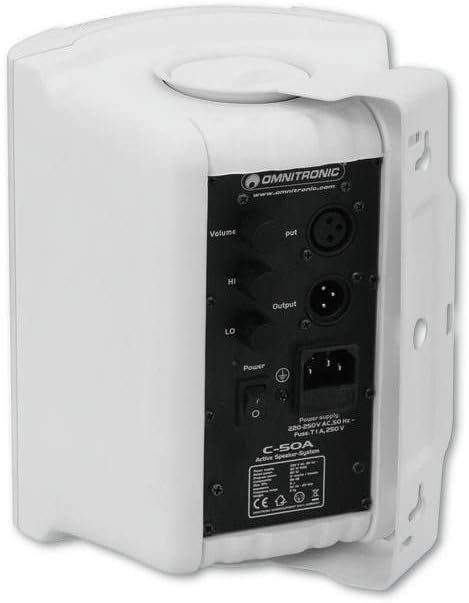
Figure 4.2: Rear panel connections including Volume, HI, LO, Input, Output, and Power switch.
5. Operating the Speakers
5.1 Powering On/Off
After all connections are made, you can power on your speakers.
- Ensure the Volume knob is set to its minimum position before powering on.
- Flip the Power switch on the rear panel to the 'ON' position. The power indicator LED will illuminate.
- To power off, first reduce the volume, then flip the Power switch to 'OFF'.
5.2 Adjusting Volume and Tone
The C-50A speakers feature controls for overall volume and a 2-band equalizer for tone shaping.
- Volume: Rotate the Volume knob clockwise to increase the overall output level. Adjust to a comfortable listening level.
- HI (High Frequency): Use the HI knob to boost or cut the high frequencies. Turn clockwise for more treble, counter-clockwise for less.
- LO (Low Frequency): Use the LO knob to boost or cut the low frequencies. Turn clockwise for more bass, counter-clockwise for less.

Figure 5.1: Detailed view of the Volume, HI, and LO control knobs on the rear panel.
6. Maintenance
Proper maintenance ensures the longevity and optimal performance of your OMNITRONIC C-50A speakers.
- Cleaning: Regularly wipe the exterior of the speakers with a soft, dry, lint-free cloth. Do not use abrasive cleaners, waxes, or solvents.
- Dust: Use a soft brush or vacuum cleaner with a brush attachment to gently remove dust from the speaker grilles and ventilation openings.
- Storage: If storing the speakers for an extended period, disconnect them from power, clean them, and store them in a cool, dry place, ideally in their original packaging.
- Inspection: Periodically check all cables and connections for any signs of wear or damage. Replace damaged cables immediately.
7. Troubleshooting
If you encounter issues with your OMNITRONIC C-50A speakers, refer to the table below for common problems and their solutions.
| Problem | Possible Cause | Solution |
|---|---|---|
| No sound output | No power; Volume too low; Incorrect input connection; Faulty cable. | Check power cable and outlet; Ensure power switch is ON; Increase Volume; Verify XLR input connection; Test with a different cable. |
| Distorted sound | Input signal too high; Volume too high; Damaged speaker component. | Reduce input signal level from source; Lower speaker Volume; If distortion persists, contact service. |
| Humming or buzzing noise | Ground loop; Interference from other electronics; Loose cable connection. | Ensure all equipment is on the same power circuit; Try different outlets; Check all cable connections; Use balanced XLR cables. |
| Power indicator not lit | No power; Blown fuse. | Check power cable and outlet; Check the fuse on the rear panel (refer to specifications for fuse type) and replace if necessary. |
8. Technical Specifications
Detailed specifications for the OMNITRONIC C-50A active speaker.
| Feature | Specification |
|---|---|
| Model Number | 11036717 |
| Speaker Type | Active 2-way speaker system |
| Woofer Size | 5 inches (13 cm) |
| Tweeter Size | 1 inch (2.5 cm) dome tweeter |
| Maximum Output Power | 80 Watts |
| Connectivity Technology | XLR (Input/Output) |
| Power Supply | 220-230V AC, 50 Hz |
| Fuse | T 1 A, 250 V |
| Product Dimensions (L x W x H) | 28 x 21 x 37.5 cm |
| Item Weight | 6.75 Kilograms |
| Mounting Type | Tabletop / Wall Mount (with included bracket) |
9. Warranty and Support
OMNITRONIC products are manufactured with high-quality standards and come with a standard manufacturer's warranty. For specific warranty terms and conditions, please refer to the warranty card included with your product or visit the official OMNITRONIC website.
For technical support, spare parts, or service inquiries, please contact your local OMNITRONIC dealer or visit the official OMNITRONIC store online:OMNITRONIC Store on Amazon.de

Figure 9.1: OMNITRONIC brand logo.

