
1. Introduction
The Beseler CS-21 Digital/Photo & Video Copy Stand provides a stable and precise platform for capturing high-quality digital images, photographs, and videos of documents, artwork, and small objects. Its robust construction ensures minimal vibration, which is crucial for achieving sharp results.
This system features an upgraded counterbalance suitable for cameras and digital backs weighing up to 16 pounds. It incorporates a rigid twin E-channel center-braced column for enhanced stability. A rack and pinion elevation system allows for easy and precise camera positioning along the 44-inch tall column.
The column is securely mounted to a 22x28-inch baseboard, accommodating copy sizes up to 20x20 inches. The camera platform bracket offers three-axis lateral adjustments for accurate alignment of your camera with the subject.
2. What's in the Box
Please verify that all components are present before beginning assembly:
- Center Column
- Baseboard (22 x 28 inches)
- Camera Platform Bracket
- Mounting Hardware (bolts, washers, nuts)
3. Setup Instructions
Follow these steps to assemble your Beseler CS-21 Copy Stand:
- Attach the Column to the Baseboard: Carefully align the base of the center column with the pre-drilled holes on the 22x28 inch baseboard. Secure the column using the provided bolts, washers, and nuts. Ensure all fasteners are tightened securely to prevent any movement or instability.
- Install the Camera Platform Bracket: Slide the camera platform bracket onto the column. The rack and pinion mechanism should engage smoothly. Position the bracket at a convenient height for initial camera mounting.
- Mount Your Camera: Attach your digital, photo, or video camera to the camera platform bracket using the standard tripod screw. Ensure the camera is securely fastened and balanced on the platform.
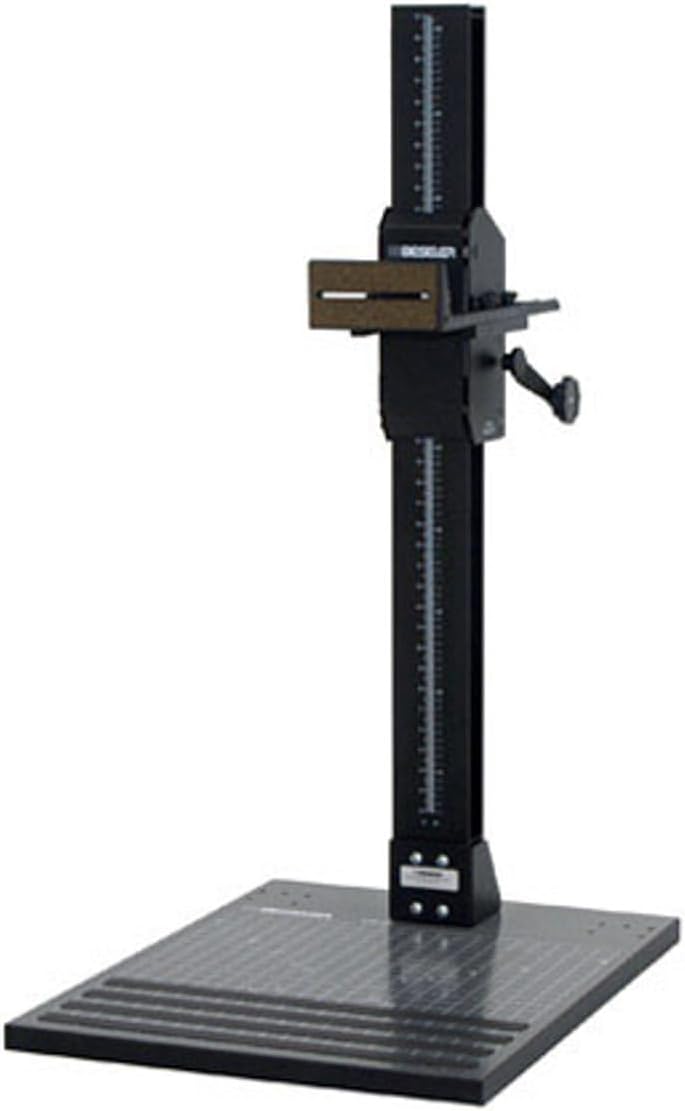
Figure 3.1: An overview of the fully assembled Beseler CS-21 Copy Stand, showing the robust column, camera platform, and large baseboard.

Figure 3.2: A close-up of the sturdy connection between the main column and the 22x28 inch baseboard, highlighting the stability features.
4. Operating Instructions
To achieve optimal results with your copy stand, follow these operational guidelines:
- Adjusting Camera Height: Use the crank handle on the camera platform bracket to raise or lower your camera. The rack and pinion system allows for smooth and precise vertical positioning. Turn the crank clockwise to raise the camera and counter-clockwise to lower it.
- Lateral Adjustments: The camera platform bracket features three-axis lateral adjustments. These allow you to fine-tune the camera's position horizontally and for minor rotational adjustments to ensure perfect alignment with your subject on the baseboard. Loosen the appropriate locking knobs, make your adjustments, and then re-tighten the knobs to secure the position.
- Subject Placement: Place your document, artwork, or object centrally on the baseboard. Ensure it is flat and well-lit.
- Focus and Capture: Once the camera is positioned and aligned, use your camera's focusing mechanism to achieve sharp focus on your subject. Proceed with capturing your image or video.

Figure 4.1: A detailed view of the camera mounting platform and the rack and pinion adjustment crank, illustrating how the camera height is controlled.
5. Maintenance
Regular maintenance will ensure the longevity and optimal performance of your Beseler CS-21 Copy Stand:
- Cleaning: Wipe down the column, baseboard, and camera platform with a soft, dry cloth to remove dust and debris. For stubborn marks, a slightly damp cloth can be used, followed by immediate drying. Avoid abrasive cleaners or solvents.
- Inspection: Periodically check all fasteners (bolts, screws, knobs) to ensure they remain tight. Re-tighten any loose components to maintain stability.
- Lubrication: The rack and pinion mechanism is designed for smooth operation. If you notice any stiffness, a small amount of dry lubricant (e.g., silicone spray) can be applied to the gear teeth, wiping away any excess.
6. Troubleshooting
Here are solutions to common issues you might encounter:
- Camera Shake/Unstable Images:
- Ensure all column-to-baseboard fasteners are securely tightened.
- Verify the camera is firmly mounted to the platform bracket.
- Check that the camera platform bracket's locking knob is tight after height adjustment.
- Difficulty Adjusting Camera Height:
- Ensure the rack and pinion mechanism is free of obstructions.
- Apply a small amount of dry lubricant if the movement is stiff (refer to Maintenance section).
- Camera Not Centered Over Subject:
- Utilize the three-axis lateral adjustments on the camera platform bracket to fine-tune alignment.
- Ensure the baseboard itself is level on your workspace.
7. Specifications
| Feature | Specification |
|---|---|
| Product Dimensions (Overall) | 44 x 22 x 8 inches |
| Item Weight | 51.4 pounds |
| Maximum Camera Weight Capacity | Up to 16 pounds |
| Column Height | 44 inches |
| Baseboard Dimensions | 22 x 28 inches |
| Maximum Recommended Copy Size | 20 x 20 inches |
| Manufacturer | Beseler |
8. Warranty Information
This product is covered by the manufacturer's standard warranty. Please refer to the warranty card included with your purchase or visit the official Beseler website for detailed terms and conditions regarding coverage, duration, and claims procedures.
9. Customer Support
For technical assistance, spare parts, or any questions not covered in this manual, please contact Beseler customer support. Contact information can typically be found on the manufacturer's website or on the product packaging.