
Introduction
This manual provides essential instructions for the safe and efficient operation of your Imation Memorex Mi9490P High-Fidelity Sound System. Please read this manual thoroughly before using the device and retain it for future reference.
The Memorex Mi9490P is designed to deliver high-fidelity audio playback and charging capabilities for compatible Apple iPod and iPhone devices, alongside CD playback and FM radio functionality.
Important Safety Instructions
- Do not expose this appliance to rain or moisture.
- Do not block any ventilation openings.
- Do not install near any heat sources such as radiators, heat registers, stoves, or other apparatus (including amplifiers) that produce heat.
- Protect the power cord from being walked on or pinched.
- Only use attachments/accessories specified by the manufacturer.
- Unplug this appliance during lightning storms or when unused for long periods of time.
- Refer all servicing to qualified service personnel.
Package Contents
Verify that all items are present in the package:
- Memorex Mi9490P High-Fidelity Sound System
- Power Adapter
- Remote Control
- User Manual (this document)
- Docking Adapters for various iPod/iPhone models
Setup
1. Unpacking and Placement
Carefully remove the unit from its packaging. Place the sound system on a stable, flat surface away from direct sunlight, heat sources, and moisture. Ensure adequate ventilation around the unit.
2. Power Connection
- Connect the power adapter cable to the DC IN jack on the rear of the Mi9490P unit.
- Plug the power adapter into a standard AC wall outlet.
- The unit will enter standby mode.
3. Inserting Batteries into Remote Control
Open the battery compartment on the back of the remote control and insert two AAA batteries (not included), observing the correct polarity (+/-). Close the compartment securely.
4. Docking an iPod/iPhone
Select the appropriate docking adapter for your specific iPod or iPhone model. Insert the adapter into the docking station on the Mi9490P. Gently place your iPod or iPhone onto the docking connector. The device will begin charging and can be used for audio playback.
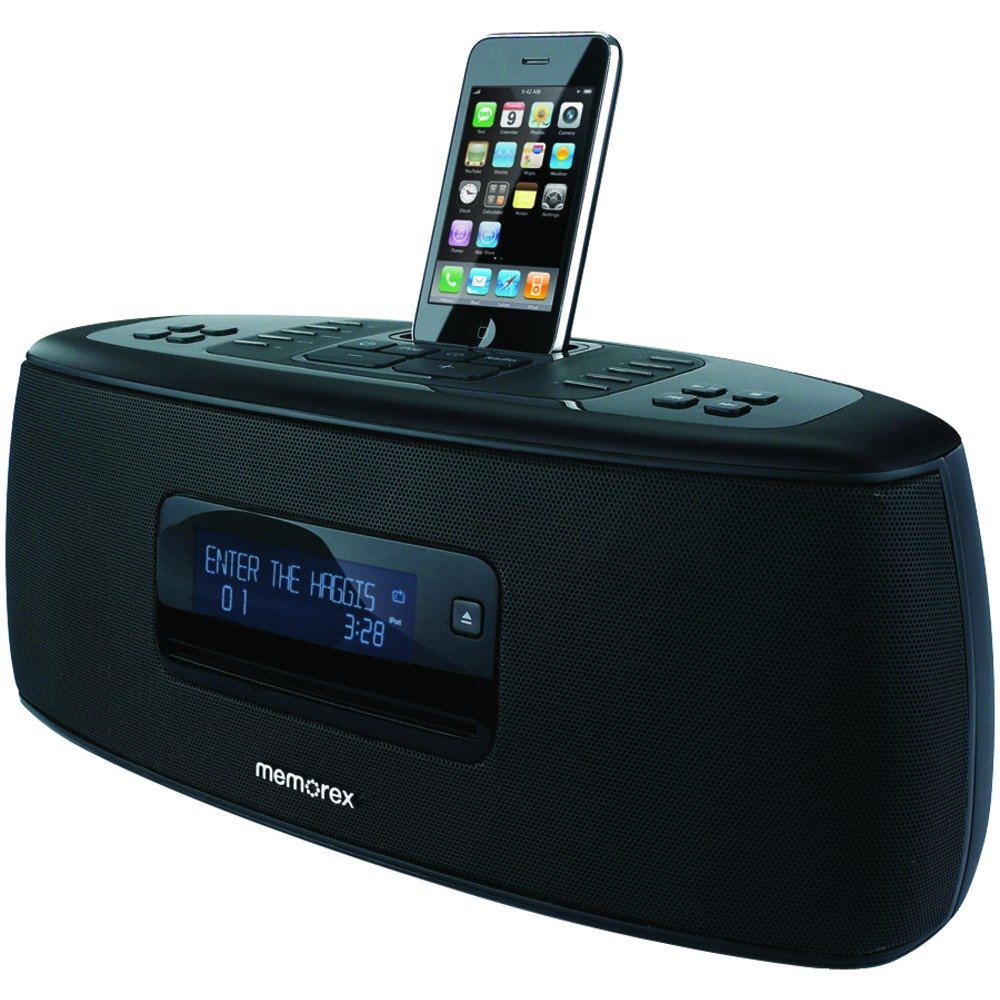
Image: Front view of the Memorex Mi9490P High-Fidelity Sound System. An iPhone is shown docked in the center, illustrating the charging and playback function. The unit features a central display, control buttons on top, and speaker grilles on either side.
Operating Instructions
1. Power On/Off
Press the POWER button on the unit or remote control to turn the system on or off (standby mode).
2. Source Selection
Press the SOURCE button repeatedly to cycle through available input modes: iPod/iPhone, CD, FM Radio, Auxiliary Input.
3. iPod/iPhone Playback and Charging
- Once docked and the source is selected, your iPod/iPhone will begin charging.
- Audio playback will automatically start or can be controlled via the device or the Mi9490P's remote control.
- ID3 tag information (song title, artist) will be displayed on the unit's LCD screen.
4. CD Player Operation
- Select the CD source.
- Insert a CD or CD-R/RW disc into the front slot-loading CD player with the label side facing up.
- The disc will load automatically, and playback should begin.
- Use the PLAY/PAUSE, STOP, SKIP, and SEARCH buttons on the unit or remote for control.
5. FM Radio Operation
- Select the FM source.
- Press the TUNE +/- buttons to manually tune to a station.
- Press and hold TUNE +/- to automatically scan for the next available station.
- To save a preset: Tune to the desired station, then press PRESET, use TUNE +/- to select a preset number, and press PRESET again to confirm.
- To recall a preset: Press PRESET repeatedly or use the number buttons on the remote.
6. Auxiliary Input
Connect an external audio device (e.g., MP3 player, computer) to the AUX IN jack on the unit using a 3.5mm audio cable (not included). Select the AUX source. Audio playback will be controlled from the connected external device.
7. Volume Control
Use the VOLUME +/- buttons on the unit or remote control to adjust the sound level.
Maintenance
Cleaning the Unit
Wipe the exterior of the unit with a soft, dry cloth. Do not use abrasive cleaners, waxes, or solvents as they may damage the finish. Ensure the unit is unplugged before cleaning.
CD Player Care
Handle CDs by their edges. Keep discs clean and free of scratches. If a disc is dirty, wipe it gently with a soft, lint-free cloth from the center outwards. Do not use solvents or abrasive cleaners on discs.
Battery Replacement (Remote Control)
Replace the remote control batteries when its operating range decreases or it stops responding. Use two fresh AAA batteries, ensuring correct polarity.
Troubleshooting
| Problem | Possible Cause | Solution |
|---|---|---|
| No power | Power cord not securely connected. | Check power cord connection to the unit and wall outlet. |
| No sound | Volume too low; incorrect source selected; device not properly docked/connected. | Increase volume; select correct source; ensure iPod/iPhone is seated correctly or AUX cable is fully inserted. |
| iPod/iPhone not charging or playing | Incorrect docking adapter; device not seated properly; software incompatibility. | Ensure correct adapter is used and device is firmly seated. Note: Older models may not be compatible with newer iOS versions. |
| CD skipping or not playing | Dirty or scratched disc; disc inserted incorrectly. | Clean disc; ensure disc is inserted label-side up; try a different disc. |
| Poor FM reception | Weak signal; antenna not extended. | Adjust the position of the unit; extend the FM wire antenna fully. |
| Remote control not working | Batteries depleted or inserted incorrectly; obstruction between remote and unit. | Replace batteries, check polarity; remove obstructions; ensure remote is pointed at the unit's sensor. |
Specifications
- Model: Mi9490P (1831)
- Brand: Imation / Memorex
- Compatibility: iPod mini, iPod nano (1st, 2nd, 3rd, 4th Gen), iPod classic (4th, 5th, 5.5th, 6th Gen), iPod touch (1st, 2nd Gen), iPhone (1st, 3G). Note: Compatibility with newer iOS versions or iPhone models may vary.
- Audio Output: 30 Watts
- CD Player: Front slot-loading, supports CD, CD-R/RW
- Radio: FM with user presets
- Inputs: 3.5mm Auxiliary Audio Input, iPod/iPhone Dock
- Hardware Interface: 3.5mm Audio
- Number of Ports: 2 (Dock, Aux In)
- Power: AC Adapter (external)
- Dimensions (approx.): 25.4 cm (W) x 17.78 cm (D) x 12.7 cm (H)
- Weight (approx.): 2.72 kg
- Color: Black
- GTIN/UPC: 749720018314
Warranty Information
This product is covered by a limited manufacturer's warranty. Please refer to the warranty card included in your original packaging for specific terms, conditions, and duration. Retain your proof of purchase for warranty claims.
The warranty typically covers defects in materials and workmanship under normal use. It does not cover damage caused by misuse, accident, unauthorized modification, or external causes such as power surges.
Customer Support
For technical assistance, troubleshooting beyond this manual, or warranty inquiries, please contact Imation customer support.
Please have your product model number (Mi9490P or 1831) and proof of purchase ready when contacting support.
Contact information for Imation support may be found on their official website or in the original product packaging.