
Aroma AMT-530 Clip Tuner Metronome
User Manual
Introduction
Thank you for purchasing the Aroma AMT-530 Clip Tuner Metronome. This compact and versatile device is designed to assist musicians in tuning various instruments and maintaining precise rhythm during practice. It combines a highly accurate tuner with a functional metronome, all in a convenient clip-on design.
Please read this manual carefully to understand the features and operation of your AMT-530.
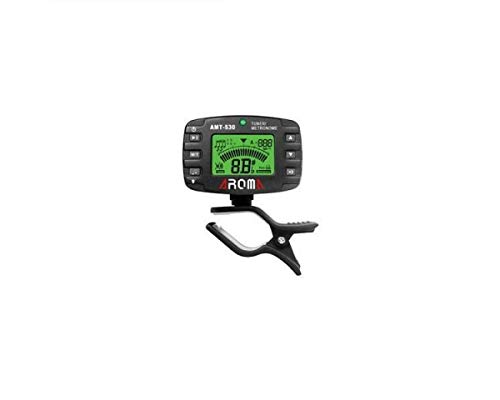
Image: Front view of the Aroma AMT-530 Clip Tuner Metronome, showing the display and control buttons.
Product Features
- Tuning Modes: Chromatic (C), Guitar (G), Bass (B), Ukulele (U), Violin (V).
- Detection Range: A0 (27.5Hz) – C8 (4186.00Hz).
- Tuning Type: Clip (vibration sensor).
- Pitch Base: 430 Hz – 450 Hz.
- Tuning Accuracy: ± 0.5 cent.
- Display: Two-color backlight for improved readability.
- Functions: Tuner and Metronome.
Setup
1. Battery Installation
The AMT-530 typically uses a CR2032 coin cell battery. To install or replace the battery:
- Locate the battery compartment on the back of the unit.
- Open the compartment cover.
- Insert a new CR2032 battery with the positive (+) side facing up.
- Close the battery compartment cover securely.
2. Powering On/Off
Press and hold the Power button (usually located on the top left) for a few seconds to turn the device on or off.
3. Attaching to Instrument
The AMT-530 features a clip-on design. Attach the clip securely to the headstock of your instrument (for tuning) or to a music stand/sheet music (for metronome use). Ensure the display is visible for easy reading.
Operating Instructions
Tuner Mode
In Tuner Mode, the device detects the vibration of your instrument to display the note and indicate whether it is sharp, flat, or in tune.
- Select Mode: Press the M/T button (Mode/Tuner) to switch to Tuner Mode. The display will show "TUNER".
- Select Instrument: Repeatedly press the Tuning Item button (often labeled with a musical note icon) to cycle through the available tuning items: Chromatic (C), Guitar (G), Bass (B), Ukulele (U), Violin (V). Select the appropriate setting for your instrument.
- Adjust Pitch Base (A4): Press the A4 button (often labeled with a speaker icon or A4) to adjust the A4 reference pitch, typically from 430 Hz to 450 Hz. The standard is 440 Hz.
- Tune Your Instrument: Pluck a single string on your instrument. The display will show the detected note and a meter indicating if the note is flat, sharp, or in tune.
- If the backlight is red and the needle is to the left, the note is flat.
- If the backlight is red and the needle is to the right, the note is sharp.
- If the backlight is green and the needle is in the center, the note is in tune.

Image: The AMT-530 display showing tuner mode, indicating a note and the A4 reference pitch, clipped to a guitar headstock.
Metronome Mode
In Metronome Mode, the device provides a steady beat to help you practice rhythm and timing.
- Select Mode: Press the M/T button to switch to Metronome Mode. The display will show "METRONOME".
- Adjust Tempo (BPM): Use the Up/Down arrow buttons (often on the right side) to adjust the Beats Per Minute (BPM).
- Select Beat: Press the Beat button (often labeled with a time signature icon) to cycle through different beat patterns (e.g., 1/4, 2/4, 3/4, 4/4, etc.).
- Select Rhythm: Press the Rhythm button (often labeled with a note value icon) to choose different rhythmic subdivisions (e.g., quarter notes, eighth notes, triplets).
- Start/Stop Metronome: Press the Play/Pause button (often a triangle icon) to start or stop the metronome click.

Image: The AMT-530 display showing metronome mode, with BPM and beat pattern visible.
Backlight
The AMT-530 features a two-color backlight (red/green) for clear visibility in various lighting conditions. The backlight color changes in tuner mode to indicate tuning status.
Maintenance
- Cleaning: Use a soft, dry cloth to clean the device. Do not use liquid cleaners or abrasive materials.
- Storage: Store the AMT-530 in a cool, dry place away from direct sunlight and extreme temperatures.
- Battery: If the device will not be used for an extended period, remove the battery to prevent leakage.
- Handling: Avoid dropping the device or subjecting it to strong impacts.
Troubleshooting
- Device does not power on:
- Check if the battery is installed correctly with the correct polarity.
- Replace the battery with a new CR2032 battery.
- Tuner is not detecting notes accurately:
- Ensure the tuner is securely clipped to the instrument's headstock or a part that vibrates well.
- Check for excessive background noise that might interfere with vibration detection.
- Verify that the correct tuning item (C, G, B, U, V) is selected for your instrument.
- Metronome sound is too low or absent:
- Ensure the volume is not set to minimum (if applicable, though not explicitly mentioned for this model, it's a common feature).
- The metronome primarily provides a visual beat on the display; audible clicks might be subtle or absent depending on the model's design.
Specifications
| Feature | Detail |
|---|---|
| Model | AMT-530 |
| Brand | Aroma Housewares (AROMA) |
| Tuning Items | Chromatic (C), Guitar (G), Bass (B), Ukulele (U), Violin (V) |
| Detection Range | A0 (27.5Hz) – C8 (4186.00Hz) |
| Tuning Type | Clip (vibration) |
| Pitch Base (A4) | 430 Hz – 450 Hz |
| Tuning Accuracy | ± 0.5 cent |
| Part Number | 6943207680078 |
| ASIN | B002BFKV10 |
Warranty and Support
For warranty information or technical support, please refer to the documentation provided with your purchase or contact Aroma Housewares customer service directly. Keep your proof of purchase for any warranty claims.