
Instruction Manual: Vista Pro 300 Watt Direct Bury Transformer ITT 300
Model: ITT 300
1. Introduction
This manual provides essential information for the safe installation, operation, and maintenance of your Vista Pro 300 Watt Direct Bury Transformer ITT 300. Please read these instructions thoroughly before beginning installation or use to ensure proper function and safety.
1.1 Safety Information
- Always disconnect power at the main circuit breaker before installing or servicing the transformer.
- Installation must comply with all local electrical codes and regulations. If unsure, consult a qualified electrician.
- This transformer is designed for direct burial. Ensure all connections are waterproof and sealed according to instructions.
- Do not exceed the maximum wattage rating of 300 watts. Overloading can cause damage and fire hazards.
- Keep children and pets away from the installation area during setup.
- Do not attempt to modify or repair the transformer. Refer all servicing to qualified personnel.
2. Product Overview
The Vista Pro 300 Watt Direct Bury Transformer ITT 300 is a robust, low-voltage transformer designed for outdoor landscape lighting applications. Its direct bury design allows for discreet and secure underground installation, protecting it from environmental elements.
2.1 Key Features
- 300 Watt Capacity: Provides ample power for a wide range of low-voltage lighting fixtures.
- Direct Bury Design: Engineered for safe and reliable underground installation.
- Durable Construction: Built to withstand outdoor conditions and provide long-lasting performance.
- Low Voltage Output: Converts standard line voltage to safe low voltage for landscape lighting.
2.2 Product Components
The package typically includes the following:
- Vista Pro 300 Watt Direct Bury Transformer ITT 300 unit
- Installation instructions (this manual)
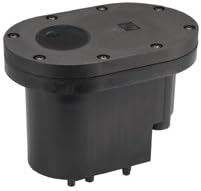
Figure 1: Vista Pro 300 Watt Direct Bury Transformer ITT 300. This image displays the compact, black casing of the Vista Pro 300 Watt Direct Bury Transformer, designed for underground installation. The top surface features a sealed cover with screw fasteners, indicating its weather-resistant construction.
3. Setup and Installation
Proper installation is crucial for the safe and efficient operation of your direct bury transformer.
3.1 Site Preparation
- Choose Location: Select a location that is easily accessible for future maintenance but discreet for aesthetic purposes. Ensure it is away from heavy foot traffic or areas prone to standing water.
- Dig Trench: Dig a trench of appropriate depth (consult local codes, typically 6-12 inches) for the low-voltage cable run from the transformer to your lighting fixtures.
- Dig Hole for Transformer: Dig a hole large enough to accommodate the transformer unit, ensuring it can be buried completely with its top flush with or slightly below ground level. Ensure proper drainage.
3.2 Wiring Instructions
WARNING: Ensure power is OFF at the circuit breaker before proceeding with any wiring.
- Connect Input Power: Connect the main power supply (120V AC) to the transformer's input terminals. Use appropriate wire connectors and ensure all connections are secure and waterproof.
- Connect Low Voltage Output: Connect your low-voltage landscape lighting cables to the transformer's output terminals. Ensure correct polarity if specified by your lighting fixtures.
- Seal Connections: Use waterproof wire nuts, silicone sealant, or heat-shrink tubing to ensure all electrical connections are completely sealed from moisture. This is critical for direct bury applications.
- Test Connections: Before final burial, temporarily restore power to test the lighting system. Verify all lights illuminate correctly. Disconnect power again before proceeding.
3.3 Burial
- Position Transformer: Carefully place the transformer into the prepared hole, ensuring it is level and stable.
- Backfill: Backfill the hole with soil, ensuring the transformer is completely covered and the top is flush with the ground. Compact the soil gently around the unit.
- Route Cables: Ensure low-voltage cables are properly routed in the trench and buried to the recommended depth.
4. Operation
Once installed and wired, operating the Vista Pro 300 Watt Direct Bury Transformer ITT 300 is straightforward.
4.1 Powering On
- After completing installation and ensuring all connections are secure and buried, restore power at the main circuit breaker.
- The transformer will immediately begin converting line voltage to low voltage, powering your connected landscape lights.
4.2 Usage
This transformer typically operates continuously when power is supplied. For automated control of your lighting system, consider integrating external timers or photocells with your low-voltage lighting circuit, if not already built into your fixtures.
5. Maintenance
Regular maintenance helps ensure the longevity and optimal performance of your transformer.
- Periodic Inspection: Annually inspect the area around the transformer for any signs of damage, exposed wiring, or excessive moisture.
- Cleanliness: Keep the area around the transformer clear of debris, leaves, and excessive vegetation to prevent overheating and ensure proper ventilation (if applicable for the top surface).
- Connection Check: If accessible, periodically check the integrity of the wiring connections, ensuring they remain tight and waterproof.
- Avoid Overloading: Do not add more lighting fixtures than the transformer's 300-watt capacity allows.
6. Troubleshooting
If you encounter issues with your transformer, refer to the following table for common problems and solutions.
| Problem | Possible Cause | Solution |
|---|---|---|
| Lights not turning on. | No power to transformer; tripped circuit breaker; loose wiring connections; faulty light fixture. | Check circuit breaker; ensure power is supplied; inspect and tighten all wiring connections; test individual light fixtures. |
| Lights flickering or dim. | Overloaded transformer; voltage drop due to long wire runs or undersized wire; loose connections. | Reduce total wattage of connected lights; use heavier gauge wire for longer runs; check and secure all connections. |
| Transformer making unusual noises. | Internal fault; severe overloading. | Immediately disconnect power. Do not attempt to repair. Contact customer support. |
If the problem persists after attempting these solutions, contact customer support or a qualified electrician.
7. Specifications
| Attribute | Detail |
|---|---|
| Brand | Vista Pro |
| Model | ITT 300 |
| Wattage | 300 watts |
| Input Voltage | Standard Line Voltage (e.g., 120V AC) |
| Output Voltage | Low Voltage (e.g., 12V AC) |
| Material | Glass (as per product data, likely referring to internal components or a specific part, while casing is likely plastic/metal) |
| Finish | Black |
| Installation Type | Direct Bury |
| ASIN | B002AY6KEE |
8. Warranty and Support
Specific warranty details for the Vista Pro 300 Watt Direct Bury Transformer ITT 300 are not provided in this manual. Please refer to the product packaging or the manufacturer's official website for the most current warranty information.
For technical support, replacement parts, or further assistance, please contact Vista Pro customer service through their official channels. When contacting support, please have your product model (ITT 300) and ASIN (B002AY6KEE) available.
Manufacturer: Vista


