
Vista Pro MT 600 T
Vista Pro 600 Watt Multi Transformer with Mechanical Timer MT 600T User Manual
Model: MT 600 T
Product Overview
The Vista Pro 600 Watt Multi Transformer with Mechanical Timer (Model MT 600T) is designed to provide reliable low-voltage power for landscape lighting systems. It features a robust steel construction and an integrated mechanical timer for automated operation.
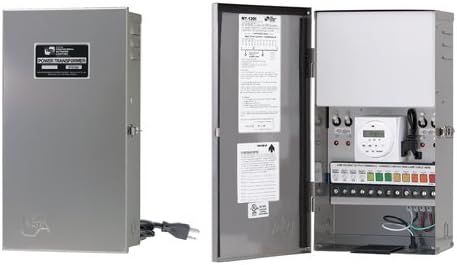
Image: The Vista Pro 600 Watt Multi Transformer. The left side shows the closed, gray steel enclosure with a "POWER TRANSFORMER" label. The right side shows the transformer with its door open, revealing the internal components including a mechanical timer, terminal blocks for wiring, and various controls. This view highlights the sturdy construction and the accessible internal layout for installation and operation.
Safety Information
WARNING:
- Always disconnect power before installing or servicing the transformer.
- Installation must be performed by a qualified electrician in accordance with all local and national electrical codes.
- Do not immerse the transformer in water. Ensure it is installed in a location protected from direct water exposure.
- Ensure the total wattage of connected fixtures does not exceed the transformer's maximum output (600 watts).
- Use only low-voltage landscape lighting cables and connectors.
Setup and Installation
1. Mounting the Transformer
The MT 600T transformer is designed for wall mounting. Choose a secure, vertical surface near a 120V AC power outlet. Ensure the mounting location is protected from direct weather exposure, such as under an eave or in a sheltered area.
- Mark the desired mounting points on the wall using the transformer's mounting holes as a template.
- Drill pilot holes if necessary and secure the transformer using appropriate screws or anchors for your wall type.
- Ensure the transformer is level and securely fastened to prevent accidental dislodgement.
2. Wiring the Low-Voltage Output
The transformer features multiple low-voltage output terminals. Connect your landscape lighting cables to these terminals.
- Strip approximately 1/2 inch of insulation from the ends of your low-voltage cables.
- Loosen the terminal screws on the desired output terminals (e.g., 12V, 14V, 15V, depending on your fixture requirements).
- Insert the bare wire ends into the terminals and tighten the screws firmly to ensure a secure connection.
- Ensure all connections are tight and no bare wires are exposed that could short circuit.
3. Connecting to Power
The transformer comes with a pre-attached 120V power cord.
- Plug the transformer's power cord into a grounded 120V AC outlet.
- Verify that the outlet is protected by a Ground Fault Circuit Interrupter (GFCI) for outdoor installations.
Operating Instructions
Setting the Mechanical Timer
The MT 600T includes a mechanical timer to automate your lighting system's operation.
- Set Current Time: Rotate the outer dial of the timer clockwise until the current time aligns with the arrow indicator. The dial is marked with 24-hour increments (e.g., 18 for 6 PM).
- Set ON/OFF Times: The timer has small, push-in/pull-out pins around its circumference. Each pin represents a specific time interval (e.g., 15 minutes).
- To set an "ON" period, push the pins inwards for the desired duration.
- To set an "OFF" period, pull the pins outwards for the desired duration.
- Manual Override: The timer typically has a manual override switch (often labeled "ON," "AUTO," "OFF"). Set this switch to "AUTO" for timer-controlled operation. You can switch to "ON" for continuous power or "OFF" to cut power manually.
Testing the System
After setting up the timer and connecting all fixtures:
- Ensure the timer is set to "AUTO" or "ON" for testing.
- Verify that all connected low-voltage lights illuminate correctly.
- If any lights do not work, check wiring connections and bulb integrity.
Maintenance
Regular maintenance ensures the longevity and optimal performance of your Vista Pro transformer.
- Periodic Inspection: Annually inspect the transformer and all wiring for signs of wear, damage, or corrosion. Check for loose connections.
- Cleaning: Keep the transformer's exterior clean and free of debris. Use a soft, dry cloth. Do not use abrasive cleaners or solvents.
- Ventilation: Ensure the transformer's ventilation openings are not obstructed to prevent overheating.
- Timer Battery (if applicable): Some mechanical timers may have a small internal battery for timekeeping during power outages. Consult the timer's specific instructions if it has such a feature and requires battery replacement.
Troubleshooting
| Problem | Possible Cause | Solution |
|---|---|---|
| Lights not turning on. |
|
|
| Lights flickering or dim. |
|
|
| Timer not working correctly. |
|
|
Specifications
- Model: MT 600 T
- Brand: Vista Pro
- Input Voltage: 120 Volts AC
- Output Wattage: 600 Watts (Maximum)
- Material: Steel
- Timer Type: Mechanical
- Item Weight: Approximately 30 pounds
- Package Dimensions: Approximately 20 x 11.5 x 8.7 inches
- Certifications: ETL Listed
Warranty and Support
Warranty Information
For specific warranty details, please refer to the warranty card included with your product or visit the official Vista Pro website. Typically, transformers come with a limited manufacturer's warranty covering defects in materials and workmanship under normal use.
Customer Support
If you encounter any issues or have questions regarding your Vista Pro MT 600T transformer, please contact Vista Pro customer support. Contact information can usually be found on the product packaging, the manufacturer's website, or the included documentation.
Please have your model number (MT 600 T) and purchase date available when contacting support.
Related documentsMT 600 T

Ask a question about this manual
Ask about setup, troubleshooting, compatibility, parts, safety, or missing instructions. Manuals+ will review the question and use this page’s manual context to help answer it.