
Introduction
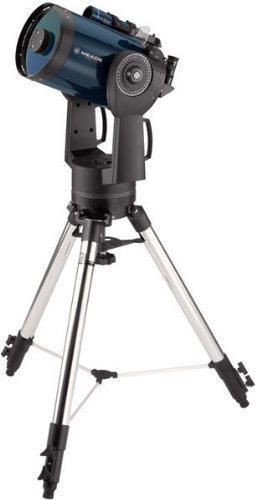
The Meade Instruments LX90-ACF 8-Inch (f/10) Advanced Coma-Free Telescope is a sophisticated astronomical instrument designed for both amateur and experienced stargazers. Featuring advanced coma-free optics and an integrated GPS system, this telescope offers unparalleled clarity and ease of use for observing celestial objects. This manual provides essential information for the proper assembly, operation, maintenance, and troubleshooting of your LX90-ACF telescope.
The LX90-ACF is equipped with a built-in Sony GPS sensor for precise date, time, and location determination, enabling its AutoAlign technology to locate over 30,000 celestial objects automatically. Its high-speed slewing capabilities allow for efficient observation sessions, moving from one target to another at 7 degrees per second. The included AudioStar handbox provides intuitive control and access to a vast database of astronomical objects.
Setup
Proper setup is crucial for the optimal performance of your LX90-ACF telescope. Follow these steps carefully:
- Unpacking and Inspection: Carefully remove all components from the packaging. Verify that all parts are present, including the optical tube assembly, tripod, AudioStar handbox, and 26mm Series 4000 Super Plossl Eyepiece.
- Tripod Assembly: Assemble the standard field tripod. Ensure all legs are securely extended and locked. The telescope attaches to the tripod via a single 1/2-inch bolt. This connection must be firm to ensure stability.
- Mounting the Telescope: Carefully lift the optical tube assembly and align it with the tripod mount. Secure it using the provided bolt. Ensure the telescope is level on the tripod for accurate alignment.
- Battery Installation: The LX90-ACF requires 8 C-cell batteries (not included) for operation. Locate the battery compartment, typically at the base of the mount, and insert the batteries according to the polarity indicators.
- Attaching Accessories: Attach the 26mm Series 4000 Super Plossl Eyepiece to the telescope's focuser. Connect the AudioStar handbox to the designated port on the telescope mount.
- Initial Focuser Adjustment: Upon first use, the main mirror may be positioned at the rear of the optical tube. To achieve initial focus, rotate the focuser knob approximately 30 full rotations to bring the mirror forward. This is a normal initial adjustment and not an indication of malfunction.
- Finder Scope Alignment: Align the finder scope with the main telescope. This can be done during the day by pointing the main telescope at a distant, stationary object (e.g., a power pole top) and then adjusting the finder scope until the same object is centered in its view. At night, the Moon can be used for this purpose.

Operating
The LX90-ACF is designed for user-friendly operation, especially with its integrated GPS and AutoAlign features.
- Power On and GPS Initialization: Turn on the telescope. The built-in Sony GPS sensor will automatically connect to satellites to determine your precise date, time, and location. This process ensures accurate object tracking.
- AutoAlign Technology: Once GPS data is acquired, the telescope's AutoAlign technology will guide you through a simple alignment process. Follow the on-screen prompts on the AudioStar handbox.
- Object Selection: Use the AudioStar handbox to navigate the extensive database of over 30,000 celestial objects. You can select specific stars, planets, galaxies, nebulae, and more.
- GoTo Function: After selecting an object, press the "GoTo" button. The telescope will automatically slew (move) to the desired target. The LX90-ACF boasts a slewing speed of 7 degrees per second, allowing for quick transitions between objects.
- "Tonight's Best" Feature: For a guided observing session, select the "Tonight's Best" option. This feature provides a curated tour of the most prominent and well-positioned celestial objects visible from your specific location and time.
- Focusing: Use the focuser knob to achieve a sharp image. Fine-tune the focus for each object and eyepiece change.
- Software Upgrades: Meade regularly releases software upgrades for the AudioStar system. These upgrades can be downloaded from the official Meade website (www.meade.com) to keep your telescope's database and functionality up-to-date.
Maintenance
Regular maintenance ensures the longevity and performance of your LX90-ACF telescope.
- Optics Cleaning: Dust and smudges on the optical surfaces can degrade image quality. Use a soft, lint-free cloth specifically designed for optics and a specialized cleaning solution. Avoid touching the optical surfaces directly with your fingers.
- Exterior Cleaning: Wipe down the exterior surfaces of the telescope and mount with a clean, damp cloth. Avoid abrasive cleaners or solvents.
- Battery Replacement: Replace the C-cell batteries when the power indicator on the AudioStar handbox shows low battery or when performance degrades. Always use fresh, high-quality alkaline batteries.
- Storage: When not in use, store the telescope in a dry, dust-free environment. If possible, use the original packaging or a dedicated telescope case to protect it from impacts and environmental factors. Avoid storing in areas with extreme temperature fluctuations.
- Mechanical Inspection: Periodically check all screws and fasteners to ensure they are tight. Do not overtighten.
Troubleshooting
This section addresses common issues you might encounter with your LX90-ACF telescope.
- Telescope Not Powering On:
- Check battery installation: Ensure 8 C-cell batteries are correctly inserted with proper polarity.
- Replace batteries: If batteries are old or depleted, replace them with a fresh set.
- Inaccurate GoTo Alignment:
- Verify GPS signal: Ensure the telescope has a clear view of the sky for GPS acquisition.
- Re-perform AutoAlign: Follow the AutoAlign procedure carefully, ensuring accurate centering of alignment stars.
- Check levelness: Ensure the tripod and telescope are level before starting the alignment process.
- Focuser Appears Stuck or Not Moving:
- Initial adjustment: If this is the first use, remember that the focuser may require many rotations (up to 30) to bring the mirror into the initial focus range. Continue turning the knob.
- Check for obstructions: Ensure no debris is preventing the focuser mechanism from moving freely.
- Poor Image Quality:
- Check focus: Ensure the image is sharply focused.
- Clean optics: Dust or smudges on the objective lens or eyepiece can degrade image quality. Clean carefully as per maintenance instructions.
- Atmospheric conditions: Turbulence or light pollution can affect viewing quality. Observe on clear, stable nights away from city lights if possible.
- Missing Tripod Upon Delivery:
- While the LX90-ACF is typically sold with a standard field tripod, some retailers may offer the optical tube assembly separately. Verify your purchase order and contact your vendor if the tripod was expected but not included.
Specifications
| Feature | Specification |
|---|---|
| Optical Design | Advanced Coma-Free (ACF) Schmidt-Cassegrain |
| Clear Aperture | 8 inches (203mm) |
| Focal Length | 2000mm |
| Focal Ratio | f/10 |
| Coatings | Ultra-High Transmission Coatings (UHTC) |
| Mount Type | Altazimuth Mount |
| Handbox Controller | AudioStar™ with speaker and Astronomer Inside™ |
| Object Database | Over 30,000 celestial objects |
| Slewing Speed | 7 degrees per second |
| Power Source | 8 C-cell batteries (not included) |
| Included Eyepiece | 26mm (76x) Series 4000 Super Plossl Eyepiece |
| Product Dimensions (LxWxH) | 35.6 x 119.4 x 53.3 Centimeters |
| Item Weight | 21 kg 300 g |
Warranty Information
Meade Instruments provides a warranty for the LX90-ACF telescope. Specific warranty terms, conditions, and duration may vary by region and purchase date. For detailed warranty information, including coverage and how to make a claim, please refer to the documentation included with your product or visit the official Meade Instruments website.
Support
For further assistance, technical support, or to download the latest software upgrades for your AudioStar handbox, please visit the official Meade Instruments website:
You may also contact Meade customer service directly through the contact information provided on their website for specific inquiries or troubleshooting not covered in this manual.


