
1. Introduction
This manual provides essential instructions for the safe and effective use of your Pilot Navigator CG-07 Aerodynamic Waterproof Cargo Carrier. This cargo carrier is designed to provide additional storage space on your vehicle's roof rack, ensuring safe and dry transport of your belongings. Please read this manual thoroughly before installation and use to ensure proper operation and to prevent damage or injury.
2. Safety Information
Adhering to these safety guidelines is crucial for preventing accidents and ensuring the longevity of your cargo carrier and vehicle.
- Do Not Overload: The cargo carrier has a volume of 15 cubic feet. Always adhere to the maximum weight capacity specified by your vehicle manufacturer for its roof rack system. Exceeding this limit can compromise vehicle stability and safety.
- Secure All Contents: Ensure all items inside the carrier are packed securely to prevent shifting during transit. Shifting cargo can affect vehicle handling.
- Proper Installation: Always ensure the cargo carrier is securely mounted to your vehicle's roof rack (cross bars or side rails) using all provided straps. Regularly check strap tension, especially during long trips.
- Weight Distribution: Distribute weight evenly within the carrier to maintain vehicle balance. Place heavier items towards the center of the carrier.
- Vehicle Height: Be aware that the cargo carrier increases your vehicle's overall height. Exercise caution when entering garages, car washes, or areas with low overhead clearance.
- Regular Checks: Before each trip and periodically during long journeys, stop and check that the carrier is still securely attached and that all straps are tight.
- Driving Conditions: Adjust your driving speed and style to account for the added weight and wind resistance. High speeds, sudden braking, or sharp turns can affect stability.
- Sharp Objects: Avoid placing sharp objects directly against the carrier's fabric without adequate padding to prevent punctures or tears.
3. Package Contents
Please verify that all components are present before proceeding with installation:
- 1 x Pilot Navigator CG-07 Aerodynamic Waterproof Cargo Carrier
- Mounting Straps (quantity may vary, typically 4-6)
- Instruction Manual (this document)
4. Setup and Installation
Follow these steps to properly install the cargo carrier on your vehicle's roof rack.
- Prepare Your Vehicle: Ensure your vehicle is equipped with a roof rack system, including either cross bars or side rails, as the carrier mounts to these. Refer to your vehicle's owner manual for roof rack specifications and weight limits.
- Position the Carrier: Place the empty cargo carrier on top of your vehicle's roof rack. Center it to ensure even weight distribution and aerodynamic performance.
- Secure with Straps:
- Locate the integrated mounting straps on the carrier.
- Route each strap around your vehicle's cross bars or side rails. Ensure the straps are not twisted.
- Thread the strap through its buckle and pull firmly to tighten. Ensure the carrier is snug against the roof rack and does not shift.
- Repeat for all straps, ensuring even tension across the carrier.
- Tuck away any excess strap length to prevent flapping during travel.
- Final Check: Before loading, gently push and pull on the carrier to confirm it is securely attached and does not move.

Image 4.1: The Pilot Navigator CG-07 cargo carrier shown mounted on a vehicle's roof rack, illustrating how it sits on the cross bars or side rails.

Image 4.2: A side profile of a vehicle with the Pilot Navigator CG-07 cargo carrier installed, demonstrating its overall appearance and position on the roof.
5. Operating Instructions
Proper loading and operation ensure the safety and efficiency of your cargo carrier.
- Loading the Carrier:
- Unzip the carrier's main compartment.
- Place items inside, distributing weight as evenly as possible. Heavier items should be centered and low.
- Avoid overfilling the carrier beyond its capacity (15 cubic feet) or stretching the fabric excessively.
- For added protection against moisture, consider placing sensitive items in waterproof bags inside the carrier.
- Ensure no sharp edges are pressing against the carrier fabric.
- Closing and Securing:
- Zip the main compartment completely closed. Ensure the zipper is fully engaged and covered by any protective flaps.
- Tighten any external compression straps on the carrier itself to reduce bulk and secure the load further.
- Pre-Trip Check: Before starting your journey, double-check all mounting straps for tightness and ensure the carrier is stable.
- During Travel: Periodically stop and inspect the carrier and its mounting straps, especially during the first few miles of a trip and then every few hours. Re-tighten straps if necessary.
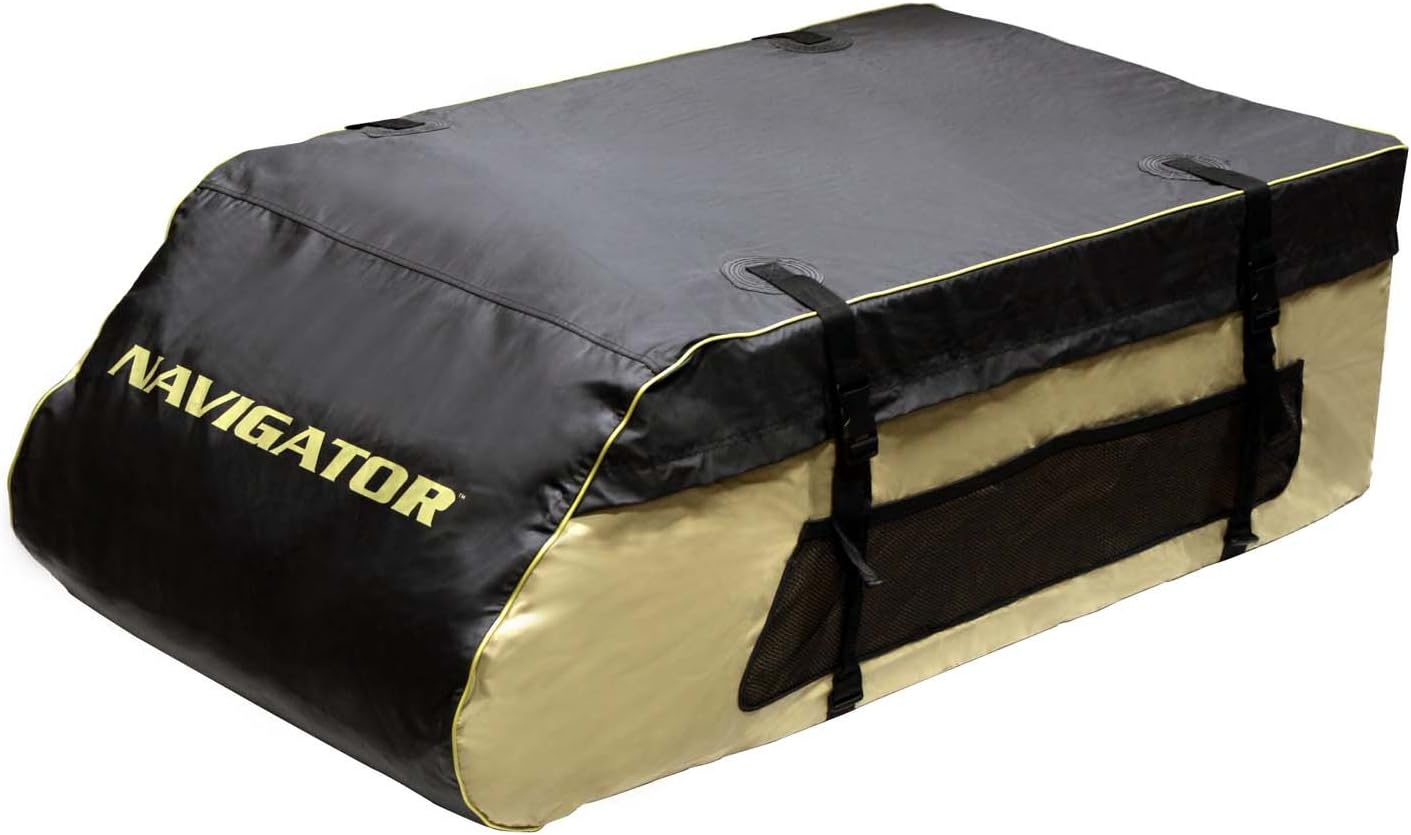
Image 5.1: The Pilot Navigator CG-07 cargo carrier in its empty state, showing its aerodynamic shape and zippered opening.
6. Maintenance
Regular maintenance will extend the life of your cargo carrier.
- Cleaning: Clean the carrier with mild soap and water. Do not use harsh chemicals or abrasive cleaners, as these can damage the waterproof coating. Rinse thoroughly and allow to air dry completely before storage.
- Inspection: Periodically inspect the fabric for tears, punctures, or excessive wear. Check all seams, zippers, and buckles for damage. Address any issues promptly to maintain waterproof integrity and security.
- Storage: When not in use, clean and dry the carrier. It folds flat for easy storage. Store it in a cool, dry place away from direct sunlight and extreme temperatures to prevent material degradation.
7. Troubleshooting
This section addresses common issues you might encounter.
| Problem | Possible Cause | Solution |
|---|---|---|
| Carrier is flapping or noisy during travel. | Straps are not tight enough; carrier is not fully loaded or contents are shifting; excessive wind resistance. | Stop safely and re-tighten all mounting straps. Ensure contents are packed snugly and compression straps are used. Reduce speed if necessary. |
| Water inside the carrier. | Zipper not fully closed or protected; damage to fabric or seams; extreme weather conditions exceeding waterproof capabilities. | Ensure zipper is fully closed and any protective flaps are properly positioned. Inspect carrier for damage; repair if possible. For sensitive items, use additional internal waterproof bags. |
| Carrier feels unstable or shifts. | Improper installation; straps are loose; uneven weight distribution of contents. | Immediately pull over safely. Re-check all mounting straps and tighten them securely. Redistribute contents for even weight. Review installation steps. |
| Difficulty zipping or unzipping. | Zipper track is dirty or obstructed; carrier is overfilled. | Clean the zipper track. Reduce the amount of contents if the carrier is overstuffed. Do not force the zipper. |
8. Specifications
- Model: CG-07
- Brand: Pilot
- Dimensions (L x W x H): 53 inches x 31 inches x 17 inches
- Item Volume: 15 Cubic Feet
- Material: Fabric
- Water Resistance Level: Waterproof
- Mounting Type: Roof Rack, Rails, Cross Bars
- Item Weight (empty): Approximately 7.4 pounds
- Manufacturer: Pilot Automotive
- UPC: 757558502165
9. Warranty and Support
For specific warranty information, please refer to the documentation included with your purchase or contact the retailer where the product was acquired. For technical support or inquiries, please reach out to Pilot Automotive customer service through their official website or contact channels.
Manufacturer: Pilot Automotive
Website: www.pilotautomotive.com (Example link, actual link may vary)

