
Ashly Ne8250
Ashly ne8250 Amplifier User Manual
Eight Channel 150 Watt Amplifier at 8 Ohms
1. Introduction
This manual provides essential information for the proper installation, operation, and maintenance of your Ashly ne8250 Eight Channel Amplifier. The ne8250 is designed to deliver reliable, high-quality audio amplification for professional sound reinforcement applications. Please read this manual thoroughly before operating the unit to ensure optimal performance and safety.
2. Important Safety Instructions
To reduce the risk of electric shock, fire, or damage to the unit, always follow these basic safety precautions:
- Read Instructions: Read all safety and operating instructions before using the product.
- Retain Instructions: Keep these instructions for future reference.
- Heed Warnings: Adhere to all warnings on the product and in the operating instructions.
- Follow Instructions: Follow all operating and use instructions.
- Water and Moisture: Do not use this apparatus near water.
- Cleaning: Clean only with a dry cloth.
- Ventilation: Do not block any ventilation openings. Install in accordance with the manufacturer's instructions.
- Heat: Do not install near any heat sources such as radiators, heat registers, stoves, or other apparatus (including amplifiers) that produce heat.
- Power Cord Protection: Protect the power cord from being walked on or pinched, particularly at plugs, convenience receptacles, and the point where they exit from the apparatus.
- Servicing: Refer all servicing to qualified service personnel. Servicing is required when the apparatus has been damaged in any way, such as power-supply cord or plug is damaged, liquid has been spilled or objects have fallen into the apparatus, the apparatus has been exposed to rain or moisture, does not operate normally, or has been dropped.
3. Package Contents
Verify that all items are present in the package:
- Ashly ne8250 Eight Channel Amplifier
- AC Power Cord
- This User Manual
- Rack Mount Screws (if applicable)
4. Product Overview
The Ashly ne8250 is an eight-channel power amplifier designed for robust and flexible audio distribution. It features individual channel controls and indicators for precise monitoring and adjustment.
4.1 Front Panel
The front panel provides access to essential controls and status indicators for each of the eight channels.
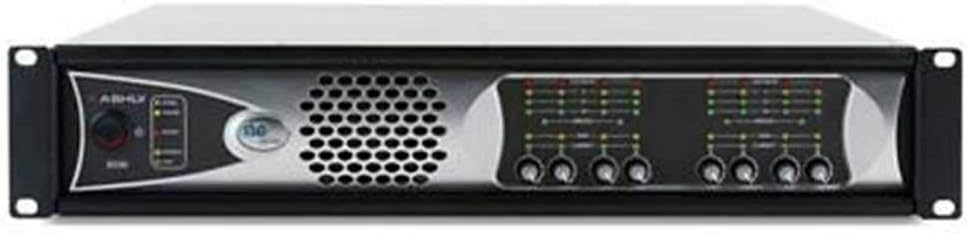
Figure 4.1: Front view of the Ashly ne8250 Eight Channel Amplifier. This image displays the rack-mountable chassis with the Ashly logo on the left, a large ventilation grille, and eight sets of level meters and control knobs for individual channels on the right.
- Power Switch: Turns the amplifier on or off.
- Power Indicator: Illuminates when the unit is powered on.
- Channel Level Controls: Individual rotary knobs for adjusting the output level of each of the eight channels.
- Signal/Clip Indicators: LEDs that show signal presence and clipping for each channel.
- Protection Indicators: LEDs that indicate when a channel is in protection mode.
- Ventilation Grille: Ensures proper airflow for cooling the internal components.
4.2 Rear Panel
The rear panel houses all input and output connections, as well as the AC power inlet.
- Audio Inputs: Eight balanced input connectors (e.g., XLR or Euroblock) for connecting audio sources.
- Audio Outputs: Eight speaker output connectors (e.g., binding posts or Euroblock) for connecting to loudspeakers.
- AC Power Inlet: Standard IEC connector for the power cord.
- Voltage Selector (if present): Allows selection between different operating voltages (e.g., 100V, 70V). Note: This unit supports 100 Volts and 70 Volts operation.
- Cooling Fan: Provides additional cooling for sustained operation.
5. Setup
Proper setup is crucial for optimal performance and safety. Follow these steps carefully.
5.1 Rack Mounting
The Ashly ne8250 is designed for standard 19-inch rack mounting. Ensure adequate ventilation space around the unit, especially at the front and rear grilles.
- Secure the amplifier to a standard equipment rack using appropriate rack screws.
- Leave at least one rack unit (1U) of empty space above and below the amplifier for optimal airflow, especially in enclosed racks.
5.2 Audio Connections
Connect your audio sources and loudspeakers to the appropriate inputs and outputs on the rear panel.
- Connect your audio mixer or signal processor outputs to the balanced audio inputs of the ne8250. Ensure correct channel assignment.
- Connect your loudspeakers to the corresponding audio outputs. Pay close attention to polarity (+/-) and impedance matching. This amplifier is rated for 8 Ohms per channel.
- Ensure all connections are secure to prevent signal loss or intermittent operation.
5.3 Power Connection
Before connecting power, ensure the amplifier's power switch is in the OFF position.
- Connect the supplied AC power cord to the AC power inlet on the rear panel of the amplifier.
- Plug the other end of the power cord into a grounded AC power outlet.
- Verify that the power source matches the voltage requirements of the amplifier (100V or 70V, as specified).
6. Operating Instructions
Follow these steps for safe and effective operation of your Ashly ne8250 amplifier.
6.1 Powering On
- Ensure all input sources are connected and their output levels are turned down.
- Turn on the Ashly ne8250 amplifier using the front panel power switch. The power indicator LED will illuminate.
- Allow a few seconds for the amplifier to stabilize before sending audio signals.
6.2 Adjusting Levels
- Start with the channel level controls on the amplifier set to their minimum position.
- Begin playing audio from your source.
- Slowly increase the input signal level from your mixer or source.
- Gradually raise the individual channel level controls on the ne8250 until the desired output volume is achieved.
- Monitor the Signal/Clip indicators. A brief flash of the clip LED is acceptable, but continuous illumination indicates signal distortion and potential damage. Reduce the level if clipping occurs.
6.3 Powering Off
- Turn down all channel level controls on the amplifier.
- Turn off the Ashly ne8250 amplifier using the front panel power switch.
- Turn off all connected audio sources and equipment.
7. Maintenance
Regular maintenance ensures the longevity and optimal performance of your amplifier.
- Cleaning: Periodically wipe the exterior of the unit with a soft, dry cloth. Do not use abrasive cleaners or solvents.
- Ventilation: Ensure that all ventilation openings remain clear of dust and debris. Use a soft brush or vacuum cleaner to gently remove any accumulation.
- Connections: Periodically check all audio and power connections for tightness and corrosion.
- Internal Servicing: There are no user-serviceable parts inside. Refer all internal servicing to qualified Ashly service personnel.
8. Troubleshooting
This section addresses common issues you might encounter. If the problem persists, contact Ashly technical support.
| Problem | Possible Cause | Solution |
|---|---|---|
| No power | Power cord disconnected; power outlet faulty; internal fuse blown. | Check power cord connection; try a different outlet; contact service if fuse is suspected. |
| No audio output | Input source not connected or muted; amplifier channel level too low; speaker cables disconnected; protection mode active. | Verify input connections and source output; increase channel level; check speaker cables; power cycle the amplifier. |
| Distorted audio / Clipping LED constantly on | Input signal too high; amplifier channel level too high; speaker impedance mismatch. | Reduce input signal level from source; reduce amplifier channel level; verify speaker impedance. |
| Protection LED illuminated | Overheating; short circuit on speaker output; DC offset detected. | Ensure adequate ventilation; check speaker wiring for shorts; power cycle the amplifier and allow to cool. If problem persists, contact service. |
9. Specifications
Technical specifications for the Ashly ne8250 Eight Channel Amplifier.
| Feature | Detail |
|---|---|
| Model | Ne8250 |
| Brand | Ashly |
| Number of Channels | 8 |
| Output Power | 150 Watts per channel at 8 Ohms |
| Voltage | 100 Volts, 70 Volts |
| Mounting Type | Surface Mount (typically rack-mountable) |
| Item Weight | 21.2 pounds |
| Package Dimensions | 24 x 24 x 6.7 inches |
| UPC | 694970561823 |
| ASIN | B002954EIS |
| Date First Available | July 20, 2016 |
10. Warranty and Support
For specific warranty information and technical support, please refer to the official Ashly website or contact their customer service department. Keep your purchase receipt as proof of purchase for warranty claims.
Ashly Website: www.ashly.com
Related documentsNe8250


Ask a question about this manual
Ask about setup, troubleshooting, compatibility, parts, safety, or missing instructions. Manuals+ will review the question and use this page’s manual context to help answer it.