
Introduction
This manual provides detailed instructions for the installation, operation, and maintenance of your Grote G5300 4" Hi Count Double-Face LED Light. Designed for durability and visibility, this LED light serves as a crucial component for vehicle safety and signaling. Please read this manual thoroughly before installation and use to ensure proper function and longevity of the product.
Safety Information
Always prioritize safety during installation and operation. Disconnect power before performing any electrical work. Ensure all connections are secure and properly insulated to prevent short circuits. Consult a qualified professional if you are unsure about any installation steps. This product is designed for 12-volt systems.
Package Contents
- Grote G5300 4" Hi Count Double-Face LED Light Unit
- Instruction Guide (this document)
Setup and Installation
The Grote G5300 LED light features a 3-wire connection system for straightforward installation. It is designed for rear automotive applications and includes a chrome die-cast housing and a polycarbonate lens for durability.
- Preparation: Ensure the vehicle's power system is off. Gather necessary tools (e.g., wrench for bolt, wire strippers, crimpers).
- Mounting: The light comes with a bolt for mounting. Securely attach the light to the desired location on the vehicle, typically for rear signal or tail light functions. Ensure the mounting surface is stable and can support the light.
- Wiring:
- Identify the three wires extending from the light unit. Typically, these correspond to ground, tail/running light, and stop/turn signal functions.
- Connect the ground wire (often black) to a suitable chassis ground point on the vehicle.
- Connect the appropriate power wires from the vehicle's wiring harness to the corresponding wires on the G5300 light. The light features both amber and red LEDs, allowing for dual functionality (e.g., amber for turn signal, red for stop/tail).
- Ensure all electrical connections are tight and protected from moisture and corrosion using appropriate connectors and heat shrink tubing.
- Testing: Once installed, reconnect the vehicle's power and test all light functions (tail, stop, turn signal) to ensure correct operation and visibility.
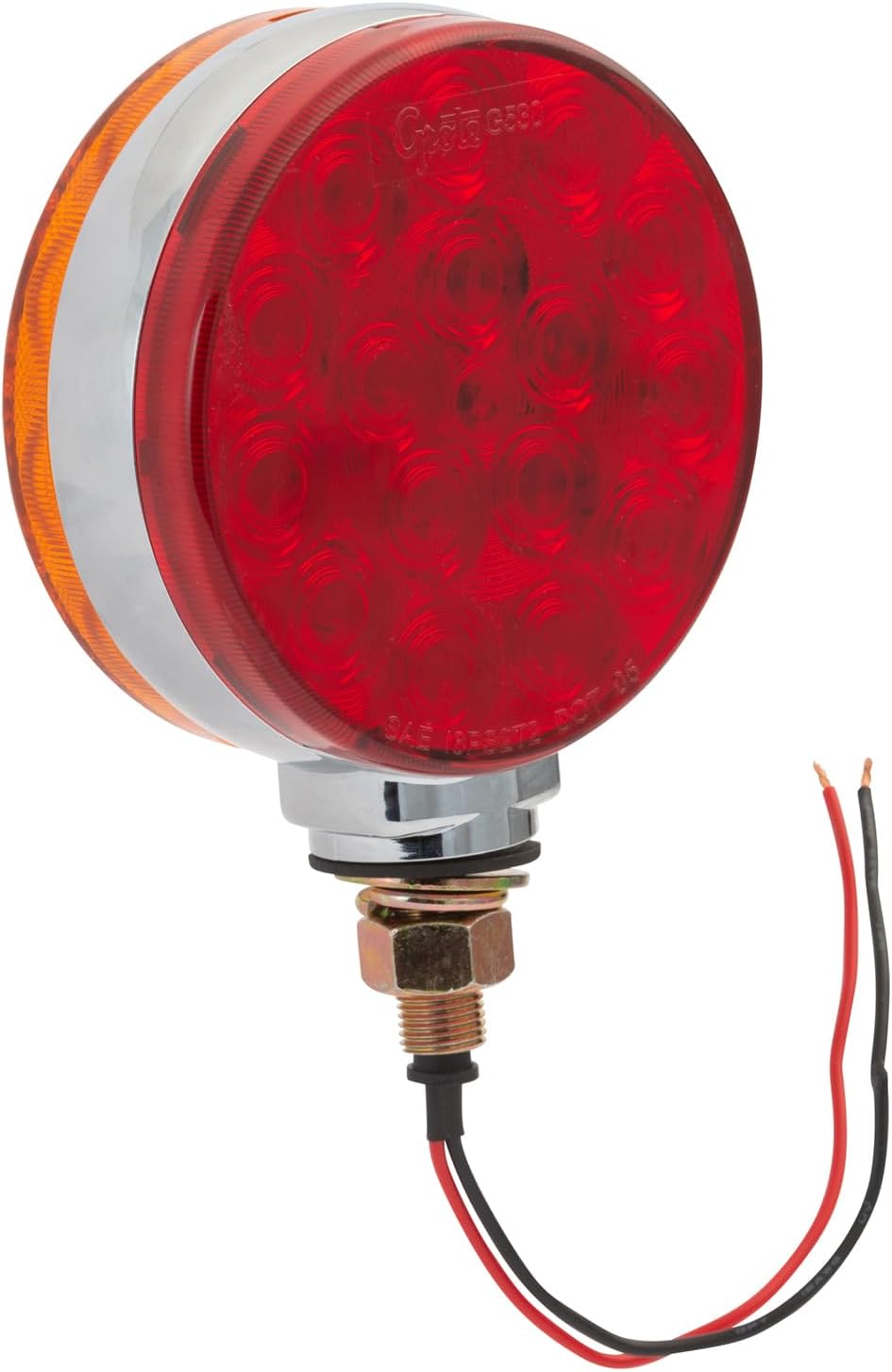
Image: The Grote G5300 Double-Face LED Light, showing its red and amber sides and wiring connections.
Operating Instructions
The Grote G5300 LED light operates automatically with your vehicle's electrical system once properly installed. It functions as a dual-color light, typically displaying amber for turn signals and red for stop/tail lights, depending on wiring configuration.
- Tail/Running Light: When the vehicle's headlights or running lights are activated, the red LEDs will illuminate at a lower intensity.
- Stop Light: When the brake pedal is pressed, the red LEDs will illuminate at a higher intensity.
- Turn Signal: When the turn signal is activated, the amber LEDs will flash.
The light is DOT compliant and waterproof, ensuring reliable performance in various weather conditions.
Maintenance
The Grote G5300 LED light is designed for minimal maintenance due to its durable construction and LED technology. However, periodic checks can ensure optimal performance:
- Cleaning: Regularly clean the polycarbonate lens with a soft cloth and mild soap and water to remove dirt and debris that may obstruct light output. Avoid abrasive cleaners.
- Connection Check: Periodically inspect the wiring connections for any signs of corrosion, fraying, or looseness. Secure any loose connections.
- Physical Inspection: Check the housing and lens for any physical damage. Although the light is waterproof, severe damage can compromise its integrity.
Troubleshooting
| Problem | Possible Cause | Solution |
|---|---|---|
| Light does not illuminate | No power, faulty wiring, poor ground connection, blown fuse. | Check power supply, inspect all wiring connections, ensure a solid ground, check vehicle's fuse box. |
| Light is dim or flickers | Poor electrical connection, insufficient voltage, corrosion. | Clean and secure all connections, verify vehicle's voltage output, remove any corrosion. |
| Incorrect color or function | Incorrect wiring of signal and tail/stop wires. | Review the wiring diagram and re-connect wires according to their intended function. |
If problems persist after troubleshooting, contact Grote customer support or a certified automotive electrician.
Specifications
| Feature | Detail |
|---|---|
| Model Number | G5300 |
| Brand | Grote |
| Light Type | LED, Double-Face |
| Colors | Red / Amber |
| Voltage | 12 Volts |
| Housing Material | Chrome Die-Cast |
| Lens Material | Polycarbonate |
| Special Features | Waterproof, DOT Compliant |
| Item Weight | 1 pound |
| Product Dimensions | 6.5 x 4.2 x 1.7 inches |
| UPC | 089373135922 |
Support and Contact Information
For further assistance, technical support, or inquiries regarding your Grote G5300 LED Light, please visit the official Grote website or contact their customer service department.
Grote Industries Official Website: www.grote.com
Please have your model number (G5300) and purchase information ready when contacting support.