
1. Introduction
The Extel WEMR 81001 is a reliable AC/DC voltage tester designed for electrical professionals and DIY enthusiasts. This device provides clear indications of voltage levels and polarity, ensuring safe and accurate electrical measurements. It operates without the need for batteries, drawing power directly from the circuit being tested.
Key features include:
- Voltage testing with up to 7 distinct indication levels.
- Polarity detection for DC circuits.
- Clear visual indication via light.
- Battery-free operation.
- Includes a durable test cable.
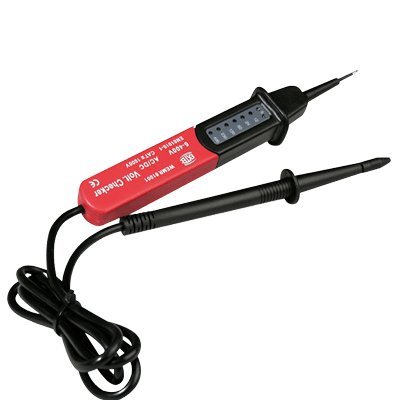
Figure 1: Extel WEMR 81001 AC/DC Voltage Tester. This image displays the compact and robust design of the voltage tester, featuring its main body and test probes.
2. Safety Information
Always prioritize safety when working with electricity. Read and understand all safety warnings before using this device.
- Do not use the tester if it appears damaged or if the test leads are frayed or broken.
- Always assume that any circuit is live until proven otherwise with a reliable voltage tester.
- Wear appropriate Personal Protective Equipment (PPE), such as insulated gloves and safety glasses, when performing electrical tests.
- Do not exceed the maximum voltage ratings specified for this device.
- Keep hands and fingers behind the finger guards on the test probes during use.
- This device is not a substitute for proper electrical training and safety procedures. If you are unsure, consult a qualified electrician.
3. Product Overview
The Extel WEMR 81001 consists of a main unit with indicator lights and two integrated test probes connected by a flexible cable.
- Main Unit: Houses the voltage indicator lights and internal circuitry.
- Test Probes: Two insulated probes (typically red and black) used to make contact with the circuit points.
- Indicator Lights: A series of LEDs that illuminate to show the detected voltage level and polarity.
4. Setup
The Extel WEMR 81001 is designed for immediate use and requires no battery installation or initial charging.
- Inspect the Device: Before each use, visually inspect the voltage tester and its test leads for any signs of damage, cracks, or exposed wiring. Do not use if damaged.
- Prepare for Use: Ensure the test probes are clean and free from dirt or moisture.
5. Operating Instructions
Follow these steps to safely and accurately test for AC or DC voltage and polarity.
- Safety Check: Ensure you are wearing appropriate PPE.
- Connect Probes: Carefully touch the tip of one test probe to the first point of the circuit you wish to test (e.g., live wire or phase).
- Complete Circuit: Touch the tip of the second test probe to the second point of the circuit (e.g., neutral wire or ground).
- Read Indication: Observe the indicator lights on the main unit.
- The lights will illuminate to indicate the detected voltage level (up to 7 levels).
- For DC voltage, an additional indicator will show the polarity (positive/negative).
- Interpret Results: The illuminated LEDs correspond to specific voltage ranges. Refer to the markings on the device for exact voltage thresholds. If no lights illuminate, it indicates the absence of voltage or a voltage below the tester's detection threshold.
- Remove Probes: Carefully remove the test probes from the circuit after testing.
Note: Since the tester operates without batteries, it draws a small amount of current from the circuit to power its indicators. This is normal operation.
6. Maintenance
Proper maintenance ensures the longevity and accuracy of your voltage tester.
- Cleaning: Wipe the device with a dry, clean cloth. Do not use abrasive cleaners or solvents.
- Storage: Store the tester in a dry, cool place, away from direct sunlight and extreme temperatures.
- Inspection: Regularly inspect the test leads and probes for any signs of wear or damage. Replace the device if any damage is found.
7. Troubleshooting
| Problem | Possible Cause | Solution |
|---|---|---|
| No indication when testing a known live circuit. |
|
|
| Inconsistent readings. |
|
|
8. Specifications
| Feature | Detail |
|---|---|
| Model Number | WEMR 81001 (Product ID: 781001) |
| Manufacturer | CFIEX |
| Brand | Extel |
| Voltage Type | AC/DC |
| Indication Levels | Up to 7 levels |
| Polarity Indication | Yes (for DC) |
| Power Source | Battery-free (powered by circuit) |
| Color | Red and Black |
| Dimensions (Package) | 26.5 x 15 x 4 cm |
| Product Weight | 160 g |
| Compliance | NF (as per specifications) |
9. Warranty and Support
For warranty information or technical support, please refer to the documentation included with your purchase or contact Extel customer service through their official website. Keep your proof of purchase for warranty claims.
Manufacturer: CFIEX
Brand: Extel