
APC SURTD5000RMXLP3U
APC Smart-UPS RT 5000VA User Manual
Model: SURTD5000RMXLP3U
Brand: APC
1. Introduction
The APC Smart-UPS RT 5000VA is an Uninterruptible Power Supply (UPS) designed to provide reliable power protection for critical electronic equipment. This unit supplies utility power to connected loads and seamlessly switches to battery power in the event of a power outage, overload, or fault. It features advanced battery management to prolong battery life by regulating charge voltage based on temperature, ensuring clean and uninterrupted power delivery. The design allows for easy upgrades and replacements of batteries by trained users, reducing downtime.
2. Safety Information
Please read and understand all safety instructions before installing, operating, or maintaining the UPS. Failure to follow these instructions can result in serious injury or equipment damage.
- Electrical Safety: This unit contains hazardous voltages. Do not open the UPS enclosure. Servicing should only be performed by qualified personnel.
- Battery Safety: Batteries can present a risk of electrical shock and high short-circuit current. Observe the following precautions:
- Do not dispose of batteries in a fire. They may explode.
- Do not open or mutilate batteries. Released electrolyte is harmful to the skin and eyes. It may be toxic.
- Replace batteries with the same type and number of batteries as originally installed.
- Weight: The UPS is heavy (128 pounds). Use proper lifting techniques and ensure adequate support during installation.
- Environment: Install the UPS in a controlled environment, away from excessive moisture, heat, and dust.
3. Setup
3.1 Unpacking
Carefully unpack the UPS and inspect it for any shipping damage. Retain the packaging materials for future use or return shipping.
3.2 Physical Installation
The APC Smart-UPS RT 5000VA is designed for both tower and rack-mountable configurations. Ensure proper ventilation around the unit.

Figure 3.1: Front view of the APC Smart-UPS RT 5000VA unit. This image shows the front and side view of the APC Smart-UPS RT 5000VA unit, illustrating its rack-mountable design with mounting brackets attached. The front panel features the APC logo, status indicators, and control buttons.
3.3 Connecting to Power
Connect the UPS to a properly grounded electrical outlet. Ensure the input voltage and current capacity of the outlet match the UPS requirements.
3.4 Connecting Equipment
Connect your critical equipment to the output receptacles on the rear panel of the UPS. The unit provides various output types including NEMA L6-20R, NEMA L14-30R, and NEMA 5-20R.
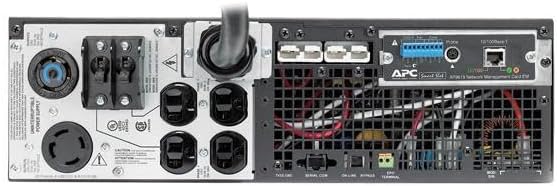
Figure 3.2: Rear view of the APC Smart-UPS RT 5000VA. This image displays the rear panel of the APC Smart-UPS RT 5000VA, highlighting various power outlets including NEMA L6-20R, NEMA L14-30R, and NEMA 5-20R receptacles, along with communication ports for network management and serial connections. The main power input cable is also visible.
3.5 Initial Startup
After connecting all cables, press the power button on the front panel to turn on the UPS. Allow the unit to perform its self-test and charge the batteries fully before connecting critical loads.
4. Operating Instructions
4.1 Power On/Off
- To Power On: Press and hold the power button on the front panel until the unit beeps and the indicators illuminate.
- To Power Off: Press and hold the power button until the unit beeps and the indicators turn off. Ensure all connected equipment is safely shut down before powering off the UPS.
4.2 Understanding Indicators
The front panel features various LED indicators and a display (if applicable) that provide real-time status information about the UPS, including battery charge level, load level, and operational mode (On Line, On Battery, Bypass, Fault).
4.3 Battery Operation
In the event of a power outage, the UPS will automatically switch to battery power, providing uninterrupted power to connected devices. The duration of battery backup depends on the connected load and battery charge level. The UPS prolongs battery life by regulating the charge voltage according to battery temperature.
5. Maintenance
5.1 Battery Replacement
The UPS batteries are user-replaceable, increasing availability and reducing Mean Time To Repair (MTTR). Battery replacement should only be performed by a trained user. Refer to the specific battery replacement kit instructions for detailed steps.
5.2 Cleaning
Keep the UPS and its ventilation openings clean and free of dust. Use a dry cloth to wipe the exterior. Do not use liquid or aerosol cleaners.
5.3 Environmental Considerations
Ensure the UPS operates within its specified temperature and humidity ranges to maximize its lifespan and performance.
6. Troubleshooting
This section provides solutions to common issues you might encounter with your UPS. If the problem persists after attempting these solutions, contact customer support.
| Problem | Possible Cause | Solution |
|---|---|---|
| UPS does not turn on. | Not connected to utility power; low battery. | Ensure the input power cord is securely connected. Allow batteries to charge for several hours. |
| UPS beeps continuously. | Overload condition; on battery power with low battery. | Reduce connected load. Allow batteries to recharge. |
| UPS switches to battery power frequently. | Unstable utility power; sensitivity setting too high. | Check utility power quality. Adjust UPS sensitivity setting if available (refer to advanced settings). |
7. Specifications
| Attribute | Value |
|---|---|
| Model Number | SURTD5000RMXLP3U |
| Capacity | 5000VA / 4000W |
| Full Load Runtime | 4.8 Minutes |
| Output Connections | 1 x NEMA L6-20R, 1 x NEMA L14-30R, 4 x NEMA 5-20R |
| Product Dimensions (H x W x D) | 5.12 x 17.01 x 25.98 inches |
| Item Weight | 128 pounds |
| Batteries | Product Specific batteries required. |
| Manufacturer | APC |
| Language | English |
8. Warranty and Support
For warranty information and technical support, please refer to the official APC website or contact APC customer service directly. Keep your purchase receipt and product serial number handy for any inquiries.
You can find more information and support resources by visiting the official APC Store.
Related documentsSURTD5000RMXLP3U


Ask a question about this manual
Ask about setup, troubleshooting, compatibility, parts, safety, or missing instructions. Manuals+ will review the question and use this page’s manual context to help answer it.