
CHAMBERLAIN 4228
CHAMBERLAIN / LiftMaster / Craftsman 4228 Replacement Battery User Manual
Model: 4228
Product Overview
The Chamberlain Replacement Garage Door Opener Battery is designed to provide backup power to your garage door opener during electrical outages. This ensures continued access to your garage even when grid power is unavailable, allowing for up to 20 cycles of operation. It is compatible with various Chamberlain, LiftMaster, and Craftsman battery backup equipped garage door openers.
Key features include:
- 12 Volt, 4.5 Amp Hour (Ah) capacity.
- Designed for use in emergency lighting and garage door opener backup systems.
- Helps prevent lockouts during power failures.
- Compatible with all Chamberlain Garage Door Openers that support battery backup.
- Packaging and color (black or grey) may vary.
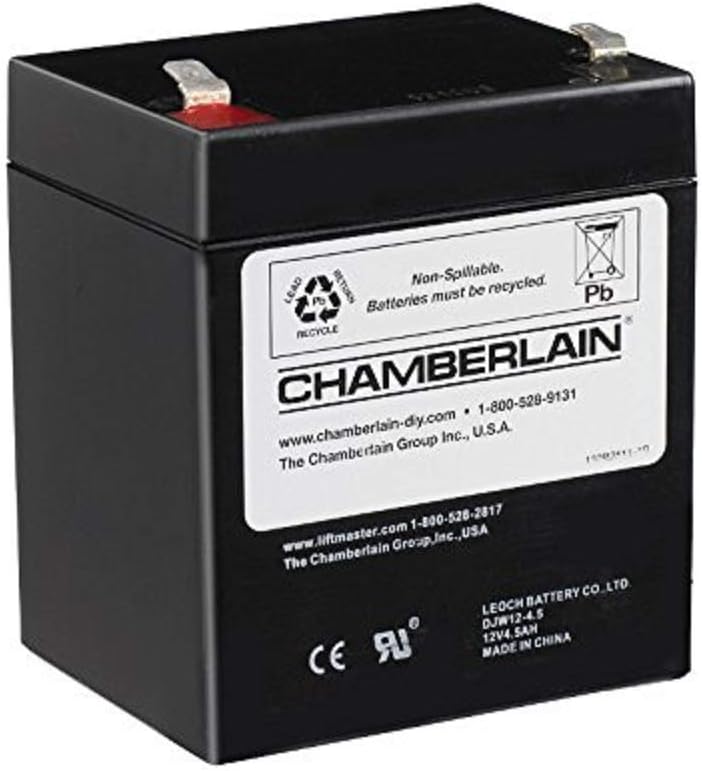
Image: The Chamberlain 4228 Replacement Battery, a compact black unit with a white label detailing specifications and recycling information.
Setup and Installation
Before beginning installation, ensure the garage door opener is disconnected from its main power source to prevent electrical shock.
- Locate the Battery Compartment: On your Chamberlain, LiftMaster, or Craftsman garage door opener, identify the battery backup compartment. This is typically located on the side or rear of the main opener unit.
- Open the Compartment: Use a Phillips head screwdriver to remove any screws securing the battery compartment cover. Carefully open or remove the cover.
- Disconnect Old Battery: Gently pull out the old battery. Disconnect the positive (+) and negative (-) terminals by carefully pulling the connectors off the battery posts. Note their orientation for the new battery.
- Insert New Battery: Place the new Chamberlain 4228 Replacement Battery into the compartment. Ensure it fits snugly.
- Connect New Battery: Connect the positive (+) wire (usually red) to the positive (+) terminal on the new battery, and the negative (-) wire (usually black) to the negative (-) terminal. Ensure connections are secure.
- Secure Compartment: Replace the battery compartment cover and secure it with the screws removed earlier.
- Restore Power: Reconnect your garage door opener to its main power source. The opener will typically begin charging the new battery automatically.
- Initial Charge: Allow the battery to charge for at least 24 hours before relying on it for full backup power.

Image: A hand is shown inserting the Chamberlain 4228 Replacement Battery into the designated battery compartment of a garage door opener unit.
Operating Instructions
Once installed and charged, the Chamberlain 4228 Replacement Battery operates automatically with your compatible garage door opener.
- Automatic Charging: The garage door opener continuously charges the battery when connected to main power, ensuring it is ready for use.
- Power Outage Operation: In the event of a power outage, the garage door opener will automatically switch to battery power. You can then operate your garage door using your remote control or wall console as usual.
- Cycle Capacity: The battery is designed to provide power for approximately 20 cycles (open and close operations) during a power outage, depending on the opener model and door weight.
- Low Battery Indication: Your garage door opener may provide an audible beep or visual indicator (e.g., flashing light) when the battery charge is low or if the battery needs replacement.
Maintenance
Proper maintenance can extend the life of your replacement battery.
- Regular Testing: Periodically test your battery backup system by unplugging the garage door opener from the main power source. Operate the door a few times to ensure the battery is functioning correctly. Reconnect main power after testing.
- Terminal Inspection: Annually inspect the battery terminals for any signs of corrosion. If corrosion is present, disconnect the battery and carefully clean the terminals with a wire brush or a mixture of baking soda and water. Ensure terminals are dry before reconnecting.
- Environmental Conditions: Store and operate the battery within recommended temperature ranges (typically 32°F to 104°F or 0°C to 40°C) to maximize its lifespan. Avoid extreme heat or cold.
- Replacement: Batteries typically last 3-5 years depending on usage and environmental factors. Replace the battery when it no longer holds a charge or provides sufficient power during outages.
Troubleshooting
If you encounter issues with your Chamberlain 4228 Replacement Battery, consider the following common problems and solutions:
| Problem | Possible Cause | Solution |
|---|---|---|
| Garage door opener beeps continuously. | Battery is low on charge or needs replacement. | Ensure the opener is connected to main power. Allow 24 hours for charging. If beeping persists, replace the battery. |
| Garage door opener does not work during a power outage. | Battery is not charged, faulty, or not connected. | Verify the battery is properly connected. Ensure the opener was connected to main power to allow charging. Test the battery as described in the Maintenance section. Replace if necessary. |
| Battery does not seem to be charging. | Loose connections, faulty opener charging circuit, or battery is at end of life. | Check all battery connections. Ensure the garage door opener itself is receiving power. If the battery is old (3+ years), it may need replacement. Consult a professional if the opener's charging circuit is suspected. |
| Door opens very slowly on battery power. | Battery charge is low or battery is nearing end of life. | Allow the battery to fully charge. If the issue persists after a full charge, the battery's capacity may be diminished, indicating it needs replacement. |
Specifications
| Attribute | Detail |
|---|---|
| Brand | CHAMBERLAIN |
| Model Number | 4228 |
| Part Number | 4228 |
| Voltage | 12 Volts |
| Battery Capacity | 4.5 Amp Hours (Ah) |
| Battery Cell Type | Lead-Acid, AGM |
| Item Weight | 3.64 pounds |
| Product Dimensions | 4 x 2.7 x 3.5 inches |
| Included Components | Replacement Battery For Garage Access Systems |
| Special Features | Rechargeable |
| Power Source | AC (for charging via opener) |
| Mounting Type | Door (refers to garage door opener system) |
Warranty Information
This Chamberlain 4228 Replacement Battery comes with a limited 2-year warranty from the date of purchase. This warranty covers defects in materials and workmanship under normal use. Please retain your proof of purchase for warranty claims.
For specific warranty terms and conditions, please refer to the documentation provided with your garage door opener or contact Chamberlain customer support.
Support
For further assistance, technical support, or to view the original user manual for your garage door opener, please use the resources below:
- Official User Manual (PDF): Download User Manual
- Chamberlain Support: Visit the official Chamberlain website or contact their customer service for product-specific inquiries.
Related documents4228


Ask a question about this manual
Ask about setup, troubleshooting, compatibility, parts, safety, or missing instructions. Manuals+ will review the question and use this page’s manual context to help answer it.