Introduction
Thank you for choosing the Philips 261016 Projection Lamp. This high-quality halogen bulb is designed to provide reliable illumination for compatible projection systems. Please read this manual carefully before installation and use to ensure proper operation and safety.
Safety Information
Observe the following safety precautions to prevent injury or damage to the lamp and equipment:
- Halogen lamps operate at extremely high temperatures. Do not touch the glass bulb with bare hands. Oils from your skin can create hot spots, leading to premature lamp failure. Use a clean cloth or gloves if handling is necessary.
- Always allow the lamp to cool completely before handling, replacing, or performing any maintenance.
- Ensure the projection equipment is turned off and unplugged from the power source before attempting any installation or replacement.
- Use this lamp only in fixtures specifically designed for its type, wattage (100W), and voltage (12V). Using an incorrect lamp can cause damage or fire.
- Keep the lamp and packaging out of reach of children.
- Dispose of used lamps according to local environmental regulations.
Product Overview
The Philips 261016 is a 100-watt, 12-volt halogen projection lamp. It features a T3 bulb shape and a two-pin base, designed for use in various compatible projection equipment. This lamp provides bright, consistent light output essential for clear projections.
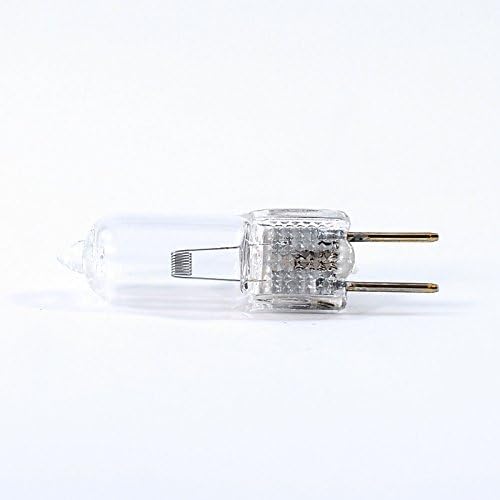
This image shows the Philips 261016 Projection Lamp, highlighting its compact clear glass bulb and the two-pin base for electrical connection.
Setup and Installation
Proper installation is crucial for the performance and longevity of your projection lamp.
Before Installation:
- Ensure the projection equipment is completely turned off and unplugged from the power source.
- If replacing an old lamp, allow it to cool down completely (at least 30 minutes) before touching it.
- Prepare a clean, lint-free cloth or gloves to handle the new lamp, avoiding direct contact with the glass bulb.
Installation Steps:
- Locate the lamp housing or access panel on your projection equipment. Refer to your projector's specific user manual for precise instructions on accessing the lamp compartment.
- Carefully open the lamp housing. This may involve unscrewing a panel or releasing a latch.
- Gently remove the old lamp from its socket. If the lamp is secured by a bracket, carefully unfasten it.
- Using a clean cloth or gloves, align the two pins of the new Philips 261016 lamp with the corresponding socket in the projector. Insert the lamp firmly but without applying excessive force. Ensure it is seated correctly.
- Secure the lamp if necessary (e.g., re-fasten a bracket).
- Close the lamp housing securely. Ensure all latches or screws are fastened to prevent accidental opening and to activate any safety interlocks.
- Plug the projection equipment back into the power source.
Operating Instructions
Once the Philips 261016 Projection Lamp is correctly installed, its operation is integrated with your projection system. Follow the operating instructions provided with your specific projection equipment to power on and use the device.
Important Operating Tips:
- Avoid frequent on/off cycling of the projector, as this can significantly reduce the lifespan of the lamp.
- Allow the lamp to reach its full brightness and cool down naturally after use. Most projectors have a built-in cooling cycle that should not be interrupted.
- Ensure adequate ventilation around your projection equipment to prevent overheating, which can shorten lamp life.
Maintenance
Regular maintenance helps ensure optimal performance and extends the life of your projection lamp.
Cleaning:
- Periodically inspect the lamp housing and projector's air vents for dust accumulation. Dust can impede cooling and reduce lamp efficiency and lifespan.
- Use a soft, dry cloth or compressed air to gently clean the exterior of the lamp housing and any accessible reflective surfaces within the projector.
- Do not clean the lamp bulb itself unless absolutely necessary. If cleaning is required, ensure the lamp is completely cool and unplugged. Use a clean, lint-free cloth lightly dampened with isopropyl alcohol. Allow the lamp to dry completely before re-installation or use.
Lamp Replacement:
Replace the lamp when its brightness significantly diminishes, the light output becomes inconsistent, or when it fails completely. Always use a genuine Philips 261016 replacement lamp to ensure compatibility, optimal performance, and safety.
Troubleshooting
If you encounter issues with your projection lamp, consider the following troubleshooting steps:
Lamp Does Not Light:
- Verify that the projector is properly plugged into a working power outlet and is powered on.
- Ensure the lamp housing is securely closed. Many projectors have safety interlocks that prevent the lamp from lighting if the housing is not properly sealed.
- Check if the lamp is correctly seated in its socket. Gently re-seat it if necessary, ensuring pins are aligned.
- The lamp may have reached the end of its operational life and requires replacement.
- Consult your projector's specific user manual for additional troubleshooting steps related to lamp failure.
Dim or Flickering Light:
- The lamp may be nearing the end of its operational life and should be considered for replacement.
- Check for any loose connections within the lamp housing or projector.
- Ensure proper ventilation around the projector. Overheating can cause inconsistent light output.
Specifications
| Brand | Philips |
| Model Name | Projection Lamp |
| Part Number | 261016 |
| Light Type | Halogen |
| Wattage | 100 watts |
| Voltage | 12 Volts |
| Bulb Shape Size | T3 |
| Color Temperature | 3400 Kelvin |
| Color Rendering Index (CRI) | 80 |
| Material | Copper |
| Product Dimensions | 0.73 x 0.64 x 1.76 inches |
| Country of Origin | China |
| Family | Philips luminaires Lightolier |
Warranty and Support
Warranty:
This Philips 261016 Projection Lamp is covered by a 90-day manufacturer warranty. Please retain your proof of purchase for any warranty claims. The warranty covers defects in materials and workmanship under normal use.
Support:
For technical assistance, product inquiries, or warranty support, please contact Philips customer support. You may also refer to the support resources provided with your specific projection equipment for lamp-related issues.


