
1. Introduction
This manual provides detailed instructions for the safe and effective operation of your TC Electronic RH450 450W Bass Amplifier Head. The RH450 is a powerful and versatile Class D bass amplifier designed for professional musicians, featuring advanced tone-shaping capabilities, an integrated tuner, and user-definable presets.
Key features include:
- TubeTone Emulation: Provides realistic tube amplifier characteristics.
- SpectraComp Compression: Multi-band compression for consistent bass dynamics.
- Integrated Tuner: High-resolution tuner with a light ring for quick and accurate tuning.
- User Memory Banks: Store and recall up to three custom sound presets.
- Rehearsal Inputs: Rear-mounted auxiliary inputs for connecting MP3 players or computers.
- Headphone Output: Features a speaker filter for practice without a cabinet.
2. Important Safety Instructions
Please read and follow all safety instructions before operating the RH450 amplifier head. Retain this manual for future reference.
- Power Source: Connect the unit only to an AC power source of the specified voltage (100-240V~, 50/60Hz). Ensure the mains ground is connected.
- Ventilation: Do not block any ventilation openings. Install in accordance with the manufacturer's instructions. Ensure adequate airflow around the unit.
- Water and Moisture: Do not expose this apparatus to rain or moisture. Do not use near water.
- Heat: Do not install near any heat sources such as radiators, heat registers, stoves, or other apparatus (including amplifiers) that produce heat.
- Cables: Protect the power cord from being walked on or pinched, particularly at plugs, convenience receptacles, and the point where they exit from the apparatus.
- Servicing: Refer all servicing to qualified service personnel. Servicing is required when the apparatus has been damaged in any way, such as power-supply cord or plug is damaged, liquid has been spilled or objects have fallen into the apparatus, the apparatus has been exposed to rain or moisture, does not operate normally, or has been dropped.
- Speaker Connections: Always use high-quality speaker cables. Ensure the minimum speaker load of 4 ohms is met. Never operate the amplifier without a speaker load connected unless using headphones with the speaker muting feature.
3. Setup and Connections
This section details how to properly connect your RH450 amplifier head to your instrument, speakers, and other external devices.
3.1 Front Panel Overview
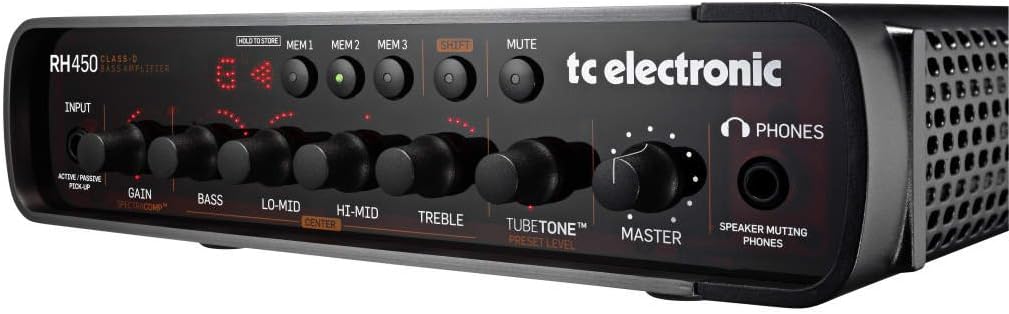
Figure 3.1: Front panel of the TC Electronic RH450 Bass Amplifier Head, showing input, EQ controls, TubeTone, Master, memory buttons, tuner display, and headphone jack.
3.2 Rear Panel Connections
The rear panel provides all necessary connections for power, speakers, and external audio devices.

Figure 3.2: Rear panel of the TC Electronic RH450 Bass Amplifier Head, displaying power input, speaker outputs, remote input, digital out, auxiliary input, insert, and line driver output.
3.2.1 Power Connection
- Connect the supplied power cable to the MAINS IN socket on the rear panel and then to a grounded AC outlet.
- Ensure the power switch is in the OFF position before connecting.
3.2.2 Instrument Input
- Connect your bass guitar to the INPUT jack on the front panel using a standard 1/4" instrument cable.
- Use the ACTIVE/PASSIVE PICKUP switch to match your instrument's output level. Select 'ACTIVE' for instruments with higher output (e.g., active pickups) and 'PASSIVE' for standard passive pickups.
3.2.3 Speaker Output
- Connect your speaker cabinet(s) to the SPEAKER OUT (Speakon or 1/4" combo jack) on the rear panel.
- The RH450 requires a minimum speaker load of 4 ohms. Ensure your cabinet(s) impedance meets this requirement.
- For optimal performance and safety, use high-quality speaker cables.
3.2.4 Auxiliary Input (Rehearsal)
- Connect an MP3 player, computer, or other audio source to the AUX IN (RCA jacks) on the rear panel for rehearsal purposes.
- A mini-jack-to-RCA adapter may be required for some devices.
3.2.5 Other Connections
- REMOTE IN: For connecting an optional TC Electronic RC4 footswitch (sold separately) for remote control of presets and tuner.
- DIGITAL OUT (AES/EBU 96kHz): Provides a digital audio output of the pre-preamp signal for recording or external processing.
- INSERT (PRE/AMP I/O): Allows connection of external effects processors into the signal path.
- LINE DRIVER OUT: Transformer-balanced XLR output for sending a pre or post-preamplifier signal to a mixing console or recording interface.
4. Operating Instructions
This section guides you through the functions and controls of your RH450 amplifier head.
4.1 Front Panel Controls
- INPUT (Gain & SpectraComp): Adjusts the input sensitivity. The GAIN knob controls the overall input level. The integrated SpectraComp multi-band compressor is always active and optimized for bass.
- EQ Section (Bass, Lo-Mid, Hi-Mid, Treble): A 4-band equalizer for precise tone shaping. Each band has a dedicated knob. The CENTER button allows you to adjust the center frequency for the Lo-Mid and Hi-Mid bands.
- TUBETONE™: This control emulates the characteristics of a tube amplifier, adding warmth and harmonic richness. Adjust the PRESET LEVEL knob to control the intensity of the TubeTone effect.
- MASTER: Controls the overall output volume of the amplifier.
- MEMORY (MEM1, MEM2, MEM3): These buttons allow you to store and recall up to three complete amplifier settings (including EQ, TubeTone, and Gain).
- HOLD TO STORE: Press and hold one of the MEM buttons to save the current settings to that memory slot.
- SHIFT: Used in conjunction with other buttons for advanced functions, such as accessing the tuner or specific EQ frequency adjustments.
- MUTE: Silences the amplifier output to the speakers and Line Driver Out, useful for tuning or changing instruments. The headphone output remains active.
- TUNER: The integrated tuner provides a full-resolution display with a light ring for accurate tuning. Activate by pressing the SHIFT button and a MEM button simultaneously (refer to full manual for specific combination).
- PHONES: Connect headphones for silent practice. The headphone output includes a speaker filter for a more natural sound.
4.2 Using Presets
The RH450 allows you to save and recall your favorite settings quickly.
- To Store a Preset: Adjust all controls (Gain, EQ, TubeTone) to your desired sound. Press and hold the desired MEM1, MEM2, or MEM3 button until the display confirms the save.
- To Recall a Preset: Simply press the MEM1, MEM2, or MEM3 button corresponding to the desired preset. The amplifier will instantly switch to the stored settings.
5. Maintenance
Proper care will ensure the longevity and optimal performance of your RH450 amplifier head.
- Cleaning: Use a soft, dry cloth to clean the exterior of the unit. Do not use abrasive cleaners, solvents, or waxes.
- Ventilation: Regularly check that the ventilation openings are clear of dust and debris.
- Storage: When not in use for extended periods, store the amplifier in a dry, cool environment, away from direct sunlight and extreme temperatures.
- Transportation: Always transport the amplifier in a protective case to prevent damage.
6. Troubleshooting
If you encounter issues with your RH450, consult the following table before contacting support.
| Problem | Possible Cause | Solution |
|---|---|---|
| No sound output | Power not connected; Mute engaged; Speaker cable disconnected or faulty; Master volume low; Instrument cable faulty. | Check power connection and switch; Disengage Mute; Verify speaker and instrument cable connections; Increase Master volume. |
| Distorted sound | Input Gain too high; Faulty instrument or cable; Speaker impedance mismatch. | Reduce Input Gain; Test with another instrument/cable; Ensure speaker impedance is 4 ohms or higher. |
| Tuner not responding | Tuner not activated correctly; Instrument not plugged in; Mute engaged. | Activate tuner using SHIFT + MEM button combination; Ensure instrument is connected; Disengage Mute. |
| Presets not saving/recalling | Incorrect save procedure; Unit power cycled before saving. | Ensure you hold the MEM button until save is confirmed; Save presets before powering off. |
7. Specifications
| Feature | Detail |
|---|---|
| Model | RH450 |
| Output Wattage | 450W |
| Power Source | Corded Electric (100-240V~, 50/60Hz) |
| Minimum Speaker Load | 4 Ohms |
| Dimensions (H x W x D) | 2.6 x 10.8 x 11.4 inches (approx. 6.6 x 27.4 x 29 cm) |
| Item Weight | 9 pounds (approx. 4.1 kg) |
| Input Connector | 1/4" TS (Active/Passive switch) |
| Speaker Output Connector | Speakon / 1/4" Combo Jack |
| Auxiliary Input | RCA (Stereo) |
| Digital Output | AES/EBU (96kHz, Pre-Preamp) |
| Line Driver Output | Balanced XLR (Pre/Post Preamp switchable) |
| Headphone Output | 1/4" TRS with Speaker Filter |
8. Warranty Information
TC Electronic products are covered by a limited warranty. For detailed information regarding warranty terms, conditions, and registration, please refer to the official TC Electronic website or the warranty card included with your product.
Please retain your proof of purchase for any warranty claims.
9. Support
For technical support, service, or further information about your TC Electronic RH450, please visit the official TC Electronic website:
You may also find additional resources, FAQs, and software updates on their support pages.


