
Introduction
This instruction manual provides essential information for the proper installation, use, and maintenance of your Braun Series 3 Old Generation Electric Shaver Replacement Head, Model 30B. Regular replacement of the shaver head is crucial to maintain optimal shaving performance and ensure skin comfort. Over time, the cutting elements naturally wear down, leading to reduced efficiency and potential skin irritation. By following these guidelines, you can restore your shaver to its peak condition.
Installation Guide
Replacing the shaver head is a simple process that can be completed in a few steps. Ensure your shaver is turned off and unplugged before beginning.
- Remove the Old Shaver Head: Gently press the release buttons (if present) on the sides of the shaver head and pull the old foil and cutter block assembly upwards to detach it from the shaver body.
- Clean the Shaver Body: Before installing the new head, ensure the shaver body is clean and free from any hair clippings or debris. Use a small brush if necessary.
- Install the New Shaver Head: Align the new Braun Series 3 30B replacement head with the shaver body. Press it down firmly until it clicks into place. Ensure it is securely fastened.
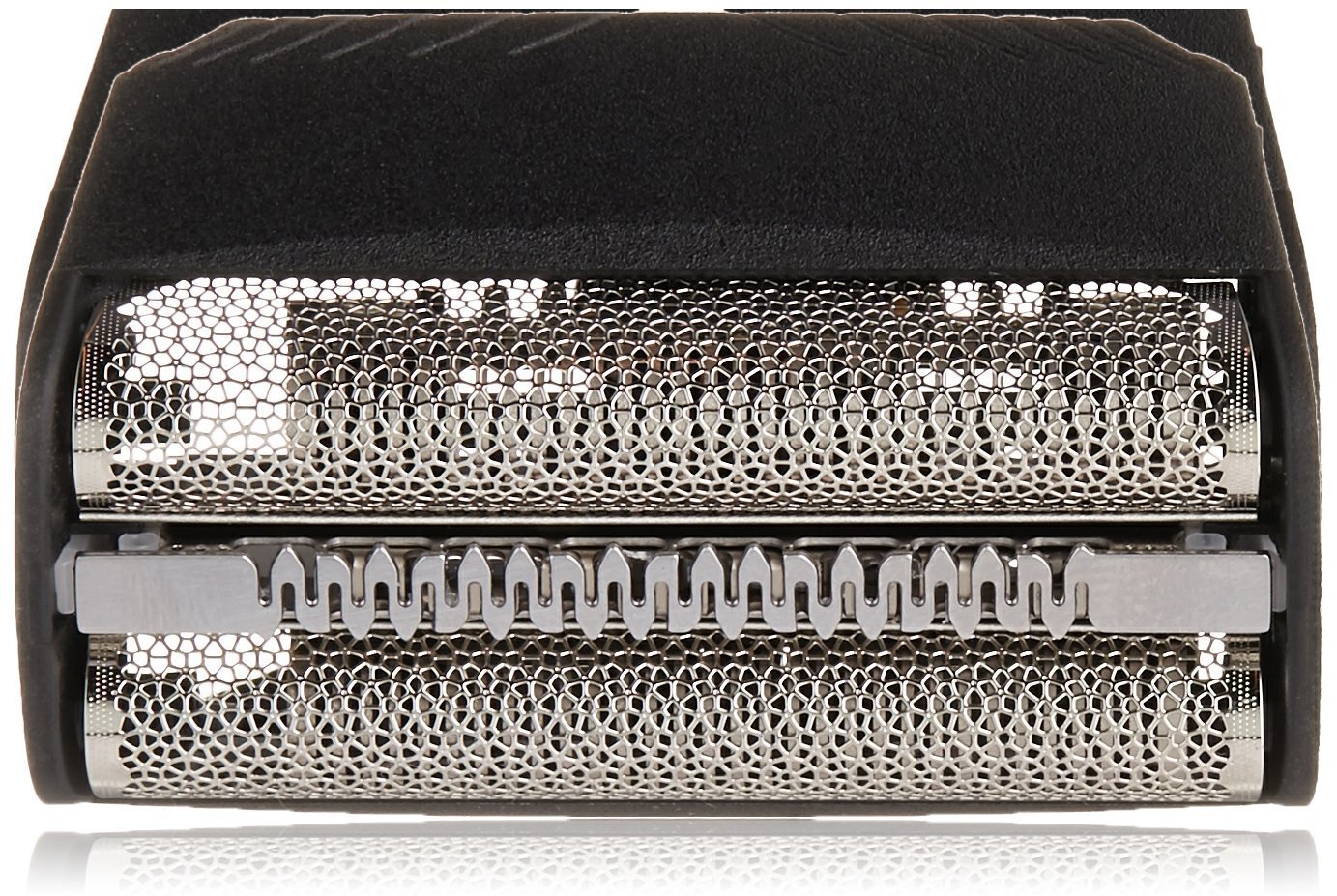
Figure 1: Braun Series 3 30B Replacement Head components, showing the foil and cutter block separately.
Video 1: Visual guide on how to replace the Braun shaver head for optimal performance.
Operating for Optimal Performance
With your new replacement head installed, your Braun Series 3 shaver is ready to deliver a close and comfortable shave. For best results:
- Ensure your skin is dry before shaving for electric shavers.
- Hold the shaver at a right angle (90°) to your skin.
- Stretch your skin and shave against the direction of hair growth.
- Apply gentle pressure; the new blades are sharp and efficient.
Maintenance and Care
To ensure the longevity and hygiene of your Braun Series 3 30B replacement head, follow these maintenance steps:
- Daily Cleaning: After each shave, remove the foil and cutter block and rinse it under hot running water. You can also use a cleaning brush to remove stubborn hair particles.
- Deep Cleaning: Periodically, use a specialized shaver cleaning solution or follow your shaver's specific deep cleaning instructions.
- Replacement Schedule: Braun recommends replacing the foil and cutter block every 18 months. This ensures continued 100% cutting performance and prevents bacterial growth.
- Storage: Store your shaver and replacement head in a dry, clean environment.

Figure 2: Braun Series 3 30B Replacement Head in its packaging, highlighting its size.
Troubleshooting
If you experience issues after replacing your shaver head, consider the following:
- Reduced Shaving Performance: Ensure the replacement head is correctly installed and securely clicked into place. Verify that the shaver model is compatible with the 30B head.
- Skin Irritation: New blades can sometimes feel different. Ensure you are not applying excessive pressure. If irritation persists, ensure proper cleaning and consider using a pre-shave lotion.
- Noise or Vibration: Check for any debris caught within the shaver head or body. Reinstall the head to ensure it is seated correctly.
Specifications
| Model Number: | 30B |
| Compatibility: | Braun Series 3 (340), Series 1 (199, 199s-1, 197s-1, 195s-1), SmartControl (4876, 4875, 4845, 4775, PRO 4745), TriControl |
| Head Type: | Foil |
| Number of Blades: | 2 |
| Blade Material: | Stainless Steel |
| Recommended Replacement: | Every 18 months |
| Product Dimensions: | 0.98 x 3.15 x 6.3 inches |
| Item Weight: | 0.64 ounces |
Warranty and Customer Support
Braun products are designed for quality and durability. For information regarding warranty, returns, or further assistance, please refer to the official Braun website or contact their customer support directly. Keep your purchase receipt as proof of purchase.
For additional resources and product registration, visit: www.braun.com


