
1. Introduction
This manual provides essential instructions for the proper setup, operation, and maintenance of your VWR Jumbo Thermo-Humidity Meter, Model 61161-378. This device is designed to accurately measure and display both temperature and relative humidity, making it suitable for various indoor environmental monitoring applications. Please read this manual thoroughly before using the product to ensure safe and efficient operation.
2. Safety Information
- Do not expose the device to extreme temperatures, direct sunlight, or high humidity levels beyond its specified operating range.
- Avoid dropping the device or subjecting it to strong impacts.
- Do not attempt to open or modify the device. There are no user-serviceable parts inside.
- Keep the device away from water and other liquids.
- Clean the device only with a soft, dry cloth. Do not use abrasive cleaners or solvents.
3. Package Contents
Verify that all items are present and in good condition upon unpacking:
- VWR Jumbo Thermo-Humidity Meter Model 61161-378
- User Manual (this document)
4. Product Overview
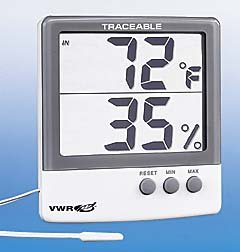
Image of the VWR Jumbo Thermo-Humidity Meter, showing its large display and tabletop design.
The VWR Jumbo Thermo-Humidity Meter features a large, easy-to-read display for simultaneous viewing of temperature and humidity. It is designed for tabletop placement, offering stable and convenient monitoring.
Key Components:
- Large LCD Display: Shows current temperature and relative humidity readings.
- Temperature Sensor: Measures ambient temperature.
- Humidity Sensor: Measures ambient relative humidity.
- Control Buttons: (If applicable, e.g., for unit selection, MIN/MAX, reset. Specific buttons are not detailed in product info, so this is a general placeholder for functionality.)
- Tabletop Stand: Integrated for stable placement.
5. Setup
- Unpack the Meter: Carefully remove the thermo-humidity meter from its packaging.
- Placement: Place the meter on a flat, stable surface in the area where you wish to monitor temperature and humidity. Ensure it is not in direct sunlight, near heat sources, or in areas with high airflow (e.g., near vents) that could affect readings.
- Power On: The device is designed to operate without user-replaceable batteries. It will typically display readings automatically upon placement or after a brief initialization period.
6. Operating Instructions
The VWR Jumbo Thermo-Humidity Meter is designed for straightforward operation, providing continuous readings of environmental conditions.
Reading Temperature and Humidity:
- Once powered on and placed, the large LCD display will show the current temperature and relative humidity simultaneously.
- Temperature readings are typically displayed in degrees Celsius (°C) or Fahrenheit (°F). Refer to the device for any unit selection buttons (if available) to switch between these units.
- Humidity readings are displayed as a percentage (%).
Understanding Readings:
- Allow the meter approximately 15-30 minutes to stabilize after initial placement or significant environmental changes to ensure accurate readings.
- The meter provides real-time data, which may fluctuate slightly with changes in the immediate environment.
7. Maintenance
Cleaning:
- Wipe the exterior of the meter with a soft, dry, lint-free cloth.
- Do not use liquid cleaners, aerosols, or solvents, as these can damage the display or internal components.
- Ensure no dust or debris accumulates on the sensor areas.
Storage:
- When not in use for extended periods, store the meter in a cool, dry place, away from direct sunlight and extreme temperatures.
8. Troubleshooting
No Display or Incorrect Readings:
- Check Placement: Ensure the meter is not in an area with extreme drafts, direct heat, or direct sunlight, which can cause inaccurate readings.
- Allow Stabilization: Give the meter sufficient time (15-30 minutes) to adjust to its environment after initial setup or relocation.
- Environmental Limits: Verify that the ambient conditions are within the operating range specified in the 'Specifications' section.
- Contact Support: If the issue persists, contact VWR customer support for further assistance. Do not attempt to repair the device yourself.
9. Specifications
| Feature | Detail |
|---|---|
| Model Number | 61161-378 |
| Mounting Type | Tabletop |
| Upper Temperature Range | 60 Degrees Celsius |
| Color | White/Gray |
| Package Dimensions | 6.8 x 4.6 x 1.1 inches |
| Weight | 6.38 ounces |
| Battery Requirement | No batteries required (internal power source) |
| Manufacturer | Vwr |
10. Warranty and Support
For warranty information or technical support, please refer to the documentation provided with your purchase or contact VWR customer service directly. Keep your purchase receipt as proof of purchase for any warranty claims.
Manufacturer: Vwr