
Introduction
This manual provides detailed instructions for the assembly, operation, and maintenance of your Walker Edison Industrial Modern Wood Universal TV Stand. Designed to accommodate most flat-panel TVs up to 80 inches, this entertainment center offers ample storage with four large drawers and a central cabinet space. Its durable laminate composition and metal accents provide an urban industrial style, enhancing your living room's organization and aesthetic.
Important Safety Information
Please read and understand all safety warnings before assembly and use. Failure to follow these instructions may result in injury or damage to the product.
- Always follow the included assembly instructions carefully.
- Ensure the TV stand is fully assembled and stable before placing any items on it.
- Do not exceed the maximum load capacity of 250 lbs (113 kg).
- Keep children and pets away from the assembly area during installation.
- Always unplug and remove any electronic components before attempting to move, assemble, or disassemble the stand.
- Avoid dragging the unit across floors, especially hardwood, as this may cause damage. Lift the unit when moving.
Package Contents
Your Walker Edison TV Stand ships ready-to-assemble and includes all necessary hardware. Before beginning assembly, please verify that all components and hardware are present and undamaged. Refer to the detailed parts list provided in the official Installation Manual (PDF) for a complete inventory.
Setup and Assembly
Assembly of this TV stand requires patience and attention to detail. It is recommended to have a second person assist with assembly due to the size and weight of some components. A power drill can be helpful, but be cautious not to overtighten screws.
- Preparation: Clear a spacious area for assembly. Lay out all parts and hardware, organizing them according to the instruction manual.
- Follow Instructions: Adhere strictly to the step-by-step instructions and diagrams in the official Installation Manual (PDF). Pay close attention to the orientation of pieces.
- Component Alignment: Some users have noted that certain components, such as drawers or doors, may require careful alignment. If parts do not seem to fit, re-check the instructions for proper orientation before forcing them.
- Secure Connections: Ensure all cam locks, wooden dowels, and screws are fully tightened for maximum stability. Glue for dowels is typically included and should be used as directed.
- Final Check: Once assembled, gently test the stability of the unit before placing your television or other heavy items.

Image: The Walker Edison TV Stand, fully assembled and integrated into a living room setting, showcasing its charcoal finish and modern design with a television placed on top.

Image: A detailed front view of the Walker Edison TV Stand, highlighting its four side drawers and central cabinet doors, all in a charcoal wood finish with black metal accents.
Operating Instructions
Your TV stand is designed for functional storage and display of your entertainment components.
- Television Placement: Place your flat-panel TV centrally on the top surface of the stand. Ensure the TV's base is fully supported and does not overhang the edges. This stand accommodates most TVs up to 80 inches, but always verify your TV's base dimensions and weight against the stand's specifications.
- Storage Drawers: Utilize the four large side drawers for organizing media, remote controls, or other accessories.
- Cabinet Space: The central cabinet features shelves for larger components such as gaming consoles, media players, or soundbars. The back panel includes cutouts for cable management to keep wires tidy.
- Weight Distribution: Distribute weight evenly across the top surface and within the storage compartments to maintain stability.

Image: The central cabinet doors of the TV stand are open, revealing two interior shelves and cable management cutouts in the back panel, designed for electronic components.
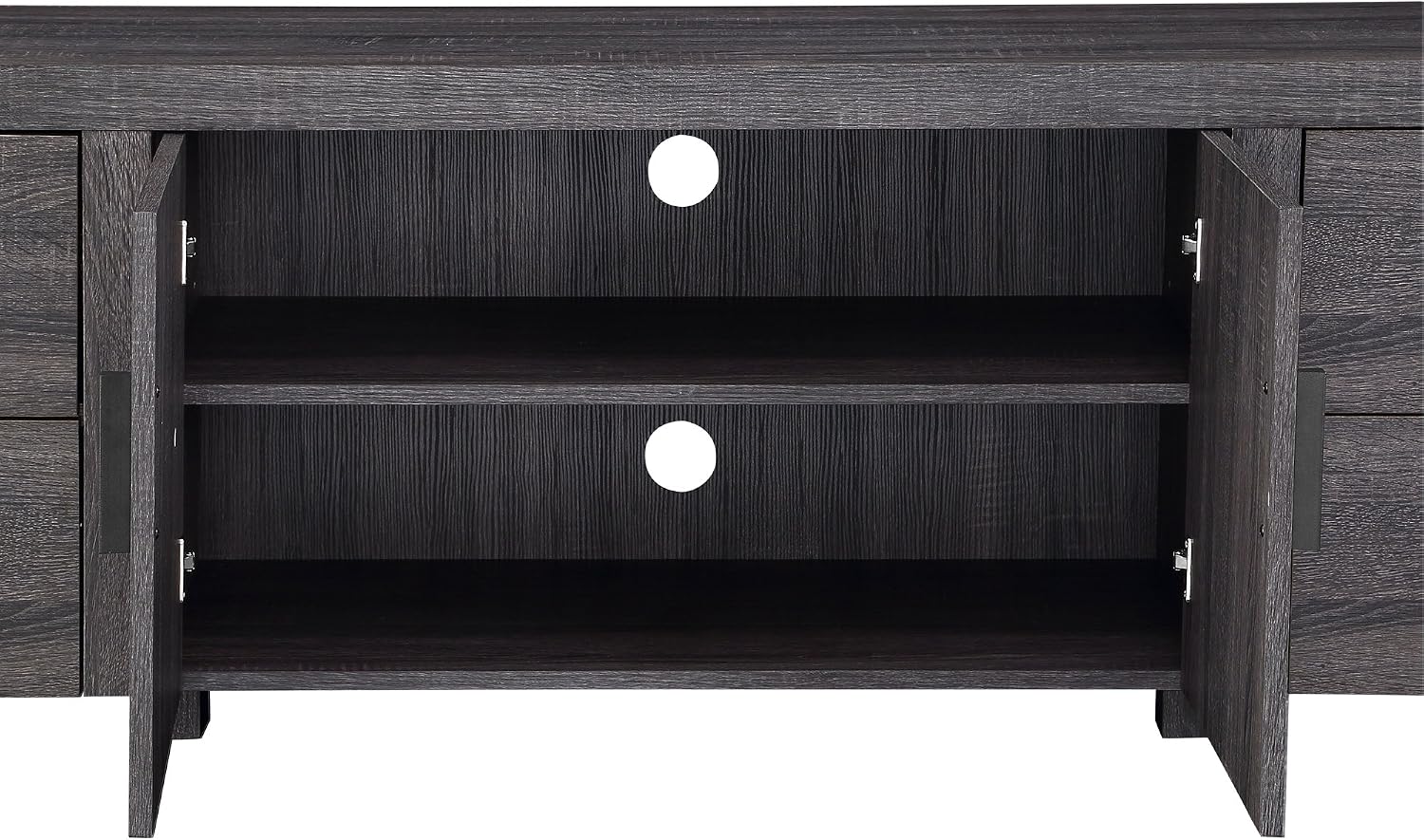
Image: Two of the side drawers on the TV stand are pulled open, demonstrating the ample storage space available for various items.
Maintenance and Care
To ensure the longevity and appearance of your TV stand, follow these simple care guidelines:
- Cleaning: Wipe the surfaces with a soft, damp cloth. Avoid using harsh chemicals or abrasive cleaners, which can damage the finish.
- Spills: Clean up spills immediately to prevent staining or damage to the wood material.
- Sunlight Exposure: Avoid prolonged exposure to direct sunlight, which can cause fading or discoloration over time.
- Heat and Moisture: Keep the stand away from direct heat sources and excessive moisture. Use coasters under beverages to protect the surface.
- Hardware Check: Periodically check and tighten all hardware connections to maintain structural integrity.
Troubleshooting
If you encounter issues during assembly or use, consider the following common solutions:
- Misaligned Parts: If drawers or doors do not align correctly, re-examine the assembly steps in the manual. Ensure all pieces are oriented as shown and that screws are not overtightened, which can warp panels.
- Wobbling/Instability: Verify that all cam locks and screws are fully engaged and tightened. Ensure the stand is on a level surface.
- Missing Hardware: Double-check the packaging and all compartments. If hardware is genuinely missing, contact customer support.
- Difficulty Assembling: Assembly can be time-consuming. Take breaks if needed and consider having a second person assist. Refer to the detailed diagrams in the manual for clarity.
Product Specifications
| Attribute | Detail |
|---|---|
| Brand | Walker Edison |
| Model Number | W70UBC22CL |
| Color | Charcoal |
| Material | Engineered Wood |
| Product Dimensions | 16 x 71 x 22 inches (Depth x Width x Height) |
| Item Weight | 121 pounds (54.9 kg) |
| Weight Capacity | 250 lbs (113 kg) |
| Accommodates TVs Up To | 80 inches |
| Assembly Required | Yes |
| Included Components | Hardware |
Warranty and Support
Your Walker Edison Industrial Modern Wood Universal TV Stand is covered by a 30-day manufacturer defect warranty. This warranty covers defects in materials and workmanship under normal use.
For warranty claims, missing parts, or any other product-related inquiries, please contact Walker Edison customer support. Refer to the contact information provided with your purchase documentation or visit the official Walker Edison website for assistance.


