
1. Introduction
This manual provides detailed instructions for the safe and effective operation of your Hisonic HS128MP3 Lithium Rechargeable Wireless Portable PA System. Please read this manual thoroughly before using the device and retain it for future reference. The HS128MP3 is designed for portable sound amplification, featuring wireless microphone capabilities, an integrated MP3 player with USB and SD card support, and a rechargeable battery for extended use.
2. Safety Information
Consumer Alert:
Most users do not need a license to operate this wireless microphone system. Nevertheless, operating this microphone system without a license is subject to certain restrictions: the system may not cause harmful interference; it must operate at a low power level (not in excess of 50 milliwatts); and it has no protection from interference received from any other device.
Purchasers should also be aware that the FCC is currently evaluating use of wireless microphone systems, and these rules are subject to change. For more information, call the FCC at 1-888-CALL-FCC (TTY: 1-888-TELL-FCC) or visit the FCC's wireless microphone website at fcc.gov/cgb/wirelessmicrophones.
- Do not expose the unit to rain or moisture to prevent fire or electric shock.
- Do not open the casing. Refer all servicing to qualified personnel.
- Ensure proper ventilation. Do not block ventilation openings.
- Use only the specified power adapter and charging cables.
- Keep the unit away from heat sources, direct sunlight, and extreme temperatures.
3. Package Contents
Verify that all items listed below are included in your package:
- Hisonic HS128MP3 Portable PA System Unit
- Wireless Handheld Microphone
- Wireless Bodypack Transmitter
- Headset Microphone (for bodypack)
- Lavalier Microphone (for bodypack)
- AC Power Adapter/Charger
- Car Cigarette Lighter Cable
- User Manual
- 9V Batteries (for microphones, quantity may vary)

Image: All components included with the Hisonic HS128MP3 Portable PA System, including the main unit, handheld microphone, bodypack transmitter, headset and lavalier microphones, power cables, and batteries.
4. Product Overview
The Hisonic HS128MP3 is a compact and versatile portable PA system. Familiarize yourself with the main unit and its controls.

Image: Front view of the Hisonic HS128MP3 Portable PA System, showing the main speaker unit, a wireless handheld microphone, and a wireless bodypack transmitter with a lavalier microphone.
4.1 Top Control Panel

Image: Close-up of the top control panel of the Hisonic HS128MP3, displaying rotary knobs for Echo, Tone, USB/SD Volume, Aux Volume, Mic Volume, and Wireless Mic Volume, along with buttons and indicator lights for Power, Charge, Play/Pause, Mode, SD, USB, and RF.
- Power Indicator: Lights up when the unit is powered on.
- Charge Indicator: Lights up during charging.
- Play/Pause Button: Controls media playback.
- Mode Button: Switches between USB and SD card input.
- SD/USB Indicators: Lights up when respective media is detected.
- RF Indicator: Lights up when a wireless microphone signal is received.
- Rotary Knobs: Adjust Echo, Tone, USB/SD Volume, Aux Volume, Mic Volume (for wired mics), and W/Mic Volume (for wireless mics).
4.2 Side Panel Connections
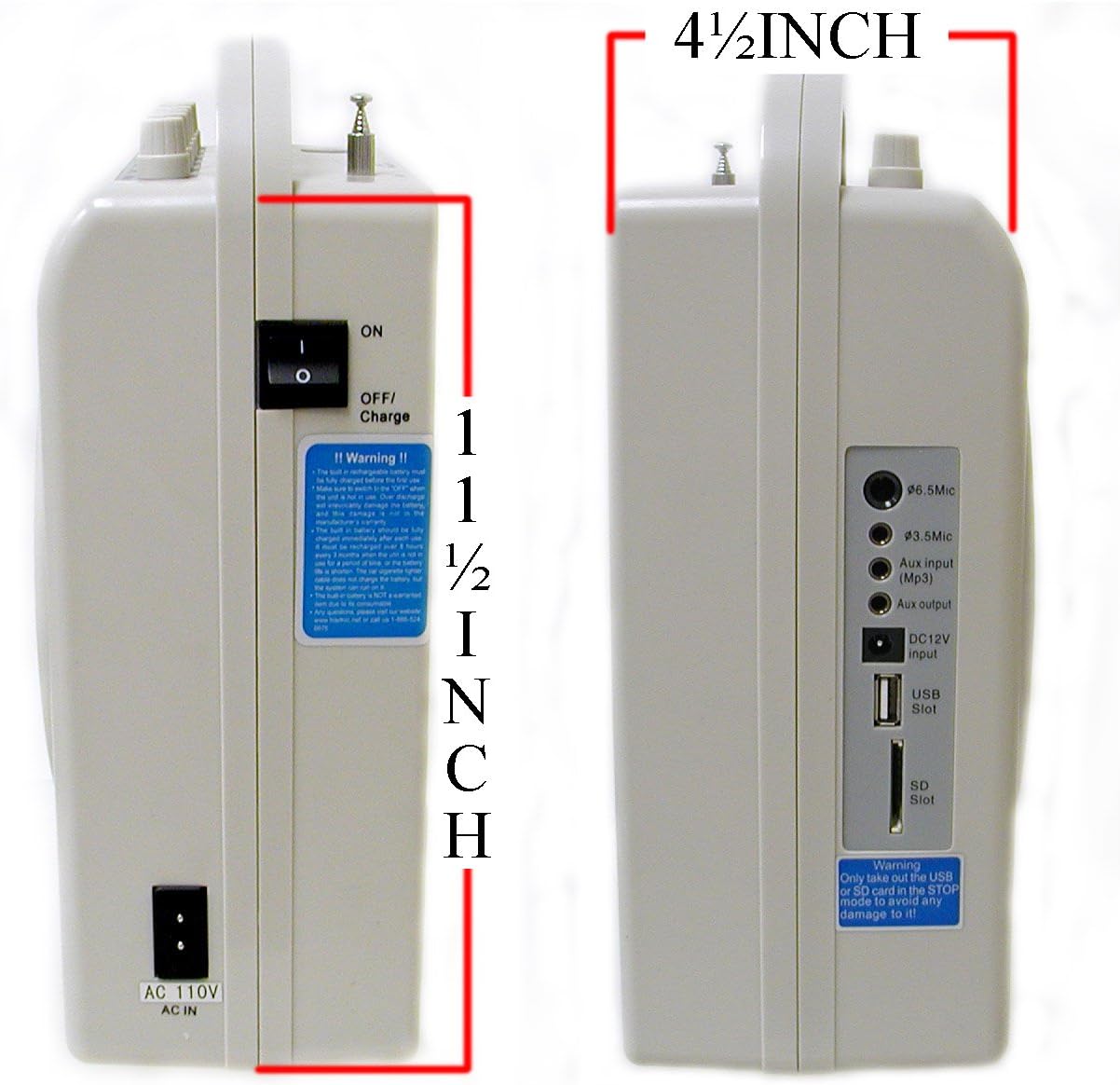
Image: Side view of the Hisonic HS128MP3, highlighting the 6.5mm Mic input, 3.5mm Mic input, Aux input (MP3), Aux output, DC12V input, USB Slot, and SD Slot.
- 6.5mm Mic Input: For wired microphones with a 1/4-inch jack.
- 3.5mm Mic Input: For wired microphones with a 1/8-inch jack.
- Aux Input (MP3): Connect external audio sources (e.g., smartphone, CD player).
- Aux Output: Connect to another amplifier or recording device.
- DC12V Input: For connecting the car cigarette lighter cable.
- USB Slot: For USB flash drives with MP3 files.
- SD Slot: For SD cards with MP3 files.
4.3 Rear Panel

Image: Rear view of the Hisonic HS128MP3, showing the battery compartment cover opened to reveal the internal rechargeable battery, along with product information and FCC compliance details.
- Battery Compartment: Houses the rechargeable lead-acid battery.
- AC 110V AC IN: Power input for charging and AC operation.
- ON/OFF/CHARGE Switch: Controls power and charging mode.
5. Setup
5.1 Initial Charging
- Ensure the unit's ON/OFF/CHARGE switch is in the "OFF/CHARGE" position.
- Connect the AC power adapter to the "AC 110V AC IN" port on the rear panel and plug it into a standard wall outlet.
- The "Charge" indicator light on the top panel will illuminate.
- Allow the unit to charge for approximately 8-10 hours before first use to ensure the battery is fully conditioned.
- The charge indicator may remain lit even after full charge; this is normal.
5.2 Microphone Battery Installation
For wireless microphones (handheld and bodypack):
- Open the battery compartment of the wireless handheld microphone or bodypack transmitter.
- Insert a fresh 9V battery, observing the correct polarity (+/-).
- Close the battery compartment securely.
6. Operating Instructions
6.1 Powering On/Off
- To power on the unit, slide the ON/OFF/CHARGE switch on the rear panel to the "ON" position. The "Power" indicator light on the top panel will illuminate.
- To power off the unit, slide the switch to the "OFF/CHARGE" position.
6.2 Using Microphones
Wireless Microphones:
- Ensure batteries are installed in the handheld microphone and/or bodypack transmitter.
- Turn on the wireless microphone(s).
- The "RF" indicator on the PA unit's top panel should light up, indicating a signal is being received.
- Adjust the "W/Mic VOL" knob on the top panel to control the volume of the wireless microphones.
- For the bodypack, connect either the headset or lavalier microphone to its input jack.
Wired Microphones:
- Connect your wired microphone to either the "6.5mm Mic Input" or "3.5mm Mic Input" on the side panel.
- Adjust the "Mic VOL" knob on the top panel to control the volume of the wired microphone.
Note: You can use one wireless microphone and one wired microphone simultaneously.
6.3 MP3 Playback (USB/SD)
- Insert a USB flash drive or SD card containing MP3 audio files into the respective slot on the side panel.
- The unit will automatically detect the media and begin playback. The corresponding "USB" or "SD" indicator will light up.
- Press the "Mode" button to switch between USB and SD card input if both are inserted.
- Use the "Play/Pause" button to start or pause playback.
- Use the skip buttons (left/right arrows) to navigate between tracks.
- Adjust the "USB/SD ON/OFF/VOL" knob to control the playback volume.
Warning: Only insert or remove the USB or SD card when the unit is in STOP or PAUSE mode to prevent potential damage to the media or unit.
6.4 Auxiliary Input/Output
Auxiliary Input:
- Connect an external audio source (e.g., smartphone, tablet, laptop) to the "Aux input (MP3)" jack on the side panel using a 3.5mm audio cable.
- Adjust the "Aux VOL" knob on the top panel to control the volume of the auxiliary input.
Auxiliary Output:
- Connect the "Aux output" jack on the side panel to another amplifier, mixer, or recording device using a 3.5mm audio cable.
- The output level is controlled by the master volume of the HS128MP3 unit.
6.5 Tone and Echo Control
- Tone Knob: Adjusts the overall tonal balance (bass/treble) of the audio output.
- Echo Knob: Adds an echo effect to the microphone inputs. Rotate clockwise to increase the effect.
7. Maintenance
7.1 Battery Care
- To prolong the life of the internal rechargeable battery, fully charge the unit after each use.
- If the unit will not be used for an extended period, charge it every 2-3 months to prevent deep discharge.
- Replace 9V batteries in microphones when performance degrades or the indicator light (if present) shows low power.
7.2 Cleaning
- Wipe the exterior of the unit with a soft, dry cloth.
- Do not use abrasive cleaners, solvents, or harsh chemicals.
- Ensure no liquids enter the unit's openings.
8. Troubleshooting
| Problem | Possible Cause | Solution |
|---|---|---|
| No sound from speaker | Unit not powered on; Volume too low; Microphone/Aux not connected or turned on. | Ensure unit is ON. Increase relevant volume knobs (Mic VOL, W/Mic VOL, Aux VOL, USB/SD VOL). Check microphone power and connections. |
| Wireless microphone not working | Microphone battery low/dead; Microphone not turned on; Out of range. | Replace 9V battery. Turn on microphone. Ensure microphone is within operating range (approx. 30-35 meters). Check if RF indicator is lit. |
| Unit not charging | AC adapter not connected properly; ON/OFF/CHARGE switch not in CHARGE position; Faulty battery. | Verify AC adapter connection. Ensure switch is in "OFF/CHARGE". If problem persists, contact support for battery replacement. |
| MP3 playback issues (no sound, not playing) | USB/SD card not inserted correctly; Files not in MP3 format; USB/SD volume too low; Unit not in correct mode. | Reinsert USB/SD card. Ensure files are MP3. Increase USB/SD VOL. Press "Mode" button to select correct input. |
9. Specifications
| Feature | Specification |
|---|---|
| Brand | Hisonic |
| Model Number | HS128MP3 |
| Output Wattage | 50 Watts |
| Connectivity Technology | Wireless |
| Item Weight | 5.4 pounds (2.45 kg) |
| Product Dimensions (L x W x H) | 11.5 x 4.5 x 7 inches (29.2 x 11.4 x 17.8 cm) |
| Mounting Type | Tabletop |
| Speaker Count | 1 |
| Compatible Devices | Headset, MP3 Player |
| Power Source | AC 110V, DC 12V (rechargeable battery) |
10. Warranty and Support
For warranty information, technical support, or service inquiries, please contact Hisonic customer service. Keep your purchase receipt as proof of purchase for warranty claims.
For further assistance, please visit the official Hisonic website or refer to the contact information provided with your product packaging.

