
Introduction
This manual provides detailed instructions for the proper use and care of your Sony Cyber-shot DSC-W290 digital camera. The DSC-W290 is a 12.1-megapixel camera featuring a 5x optical zoom Carl Zeiss Vario-Tessar lens and Super Steady Shot Image Stabilization. It is designed for ease of use, offering features like iAuto mode for automatic scene recognition and 720p HD movie recording. Please read this manual thoroughly to ensure optimal performance and longevity of your device.
Setup
1. Unpacking and Checking Contents
Before beginning, ensure all components are present:
- Sony Cyber-shot DSC-W290 Digital Camera
- Rechargeable Battery Pack (NP-BG1)
- Battery Charger
- USB Cable
- Wrist Strap
- CD-ROM (Software)
2. Installing and Charging the Battery
Insert the supplied NP-BG1 battery into the camera's battery compartment. Ensure it clicks into place. Connect the battery charger to a power outlet and insert the battery. The charge indicator will illuminate during charging and turn off when charging is complete. A full charge typically takes approximately 2-3 hours.

Image: Battery and Memory Stick Duo being inserted into the camera's compartment.
3. Inserting a Memory Card
The camera supports Memory Stick Duo/PRO Duo Media. Open the battery/memory card cover and insert the memory card with the contacts facing the correct direction until it clicks. Close the cover securely.
4. Initial Settings
Upon first power-on, you will be prompted to set the date, time, and time zone. Use the control buttons to navigate and confirm your selections.
Operating the Camera
1. Powering On/Off
Press the ON/OFF button located on the top of the camera to power it on or off.
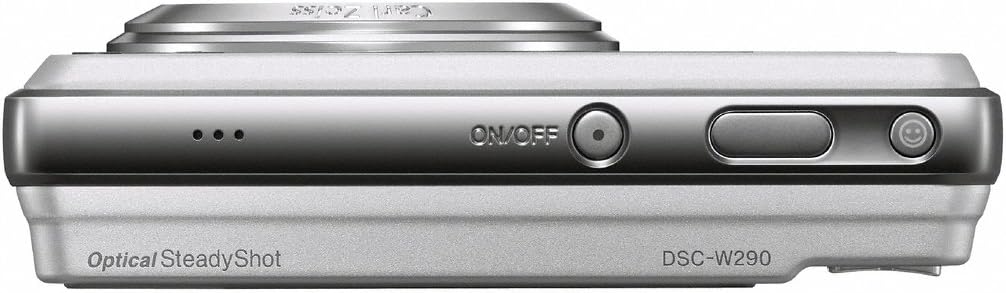
Image: Top view of the camera, highlighting the ON/OFF button.
2. Taking Photos
Rotate the mode dial to select your desired shooting mode. For automatic settings, select the iAuto mode. Frame your shot using the 3.0-inch LCD screen. Press the shutter button halfway to focus, then press fully to capture the image.

Image: Rear view of the camera with LCD and control dial.
3. Zoom Operation
Use the zoom lever located around the shutter button to adjust the optical zoom (5x) and digital zoom (up to 10x).
4. Flash Settings
Press the Flash button (often integrated with the control wheel) to cycle through flash modes: Auto, Fill-flash, Slow Sync, and Flash Off. Select the appropriate mode for your lighting conditions.
5. Recording Videos
Rotate the mode dial to the movie recording icon. Press the shutter button to start recording and press it again to stop. The camera records in 720p HD resolution.
6. Reviewing Images and Videos
Press the Playback button (usually indicated by a triangle icon) to enter playback mode. Use the directional buttons to scroll through your captured media.
7. Transferring Files to a Computer
Connect the camera to your computer using the supplied USB cable. The camera will appear as a removable drive. You can then copy photos and videos to your computer.
Maintenance
1. Cleaning the Camera
- Lens: Use a soft, lint-free cloth or a lens brush to gently remove dust. For smudges, use a lens cleaning solution applied to a cloth, not directly to the lens.
- LCD Screen: Wipe gently with a soft, dry cloth. Avoid pressing too hard.
- Camera Body: Use a soft, dry cloth to wipe away dust and fingerprints. Do not use harsh chemicals or solvents.
2. Battery Care
- Charge the battery fully before first use.
- Store the battery in a cool, dry place when not in use.
- Avoid exposing the battery to extreme temperatures.
3. Storage
When storing the camera for extended periods, remove the battery and memory card. Store the camera in a dry, dust-free environment, preferably in a camera bag or case.
Troubleshooting
This section addresses common issues you might encounter with your DSC-W290 camera.
Camera Does Not Turn On
- Ensure the battery is fully charged and correctly inserted.
- Check if the battery contacts are clean.
Images Are Blurry
- Ensure the lens is clean and free from smudges.
- Hold the camera steady when shooting, especially in low light. Utilize the Optical SteadyShot feature.
- Check if the camera has properly focused before taking the shot (press shutter button halfway).
Memory Card Error
- Ensure the memory card is inserted correctly.
- Try formatting the memory card (note: this will erase all data).
- Test with a different, compatible Memory Stick Duo/PRO Duo card.
Flash Does Not Fire
- Check the flash mode setting; ensure it is not set to "Flash Off".
- The flash may not fire if the battery is low.
Specifications
Below are the technical specifications for the Sony Cyber-shot DSC-W290 digital camera:
| Feature | Specification |
|---|---|
| Model Number | DSC-W290 |
| Image Sensor | 12.1-megapixel Super HAD CCD |
| Optical Zoom | 5x |
| Lens | Carl Zeiss Vario-Tessar, 28mm wide-angle |
| Image Stabilization | Optical SteadyShot |
| LCD Screen | 3.0-inch (230K pixels) Clear Photo LCD |
| Video Resolution | 720p HD (1280 x 720 at 30 fps) |
| Internal Memory | 11 MB |
| Compatible Memory Media | Memory Stick Duo / PRO Duo |
| Connectivity | USB, HDMI |
| Battery Type | NP-BG1 Lithium-Ion |
| Dimensions (Approx.) | 95.2 x 56.5 x 22.1 mm (W x H x D) |
| Weight (Approx.) | 0.38 Pounds (172g) with battery and media |
Warranty and Support
Warranty Information
The Sony Cyber-shot DSC-W290 digital camera comes with a 1-year limited warranty from the date of purchase. This warranty covers manufacturing defects under normal use. Please retain your proof of purchase for warranty claims. The warranty does not cover damage caused by misuse, accidents, unauthorized repairs, or normal wear and tear.
Customer Support
For technical assistance, service, or further information regarding your product, please visit the official Sony support website or contact Sony customer service in your region. You may find contact details and FAQs on the official Sony website.


