
1. Introduction
The Dorman HW7281 Rear Drum Brake Hardware Kit is engineered to provide a direct replacement for the original hardware components in specified vehicles. This kit is crucial for the proper repair and maintenance of drum brake systems, ensuring reliable performance and durability. It is designed to restore the functionality of your vehicle's rear drum brakes by replacing worn or fatigued hardware.
Proper installation of this kit is essential for vehicle safety and optimal braking performance. It is recommended that installation be performed by a qualified automotive technician.
2. Product Components
The Dorman HW7281 kit includes various springs, pins, and retainers necessary for a complete drum brake hardware replacement. The exact components may vary slightly based on specific vehicle applications, but generally include:
- Hold-down springs and pins
- Return springs (upper and lower)
- Adjuster springs
- Spring cups and retainers
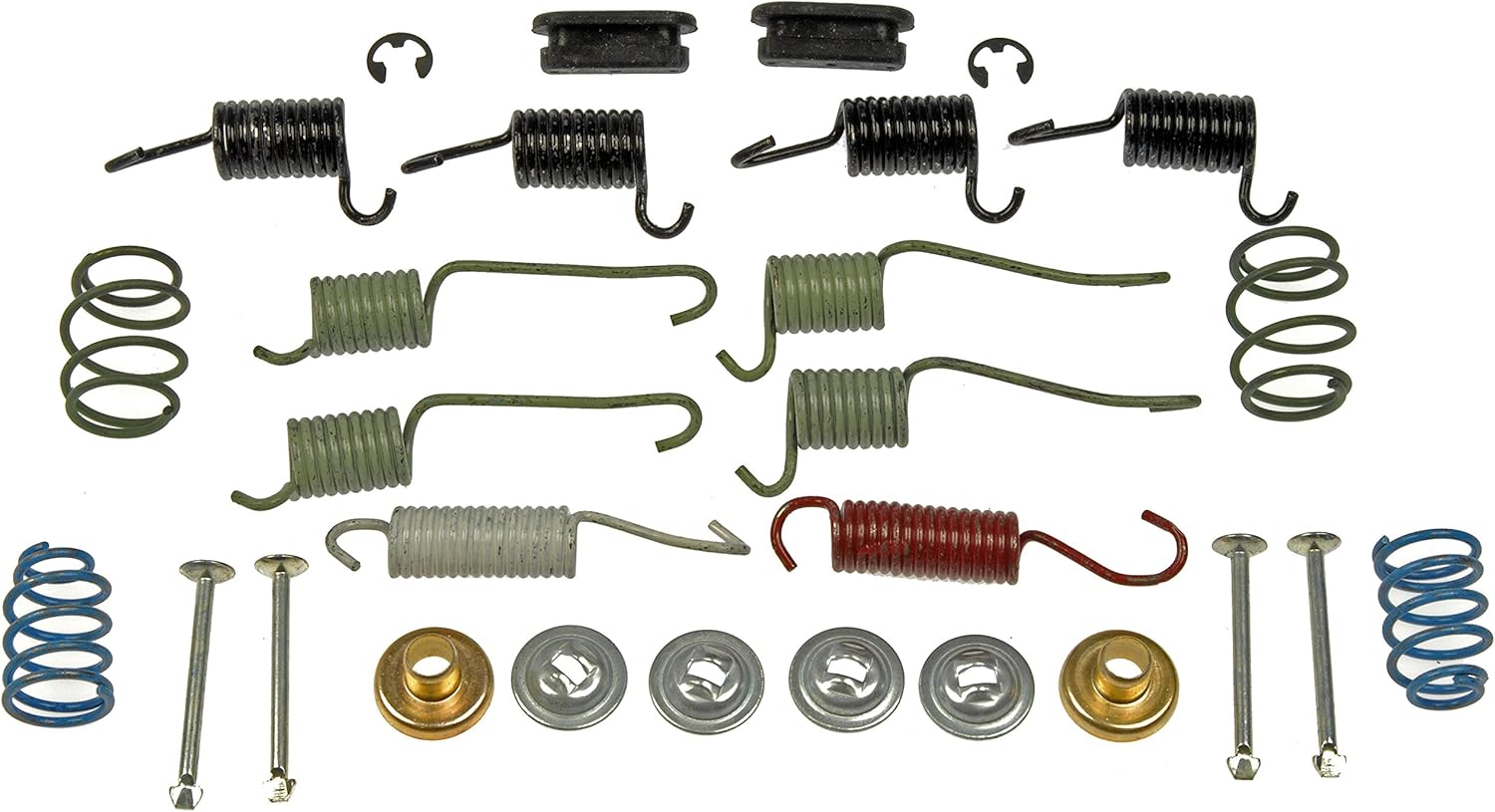
Figure 2.1: Overview of the Dorman HW7281 Rear Drum Brake Hardware Kit components, including various springs, pins, and retainers.
3. Installation Guidelines
This hardware kit is designed for direct replacement of original equipment components. Due to the critical nature of brake systems, professional installation is highly recommended. Always consult your vehicle's specific service manual for detailed, step-by-step instructions and torque specifications.
General Steps (Consult Service Manual for Details):
- Safety First: Ensure the vehicle is securely lifted and supported on jack stands. Disconnect the battery if working near electrical components.
- Remove Wheel and Drum: Carefully remove the wheel and brake drum to expose the brake shoe assembly.
- Inspect Existing Hardware: Note the position and orientation of all existing springs, pins, and retainers before removal. It is often helpful to work on one side at a time, leaving the other side intact as a reference.
- Remove Old Hardware: Using appropriate brake tools, carefully remove all old and worn hardware components.
- Clean and Inspect Components: Clean the backing plate and inspect brake shoes, wheel cylinders, and other brake components for wear or damage. Replace any worn parts as necessary.
- Install New Hardware: Install the new Dorman HW7281 hardware components according to your vehicle's service manual. Ensure all springs are correctly tensioned and all pins and retainers are securely in place.
- Reassemble: Reinstall the brake drum and wheel.
- Test Brakes: After installation, pump the brake pedal several times to ensure proper brake shoe adjustment and firm pedal feel. Test the brakes in a safe area at low speed before normal operation.
Warning: Improper installation of brake components can lead to brake failure, resulting in serious injury or death. If you are not confident in your ability to perform this repair, seek professional assistance.
4. Maintenance and Care
Regular inspection of your vehicle's drum brake hardware is crucial for maintaining optimal braking performance and safety. It is recommended to inspect the hardware during routine brake service or tire rotations.
- Visual Inspection: Check for signs of rust, corrosion, stretching, or breakage in springs. Ensure all pins and retainers are securely seated.
- Lubrication: Apply a thin layer of high-temperature brake lubricant to contact points between the brake shoes and backing plate, as specified by your vehicle's manufacturer. Avoid getting lubricant on the brake lining or drum surface.
- Replacement Schedule: While there isn't a fixed replacement schedule, hardware should be replaced whenever brake shoes are replaced, or if any signs of wear or damage are observed.
5. Troubleshooting Common Issues
Issues related to drum brake hardware often manifest as abnormal noises or reduced braking efficiency. If you experience any of the following, inspect your brake hardware:
- Squealing or Grinding Noise: Can indicate worn brake shoes, contaminated linings, or loose/worn hardware allowing components to rub.
- Clicking or Clunking Noise: Often points to loose or improperly installed hold-down springs or return springs.
- Uneven Braking or Pulling: May be caused by seized or improperly adjusted hardware, leading to uneven brake shoe application.
- Excessive Pedal Travel: Could indicate worn brake shoes, a faulty self-adjuster, or stretched return springs.
If troubleshooting does not resolve the issue, or if you are unsure of the cause, consult a professional automotive technician.
6. Product Specifications
| Specification | Detail |
|---|---|
| Brand | Dorman |
| Model Number | HW7281 |
| Orientation | Rear |
| Item Weight | 7.8 ounces |
| Product Dimensions | 2.9 x 2.4 x 4.1 inches |
| Country of Origin | China |
| Assembly Required | No |
| UPC | 082702392041 |
7. Vehicle Compatibility
The Dorman HW7281 Rear Drum Brake Hardware Kit is compatible with a wide range of vehicles. Please verify fitment for your specific vehicle using the manufacturer's fitment tool or by consulting your vehicle's service manual. Compatible models include, but are not limited to:
- Buick: Skyhawk (1982-1989), Skylark (1980-1998), Somerset (1986-1987)
- Cadillac: Cimarron (1982-1988)
- Chevrolet: Beretta (1991-1996), Cavalier (1982-2000), Chevette (1980-1987), Citation (1980-1983), Citation II (1984-1985), Corsica (1987-1996)
- Oldsmobile: Achieva (1992-1998), Calais (1985-1987), Cutlass Calais (1988-1991), Firenza (1982-1988), Omega (1980-1984)
- Pontiac: Grand Am (1985-1998), J2000 Sunbird (1984-1985), J2000 (1982-1983), Phoenix (1980-1984), Sunbird (1986-1994), Sunfire (1995-2000)
8. Warranty and Support
Dorman is committed to providing quality automotive replacement parts. This product is backed by Dorman's century of automotive experience and a team of product experts in the United States, ensuring trustworthy quality and reliable performance.
For specific warranty information, technical support, or to explore Dorman's full range of products, please visit the official Dorman website or contact their customer service department. You can also visit the Dorman Brand Store for more information.

Dorman: Driving New Solutions